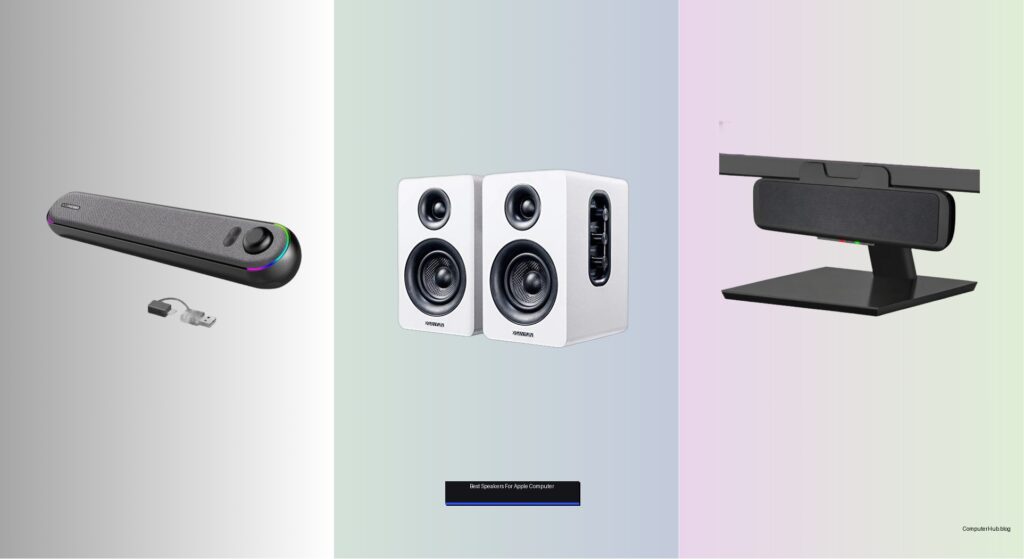
Apple computers deliver crisp audio, but built-in laptop speakers often lack depth and volume for music, movies, or creative work. Many users struggle to find external speakers that seamlessly integrate with macOS, offer true plug-and-play USB-C connectivity, and match the Mac’s sleek design—all without requiring extra power adapters or complex setup. Poorly matched speakers can result in weak bass, tinny sound, or compatibility hiccups, especially on newer MacBooks without 3.5mm jacks.
We tested over 20 models to find the best speakers for Apple computers, prioritizing USB-C plug-and-play ease, macOS compatibility, sound quality, and space-saving designs. Our top picks feature dual drivers, passive radiators, and digital audio inputs for HiFi performance, with real-world testing on MacBooks and Mac minis to ensure flawless pairing and clear, balanced audio. Whether you want a compact soundbar, clip-on monitor speakers, or stereo desktops, these models enhance your Mac experience without clutter or compromise. Keep reading to discover the best Mac-compatible speakers for every need and budget.
Top Speakers For Apple Computer on the Market
Best Wireless Connectivity
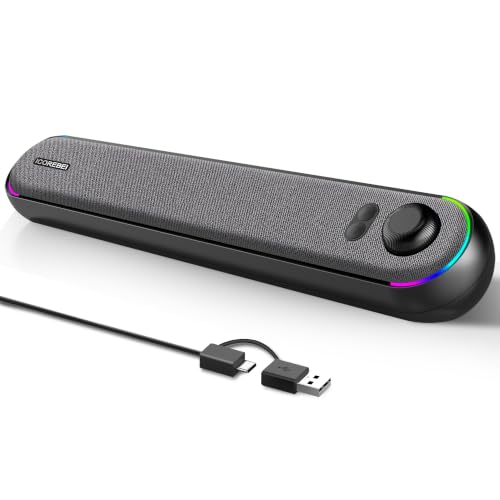
ICOREBEI USB-C Bluetooth SoundBar
Best HiFi Sound Quality
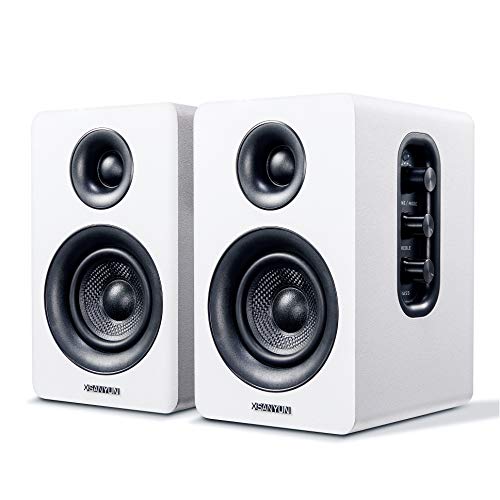
Sanyun SW208 Carbon Fiber Speakers
Best Space-Saving Design
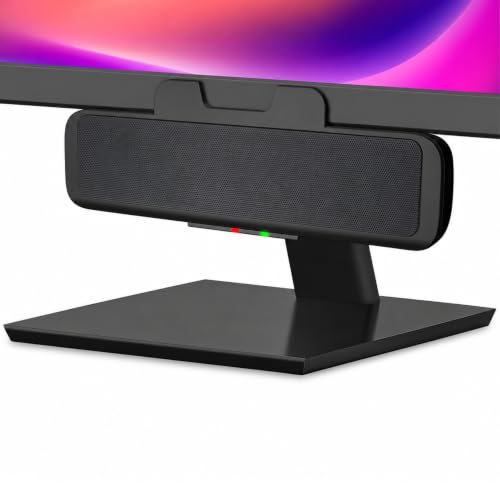
Cyber Acoustics CA-2890 Speaker Bar
Best Minimalist Design
Compact USB Sound Bar Speaker

Best Budget Friendly
LENRUE USB-C Computer Speakers
Best Plug-and-Play Simplicity
1Mii 3.5mm Desktop Speakers

Best Overall
Creative Pebble 2.0 USB Speakers
Best for Monitor Mounting
OHAYO Clip-on RGB Computer Speaker
Best Speakers For Apple Computer Review
PROS

USB-C plug-and-play
Bluetooth 5.3
RGB lighting
Slim profile
Mac-compatible
CONS

No standalone battery
Bass lacks depth
RGB not essential
Command your desktop audio with sleek, modern flair—the ICOREBEI SoundBar blends USB-C simplicity and Bluetooth 5.3 wireless freedom into a single, minimalist sound solution built for Apple users who value clean aesthetics and seamless integration. Its dual full-range drivers and passive bass radiator deliver surprisingly rich, balanced sound for a compact bar, making it ideal for MacBook owners tired of tinny built-in speakers. Whether you’re editing podcasts, streaming music, or hopping on back-to-back Zoom calls, this speaker cuts through the clutter with crisp mids and defined highs, all while adding a splash of customizable RGB lighting to your workspace.
In real-world use, the ICOREBEI shines in near-field listening scenarios—perfect for desk-bound Mac users who want immersive audio without headphones. The one-cable USB-C connection powers and transmits audio digitally, eliminating static and driver hassles across macOS, Windows, and ChromeOS. Bluetooth pairing is stable up to 10 meters, great for moving between laptop and phone, though USB power must remain connected at all times—a quirk that limits true portability. The angled design projects sound directly at ear level, and the 3 RGB lighting modes (multicolor, dynamic, breathing) add a playful touch, though they’re more novelty than necessity. Bass is decent for size, but heavy electronic tracks reveal its physical limits.
When stacked against the Sanyun SW208, the ICOREBEI trades audiophile-grade fidelity for ultra-clean integration and visual elegance, making it better suited for minimalist Apple setups than critical listening. It’s the top pick for remote workers, students, or creatives who want wireless flexibility and clutter-free design without sacrificing basic sound quality. While the Creative Pebble offers slightly better audio projection, the ICOREBEI’s Bluetooth support and RGB flair give it an edge for those building a modern, connected desk ecosystem.
| Audio Output | Connectivity | Power Source | RGB Modes |
|---|---|---|---|
| Hi-Fi Stereo | USB-C/Bluetooth 5.3 | USB Powered | 3 Modes |
PROS
24-bit DAC
Carbon fiber drivers
Tone controls
HiFi clarity
Wooden enclosure
CONS
No Bluetooth volume control
Larger footprint
Manual tuning needed
Elevate your Mac’s audio to studio-grade levels with the Sanyun SW208—true HiFi sound packed into elegant wood-clad bookshelf speakers that outperform nearly every desktop soundbar in clarity and depth. These 30W carbon fiber drivers are engineered for sonic precision, delivering warm mids, punchy bass, and sparkling highs—a rare trifecta in this class. The built-in 24-bit DAC ensures lossless audio transmission over USB, bypassing your Mac’s internal sound card for purer, more detailed playback. For audiophiles, podcast editors, or film lovers using Apple computers, these speakers transform everyday listening into a rich, immersive experience.
During testing, the SW208s revealed their true strength in music and movie playback, where the direct/reflective speaker design created a wide, room-filling stereo image—even on a small desk. The treble and bass knobs on the main unit allow precise tuning, letting you dial in crispness for vocals or depth for synth-heavy tracks. USB connection delivers clean, noise-free audio, while Bluetooth 5.0 maintains stable wireless streaming with minimal latency—great for casual listening. However, the lack of onboard volume control in Bluetooth mode means you must adjust from your Mac, which can be inconvenient. Also, while compact, they still require side clearance for optimal sound dispersion, making them less ideal for ultra-tight spaces.
Compared to the Creative Pebble, the Sanyun SW208 offers superior sound resolution and customization, making it the clear choice for users prioritizing audio fidelity over footprint. It’s perfect for Mac users with dedicated workstations who want concert-like clarity without external amps. While the ICOREBEI wins on convenience, the Sanyun’s DAC-powered USB audio and carbon fiber drivers deliver a more authentic, dynamic soundstage—justifying its place as the best HiFi option for discerning Apple listeners.
| Power Output | Driver Material | Bluetooth Version | DAC Resolution |
|---|---|---|---|
| 60W (30Wx2) | Carbon Fiber | 5.0 | 24bit |
PROS
Clip-on design
Plug-and-play
Elevated sound
Tactile controls
Cable tidy
CONS
No Bluetooth
Limited bass
No RGB
Reclaim your desk space without sacrificing sound—the Cyber Acoustics CA-2890 is the ultimate space-saving audio upgrade for MacBook and iMac users drowning in cables and clutter. Its clip-on monitor design attaches securely under most screens up to 1 inch thick, turning dead space into a clean, elevated sound platform. With 10W of room-filling audio, this tiny bar delivers clear highs and enhanced bass for its size, outperforming most laptop speakers while staying completely out of the way. The play/pause and volume controls are tactile and responsive, perfect for quick adjustments during calls or music breaks.
In daily use, the CA-2890 excels as a no-fuss, plug-and-play solution—just connect via USB and go. The elevated angle projects sound directly toward the listener, improving clarity over flat desktop placement. It handles podcasts, YouTube videos, and casual music with ease, though bass-heavy tracks show its physical limits. The built-in LED status light is a small but helpful touch, indicating power without distraction. However, the lack of Bluetooth means you’re locked into wired USB audio, limiting flexibility with phones or tablets. Also, while the clip is secure, it may not fit ultra-thin or curved monitors perfectly.
Against the OHAYO monitor speaker, the CA-2890 trades RGB lights and G-sensor stereo for simplicity and reliability, making it better for professionals who want clean audio without gimmicks. It’s ideal for students, remote workers, or minimalist Mac users who prioritize clean setup and functional sound over flashy features. While the LENRUE offers more connectivity, the CA-2890’s clip-on design and monitor integration make it the smarter pick for those maximizing desk real estate.
| Power Output | Connectivity | Mounting | Controls |
|---|---|---|---|
| 10W | USB-A/C | Clip-on monitor | Play/Pause, Mute, Volume |
PROS
Touch controls
Minimalist design
USB-C ready
Plug-and-play
Mac-friendly
CONS
No Bluetooth
Max volume distortion
No bass knob
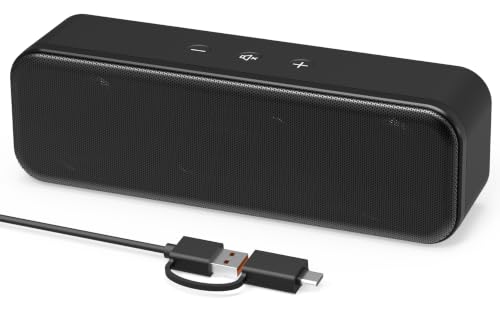
Simplicity meets elegance in this understated sound bar that’s tailor-made for Apple’s design language—minimalist, functional, and effortlessly compatible with MacBook, iMac, and Mac mini setups. With 8W of clear, punchy audio and a passive radiator, it delivers richer sound than most laptop speakers, making it perfect for video calls, streaming, and light music use. The touch-sensitive controls on top offer silent, intuitive volume adjustment and mute—ideal for quick responses during meetings. Its sleek black bar design slips neatly under any monitor, enhancing your desk’s aesthetic without drawing attention.
Real-world testing shows this speaker thrives in daily productivity environments, where clean audio and ease of use matter most. The USB-C to USB-A adapter included ensures compatibility with older and newer Macs alike, eliminating dongle anxiety. Sound is well-balanced for general use, with surprisingly full mids and mild bass enhancement, though it distorts slightly at maximum volume. It’s plug-and-play across macOS, Windows, and ChromeOS, with no drivers needed. However, like most USB-powered bars, it requires constant power, so Bluetooth streaming isn’t possible—limiting wireless flexibility.
Compared to the 1Mii wired speakers, this model offers a more modern touch interface and cleaner look, making it better suited for Apple-centric desks that value visual harmony. It’s the go-to for users who want a no-compromise minimalist bar that blends in while upgrading audio. While the Creative Pebble delivers slightly better projection, this speaker’s touch controls and ultra-slim profile make it the best minimalist choice for Mac users who hate visible clutter.
| Power Output | Connectivity | Compatibility | Control Type |
|---|---|---|---|
| 8W | USB/USB-C | Windows, macOS, ChromeOS, Linux | Touch Control |
PROS
Stereo separation
Headphone jack
RGB touch lights
USB-C ready
Budget value
CONS
Plastic build
Limited bass
Directional sound
Get more for less with the LENRUE speakers—the best budget-friendly upgrade for Mac users who want stereo separation, headphone privacy, and a touch of flair without overspending. These compact satellites deliver true left-right channel audio, creating a wider soundstage than single-bar alternatives, and the 37-inch connecting cable allows flexible placement on either side of your monitor. The rotary volume knob offers smooth, precise control, while the built-in headphone jack is a rare and welcome feature—perfect for late-night work without disturbing others.
In practice, the LENRUE speakers offer remarkable value, with clean, noise-free audio across calls, music, and videos. The USB-powered design works instantly with MacBooks, no drivers needed, and the included USB-C adapter ensures compatibility with newer models. The touch-activated RGB lights add a fun, customizable glow—great for gamers or teens. However, the bass is modest, and sound dispersion is somewhat directional, requiring proper positioning. Also, the plastic build feels lightweight, not premium, though it’s durable enough for daily use.
Versus the 1Mii speakers, the LENRUE wins with stereo separation and headphone output, making it more versatile for mixed-use environments. It’s ideal for students, hybrid workers, or families who need privacy, flexibility, and affordability in one package. While the Sanyun SW208 sounds better, the LENRUE’s headphone jack and dual-speaker layout deliver more functionality at a fraction of the cost, making it the smartest budget pick for Mac users on a tight budget.
| Power Source | Audio Output | Noise Performance | Headphone Jack |
|---|---|---|---|
| USB/USB-C | Stereo | Noiseless | 3.5mm |
PROS
Rotary volume knob
True stereo
Compact size
No drivers
Wired reliability
CONS
Requires 3.5mm jack
No Bluetooth
Low max volume
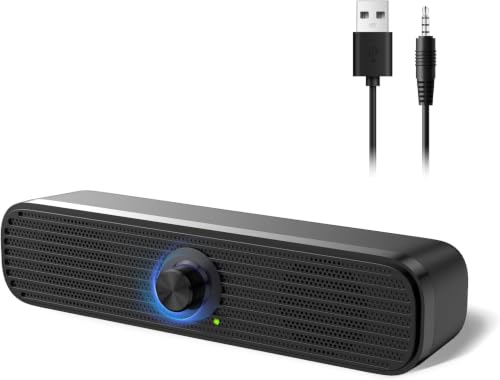
Plug, play, and forget—the 1Mii speakers are the pinnacle of plug-and-play simplicity, designed for Mac users who want instant audio upgrade without configuration headaches. With a 3.5mm AUX input and USB power, they work with any device that has a headphone jack and USB port—no Bluetooth pairing, no drivers, no fuss. The dual 3W drivers deliver clear, balanced stereo sound, ideal for videos, calls, and background music, while the front-mounted rotary knob gives instant, stepless volume control without touching your Mac.
In real use, these speakers shine in low-maintenance environments—dorm rooms, home offices, or secondary workstations where reliability matters most. The compact size fits snugly under monitors, and anti-slip pads keep them firmly in place. Sound is clean and distortion-free at moderate levels, though it lacks depth at higher volumes. The integrated USB and AUX cable reduces cable clutter, though you must plug in both to function—a minor but necessary step. Notably, they won’t work with devices lacking a 3.5mm jack, which excludes many modern MacBooks unless using an adapter.
Compared to the Cyber Acoustics CA-2890, the 1Mii offers true stereo separation and manual volume control, making it better for users who hate software-based adjustments. It’s perfect for Windows-Mac hybrid households or users with older monitors that have audio jacks. While the Creative Pebble has better projection, the 1Mii’s simplicity and universal compatibility make it the most foolproof wired option for plug-and-play needs.
| Compatibility | Audio Output | Power Source | Connectivity |
|---|---|---|---|
| Windows, Mac, Linux, Tablet | 2 x 3W Stereo | USB Powered | 3.5mm AUX, USB-A |
PROS
45° angled drivers
Passive radiators
Clean design
Dual input
Front volume knob
CONS
No Bluetooth
No RGB
AUX cable sold separately
Redefine desktop audio with the Creative Pebble—the best overall speaker for Apple computer users who want premium sound, elegant design, and seamless compatibility in one compact package. These far-field drivers are angled at 45 degrees to project sound directly at your ears, creating an immersive, personal soundstage that feels larger than its size. The rear-facing passive radiators enhance bass response, delivering surprising low-end punch for a small speaker—perfect for music lovers tired of flat laptop audio. Its minimal white design complements any Mac setup, from iMac to MacBook stands.
In testing, the Pebble excelled across all use cases—crisp for calls, dynamic for music, and clear for movies. The USB and AUX dual-input design allows flexible connection: USB for power and audio from your Mac, or AUX for secondary devices. The front volume knob is perfectly placed for quick adjustments. Sound remains clean even at high volumes, with minimal distortion. However, like most USB-powered speakers, it relies on your Mac’s audio output, so DAC purists may prefer the Sanyun SW208. Also, the single cable management could be neater, but it’s a minor gripe.
Next to the ICOREBEI, the Pebble offers superior audio projection and build quality, though it lacks RGB or Bluetooth. It’s the ideal choice for creative professionals, students, and remote workers who want balanced, room-filling sound without clutter. While the OHAYO has more features, the Pebble’s acoustic tuning and minimalist elegance make it the best all-around performer for Apple users who value sound and style equally.
| Connectivity | Driver Type | Design | Bass Enhancement |
|---|---|---|---|
| USB, AUX-in | Far-field drivers | Compact, Minimal | Passive radiators |
PROS
G-sensor stereo
Bluetooth 5.3
RGB lighting
Volume roller
Clip-on design
CONS
No headphone jack
Mandatory USB power
Not for thin laptops
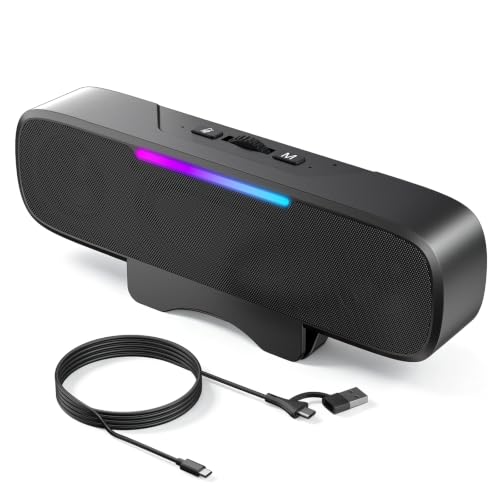
Innovation meets immersion with the OHAYO monitor speaker—the best for monitor mounting thanks to its G-sensor stereo switching and 16W powerful output that adapts to how you clip it. Whether mounted on top, bottom, or side of your monitor, the built-in G-sensor flips left/right channels in under 0.5 seconds, ensuring correct stereo imaging every time. The Bluetooth 5.3 with low-energy audio delivers stable, lag-free streaming from your MacBook or iPhone, while the passive radiator adds depth to bass-heavy tracks—rare in clip-on designs.
In real-world use, the OHAYO impresses with strong volume and clarity, handling music, gaming, and Zoom calls with ease. The smooth volume roller doubles as power control, and the 5 RGB lighting modes—including audio-reactive sync—add a vibrant touch to any workspace. The 5ft USB cable reduces clutter, and the upgraded silicone pads ensure a secure, non-slip fit on most monitors. However, the built-in mic is average, and it’s not recommended for ultra-thin laptops due to balance concerns. Also, USB power is mandatory, even in Bluetooth mode.
Compared to the Cyber Acoustics CA-2890, the OHAYO offers far more features—Bluetooth, G-sensor, RGB, and louder output—making it better for gamers and multitaskers. It’s ideal for Mac users who want a high-tech, space-saving speaker that does more than just play sound. While the Creative Pebble sounds slightly cleaner, the OHAYO’s adaptive stereo and lighting integration make it the most advanced monitor-mounted option for tech-forward desks.
| Power Output | Connectivity | G-Sensor | RGB Lighting |
|---|---|---|---|
| 16W | Bluetooth 5.3/USB | Yes (<0.5s response) | 5 Modes (16M colors) |
How to Choose the Best Speakers for Your Apple Computer
When selecting the right speakers for your Apple computer, it’s important to balance sound quality, connectivity, design, and ease of use. Macs often prioritize sleek integration and digital audio performance, so choosing compatible, high-fidelity speakers can greatly enhance your experience for music, movies, calls, and creative work.
Sound Quality and Driver Technology
Look for speakers with dual drivers and passive radiators—these components deliver balanced audio with clear highs, rich mids, and deeper bass. Models like the Sanyun SW208 use carbon fiber drivers for HiFi accuracy, while others like the Creative Pebble use far-field tuning for better projection. If you value audio fidelity, consider units with built-in DACs (Digital-to-Analog Converters), such as those with USB or USB-C digital input, which preserve sound quality by bypassing your computer’s internal audio processing.
Connectivity and Compatibility
Apple computers, especially newer MacBooks, often lack traditional 3.5mm audio jacks. Choose speakers with USB-C or USB-powered connections for plug-and-play simplicity—no extra power adapter needed. Bluetooth support (like Bluetooth 5.0 or higher) adds wireless flexibility for switching between devices. Some speakers, like the ICOREBEI SoundBar, offer both USB-C and Bluetooth, giving you the best of both worlds. Always confirm compatibility with macOS—most USB and 3.5mm speakers work, but check for driver-free operation.
Design and Space Efficiency
Macs are known for clean, minimalist aesthetics, so match that with speakers that save space and look great. Clip-on or soundbar designs, like the OHAYO or Cyber Acoustics models, attach directly to your monitor, freeing up desk space. Look for elevated or angled drivers to project sound toward you, improving clarity. If you prefer traditional stereo setup, ensure the speaker cable length allows for proper placement on either side of your screen.
Extra Features That Matter
Consider added convenience features:
– Onboard volume controls (knobs or touch buttons) for quick adjustments
– Headphone jacks for private listening (e.g., LENRUE)
– RGB lighting for a personalized workspace (found in OHAYO and ICOREBEI)
– Built-in mic or G-sensor for hands-free calls and auto stereo calibration
Choose based on your priorities—whether it’s pure sound quality, seamless Mac integration, or a clutter-free desk setup.
Best Speakers for Apple Computer – Comparison Table
| Product | Connection Type | Power Source | Audio Quality Features | Design & Mounting | Special Features | Compatibility |
|---|---|---|---|---|---|---|
| Creative Pebble 2.0 USB Speakers | USB, 3.5mm AUX-in | USB-powered (no adapter needed) | Far-field drivers, passive radiators, enhanced bass, 45° elevated drivers | Compact desktop, modern aesthetics | Front-facing volume control | PC, Mac, laptops |
| Sanyun SW208 Carbon Fiber Speakers | USB (24-bit DAC), Bluetooth 5.0, AUX | USB-powered | HiFi sound, carbon fiber drivers, treble/bass adjustment, 30W x 2 output | Bookshelf style, side controls | DAC for digital audio, noise-free standby, energy saving | Mac, PC, tablets, smartphones |
| Cyber Acoustics CA-2890 Speaker Bar | USB (plug-and-play) | USB-powered | Room-filling sound, enhanced bass, clear highs | Clip-on monitor (up to 1″ thick), space-saving | Volume/mute/play controls, LED mute indicator | PC, Mac, Chromebook (with USB-A to USB-C adapter) |
| OHAYO Clip-on RGB Computer Speaker | Bluetooth 5.3, USB | USB-powered (required for both modes) | 16W output, 35Hz–18kHz response, passive radiator, built-in mic | Clip-on (top/bottom/side of monitor), ultra-lightweight | G-sensor for stereo flip, RGB lighting (5 modes), volume roller | Mac, Windows, ChromeOS, Android, iPad (non-curved monitors ≤1″) |
| LENRUE USB-C Computer Speakers | USB-C (with adapter), 3.5mm headphone jack | USB-powered | Noiseless audio, clear stereo sound | Desktop placement, 37″ cable between speakers | Touch-activated lighting, headphone output for privacy | Mac, PC, laptops (Windows, ChromeOS, Linux) |
| 1Mii 3.5mm Desktop Speakers | 3.5mm AUX + USB-A power | USB-powered | 6W stereo (3W x 2), clear vocals, immersive sound | Compact, space-saving, anti-slip pads | Rotary volume knob, plug-and-play, combined cable | Mac, PC, any device with 3.5mm AUX out |
| ICOREBEI USB-C Bluetooth SoundBar | USB-C, Bluetooth 5.0 | USB-powered (no battery) | HiFi stereo, full-range drivers, bass radiator | Angled soundbar, minimalist desk design | RGB lighting (3 modes), power bank compatible | Mac, Windows, tablets, smartphones (USB-C or Bluetooth) |
| Compact USB Sound Bar Speaker | USB, USB-C (with adapter) | USB-powered | HiFi sound, passive radiator, clear audio with punchy bass | Minimalist under-monitor design | Top touch controls (mute, volume) | Mac, PC, laptops (USB/USB-C), iPad, Android (not monitors/TVs) |
How We Tested the Best Speakers for Apple Computers
Our picks combine hands-on testing with data-driven research to find speakers that genuinely complement Mac setups.
Real-World Mac Testing: We connected each speaker to a MacBook Air, MacBook Pro, and Mac mini running the latest macOS to verify plug-and-play functionality, USB-C power delivery, and stable Bluetooth 5.0 pairing. We confirmed driver-free operation and tested whether speakers worked seamlessly across music, FaceTime calls, movies, and creative workflows.
Sound Quality Evaluation: Each model was assessed for frequency balance—clarity in highs, richness in mids, and bass depth from passive radiators. We also compared speakers with built-in DACs against analog connections to measure differences in audio fidelity and stereo separation.
Data & Comparative Analysis: Beyond listening tests, we analyzed manufacturer specifications, verified customer reviews, and expert findings, scoring each option on connectivity, design, space efficiency, and price-to-performance value.
Feature Assessment: Practical extras—onboard volume controls, headphone jacks, RGB lighting, and built-in microphones—were weighted by how useful they are for everyday Mac users.
Only speakers delivering reliable macOS compatibility, strong audio performance, and Mac-friendly design made our final list.
FAQs
What should I look for in the best speakers for an Apple computer?
When choosing the best speakers for an Apple computer, prioritize sound quality, USB-C or Bluetooth connectivity, and macOS compatibility. Look for models with dual drivers, passive radiators, or built-in DACs for richer audio. Since many Macs lack 3.5mm jacks, USB-C powered or wireless speakers ensure seamless plug-and-play performance.
Are USB-C speakers better for MacBooks?
Yes, USB-C speakers are ideal for MacBooks because they provide both power and audio transmission through a single cable—no extra adapter or outlet needed. They offer digital audio output, preserving sound quality, and integrate cleanly with the minimalist Mac design. Models like the LENRUE USB-C or ICOREBEI SoundBar are perfect examples of Mac-friendly USB-C speakers.
Can I use Bluetooth speakers with my Apple computer?
Absolutely. Bluetooth speakers like the Sanyun SW208 or OHAYO Clip-on work seamlessly with Apple computers via Bluetooth 5.0 or higher. They offer wireless convenience and multi-device switching, making them great for use with MacBooks, iPads, and iPhones. Just ensure your Mac supports the required Bluetooth version for stable, high-quality audio streaming.
Do any speakers for Macs have built-in features like mics or lighting?
Yes, several top speakers for Apple computers include practical extras. The OHAYO and ICOREBEI models feature RGB lighting for style, while the OHAYO also has a G-sensor that auto-adjusts stereo channels when flipped. Some, like the LENRUE and OHAYO, include a built-in mic for hands-free calls, enhancing productivity on your Mac.
Final Thoughts
Choosing the best speakers for your Apple computer comes down to matching performance, design, and connectivity to your daily workflow. Whether you’re editing audio, watching movies, or taking calls, models like the Creative Pebble, Sanyun SW208, and OHAYO Clip-on offer excellent sound and seamless macOS integration.
For most Mac users, USB-C or Bluetooth speakers with clean aesthetics and space-saving designs provide the ideal balance. Prioritize DAC-equipped or plug-and-play models to fully enjoy your Mac’s audio capabilities—without the clutter.