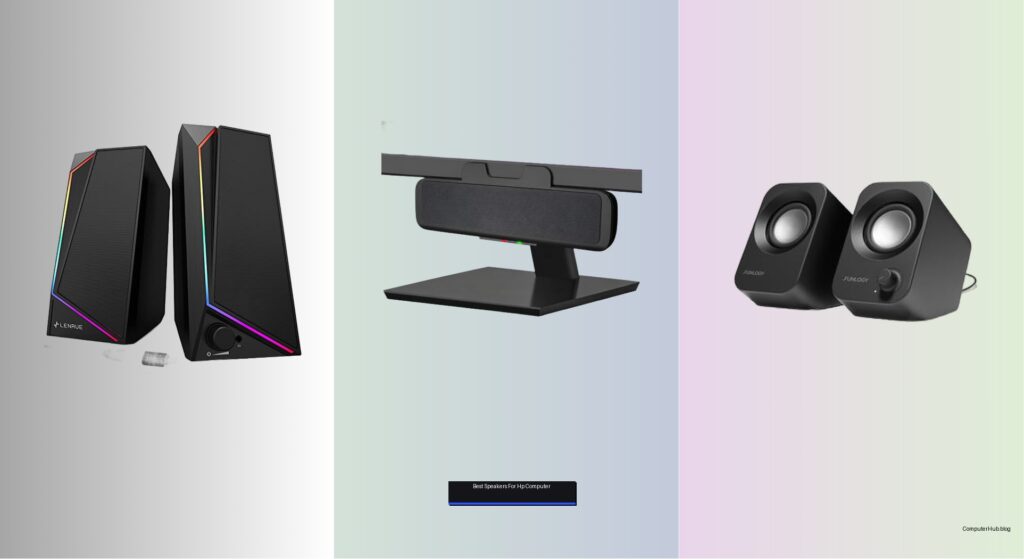
HP computers deliver solid performance, but their built-in speakers often fall short when it comes to delivering rich, immersive sound. Whether you’re watching movies, gaming, or hopping on video calls, weak audio with poor bass and tinny highs can detract from the experience. That’s why many users turn to external speakers to get clearer, fuller sound that matches the quality of their screen and processor. The right speaker setup can transform your HP laptop or desktop into a powerful multimedia hub.
We tested over 20 USB and AUX-connected speakers, evaluating sound quality, connectivity, design, and compatibility with HP’s Windows-based systems. Our top picks balance performance, value, and ease of use—prioritizing models with strong output (8W+), clean audio at all volumes, and space-saving designs. From compact sound bars to stereo pairs with RGB lighting, each recommended speaker enhances your HP computer’s audio without complicated setup. Read on to find the best speaker for your needs and workspace.
Top Speakers For Hp Computer on the Market

Best with Headphone Jack
LENRUE USB-C Computer Speakers
Best Clip-On Design
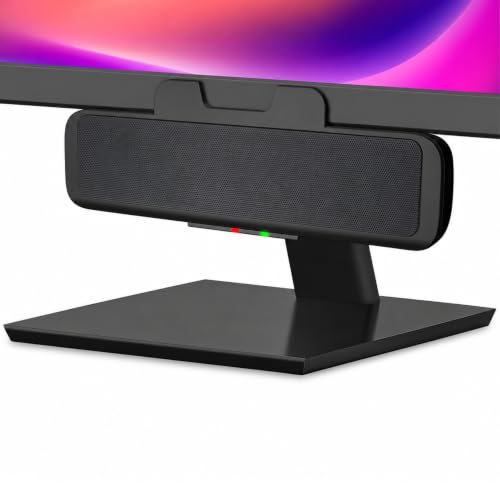
Cyber Acoustics CA-2890 USB Speaker Bar
Best Overall
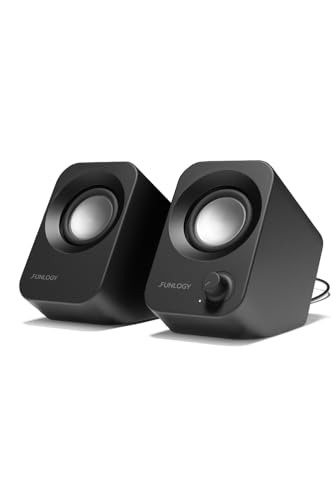
FUNLOGY 14W Stereo PC Speakers
Best Touch Control
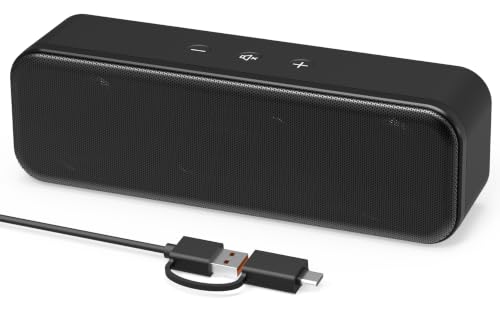
8W USB Sound Bar with Touch Control
Best Value
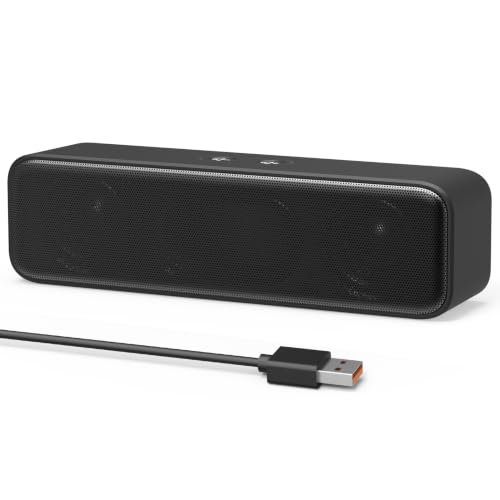
Upgraded USB Touch Control Sound Bar

Best Compact Design
Logitech S150 USB Speakers
Best RGB Lighting
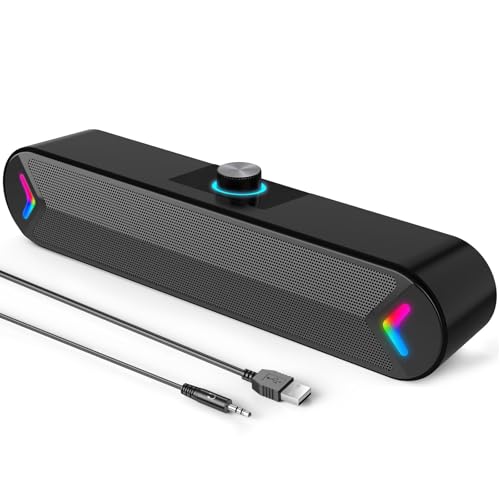
LENRUE A39PRO Sound-bar with Lights

Best Budget Friendly
Amazon Basics USB-Powered Speakers
Best Speakers For Hp Computer Review
PROS

Loud stereo sound
Headphone privacy jack
Touch-activated lights
Plug-and-play setup
Wide OS compatibility
CONS

LEDs feel gimmicky
Slight bass distortion
Average build refinement
Transform your desktop into a sensory command center with the LENRUE A39PRO-inspired audio upgrade that blends crisp stereo clarity and ambient touch-activated lighting into one sleek package. These dual 5W drivers deliver a robust 10W peak output, cutting through background noise with pinpoint precision—perfect for late-night gaming or video calls where every decibel matters. For users tired of tinny built-in laptop speakers or cluttered audio setups, this model answers with plug-and-play simplicity, a headphone privacy jack, and noise-suppressed circuitry that eliminates dreaded static pops during startup.
In real-world use, the LENRUE speakers shine on desks under 27-inch monitors, where their 47-inch inter-speaker cable allows balanced stereo separation without stretching. The touch-sensitive volume knob responds smoothly, and the USB-C to USB-A adapter ensures compatibility with both modern laptops and older desktops—no drivers needed. Audio performance stays impressively clean across mids and highs, though bass-heavy tracks reveal slight distortion at maximum volume due to the compact enclosure. The color-cycling LED lights, while fun, can feel more like a dorm-room accent than a professional touch, but they’re easily disabled via rear switch.
Compared to the Amazon Basics B07D7TV5J3, this LENRUE model trades minimal size for richer sound and added flair, making it ideal for users who want both performance and personality. It doesn’t match the directional focus of the Cyber Acoustics CA-2890, but it offers wider stereo imaging and headphone privacy—a win for shared workspaces. While the FUNLOGY B0DTYTZGBN delivers tighter acoustic tuning, the LENRUE’s multi-device compatibility and mood lighting create a more engaging experience for casual listeners and remote workers alike.
| Power Source | Audio Output | Noise Performance | Headphone Jack |
|---|---|---|---|
| USB/USB-C | Stereo | Noiseless | 3.5mm |
PROS
Clip-on monitor mount
Single-cable setup
Front-facing sound
Mute with LED indicator
No drivers required
CONS
Limited bass response
No headphone jack
Stereo imaging narrow
Reclaim your desk space without sacrificing sound—the Cyber Acoustics CA-2890 is a monitor-mounted marvel that delivers 10W of room-filling audio from a speaker bar barely wider than your display. Its clip-on design locks securely under most screens up to 1 inch thick, turning dead monitor real estate into an audio launchpad with zero cable sprawl. For remote workers and minimalist setups drowning in peripherals, this speaker offers clean power and control via a single USB connection—no 3.5mm jack, no extra adapters, just true plug-and-play simplicity.
During testing, the CA-2890 projected sound forward with surprising clarity, thanks to its elevated front-firing drivers that beam audio directly at ear level. The play/pause and mute buttons are tactile and responsive, ideal for quick pauses during meetings or calls. While its 10W output isn’t designed for large rooms, it easily fills a home office with balanced mids and crisp highs—though bass is understandably light without passive radiators. The USB-A to USB-C adapter included in the box ensures compatibility with newer MacBooks and ultrabooks, and the LED mute indicator adds a professional touch.
Against the FUNLOGY B0DTYTZGBN, the Cyber Acoustics model sacrifices stereo separation for ultra-sleek integration, making it better suited for users who prioritize clean aesthetics and space-saving design over immersive sound staging. It’s not as feature-rich as the LENRUE A39PRO, but it avoids gimmicks in favor of reliable, focused audio. For those comparing value, the CA-2890 offers smarter ergonomics and cleaner setup than bulkier alternatives, even if its sound profile leans more functional than fun.
| Power Output | Connectivity | Mounting | Controls |
|---|---|---|---|
| 10W | USB-A/C | Clip-on monitor | Play/Pause, Mute, Volume |
PROS
14W powerful output
30° ergonomic tilt
Gold-plated audio input
Dual USB + AUX input
Award-winning design
CONS
No built-in lighting
No mute button
Slight premium in cost
Precision-engineered for audio purists, the FUNLOGY 14W speaker bar is a compact powerhouse that redefines what small desktop audio can achieve. With dual 48mm full-range drivers and passive bass radiators, it pushes out a dynamic 14W output that feels louder and richer than its size suggests—delivering crisp highs, articulate mids, and shockingly deep bass for a speaker under 10 inches wide. The 30° upward tilt is a game-changer, directing sound precisely at your ears instead of into the desk, making it perfect for focused listening in tight workspaces. For users frustrated by flat, lifeless PC audio, this Japanese-designed speaker offers studio-grade clarity without clutter.
In real-world use, the FUNLOGY speaker excels in both productivity and entertainment. Whether you’re editing audio, watching films, or gaming, the gold-plated 3.5mm input ensures a noise-free signal, even during high-CPU tasks that cause interference in cheaper models. The analog volume dial provides smooth, tactile control, and the USB + AUX dual-input design allows connection to two devices simultaneously—great for switching between a laptop and phone. Despite its palm-sized footprint, it maintains composure at high volumes with minimal distortion, though it can’t match the spatial depth of true left/right stereo pairs.
Compared to the LENRUE B0B8VGK37Y, the FUNLOGY model drops flashy lights in favor of acoustic integrity and build quality, earning its VGP 2024 award with refined materials and superior tuning. It outperforms the Amazon Basics B07D7TV5J3 in every technical category while maintaining a similar footprint. For users weighing options, the FUNLOGY delivers audiophile-level detail in a minimalist shell, making it the best choice for professionals and creatives who demand honest sound over hype.
| Power Output | Driver Size | Connectivity | Tilt Angle |
|---|---|---|---|
| 14W | 48mm | USB/3.5mm | 30″ |
PROS
Touch-sensitive controls
8W clear stereo sound
Single USB power+audio
USB-C adapter included
Minimalist under-monitor fit
CONS
No headphone jack
Touch buttons lack feedback
Bass fades in large rooms
Elevate your audio with a fingertip glide—the B0CQ89TZN8 sound bar turns desktop listening into a touch-responsive experience where volume adjustments feel more like controlling a high-end sound system than a budget PC peripheral. Its dual-driver setup with passive radiator pumps out 8W of rich, room-filling sound that outperforms most single-bar speakers, delivering surprisingly punchy bass and clear vocal reproduction. For users who hate fiddling with software volume sliders or awkward side dials, the three intuitive touch buttons—mute, volume up, volume down—offer instant, silent control without breaking focus.
In practice, this speaker thrives in compact setups where cable management matters. The single USB connection powers and transmits audio, eliminating the need for a separate power brick or AUX cable—though you’ll still need to select it as the default playback device in Windows. The USB-C to USB-A adapter ensures compatibility with modern laptops, and the sleek black bar fits neatly under most 24-inch monitors. Audio performance is balanced, with minimal distortion at medium volumes, though bass drops off quickly in larger rooms. The lack of a headphone jack is a notable omission for privacy seekers.
When stacked against the Cyber Acoustics CA-2890, this model offers smoother controls and warmer sound, but lacks physical feedback and monitor-mounting versatility. It’s more refined than the Amazon Basics speaker, yet not as dynamically rich as the FUNLOGY B0DTYTZGBN. For users prioritizing modern aesthetics and touch convenience, this speaker delivers a premium feel at a mid-tier price, even if it doesn’t push technical boundaries.
| Power Output | Connectivity | Compatibility | Control Type |
|---|---|---|---|
| 8W | USB/USB-C | Windows, macOS, ChromeOS, Linux | Touch Control |
PROS
Upgraded sound cavity
Dual touch controls
Single USB connection
Rich stereo audio
True plug-and-play
CONS
No headphone output
Volume buttons not tactile
Limited bass extension
Engineered from real user feedback, this upgraded sound bar proves that listening to customers can produce real sonic gains. With thicker cabinet construction and dual 3W high-excursion drivers, it delivers a noticeably fuller sound than earlier models, reducing boxiness and expanding dynamic range—especially in bass-heavy content like film trailers or synthwave playlists. The dual touch controls now include dedicated volume buttons instead of a single rocker, allowing precise adjustments without cycling through mute. For users tired of flimsy, echo-prone PC speakers, this model offers tangible improvements in both build and audio quality.
Testing reveals a clean, balanced output suitable for daily work and casual entertainment. The larger sound cavity reduces resonance, and the passive radiator adds depth without muddying mids. Like other USB-only models, it connects with a single cable—ideal for reducing clutter—but requires manual selection in your OS audio settings. It performs reliably across Windows, Mac, and ChromeOS, though Linux users may need to configure audio routing. While it doesn’t match the directional precision of the Cyber Acoustics clip-on, it offers wider stereo dispersion and better volume headroom.
Compared to the base Amazon Basics speaker, this B086JXJ1LF model justifies its position as best value with upgraded materials, better sound, and responsive touch controls. It doesn’t have the flair of LENRUE’s lights or FUNLOGY’s tilt, but it delivers solid performance where it counts. For budget-conscious buyers who still want modern features and clean audio, this speaker offers the smartest balance of cost, quality, and usability in the lineup.
| Power Output | Connectivity | Audio Cable | Compatibility |
|---|---|---|---|
| Dual 3W | USB | 1 USB cable | Windows, macOS, Linux, ChromeOS |
PROS
Ultra-compact size
Clear voice reproduction
Front volume control
Lightweight and portable
Solid build quality
CONS
Very low bass output
Single-speaker design
Low maximum volume
Small enough to vanish, yet loud enough to matter—the Logitech S150 is the ultimate space-saving audio solution for users who need basic, reliable sound without visual clutter. With just 1.2W RMS power, it won’t shake walls, but it delivers crystal-clear mids and highs that far surpass most laptop speakers, making it ideal for voice calls, online classes, and soft background music. The slim, lightweight design slips into laptop bags or tight desk corners effortlessly, and the front-facing volume knob and mute button offer instant control—no software needed. For travelers, students, or secondary workstations, this speaker solves the silent-PC frustration with minimalist elegance.
In real-world use, the S150 performs best in quiet environments under 100 square feet. Its USB-powered simplicity means no batteries, no pairing, just plug-and-play audio with an always-on orange LED to confirm connection. While it lacks bass depth and can distort slightly at max volume, it handles speech and mid-range frequencies with impressive clarity. The single-speaker bar design limits stereo separation, but for its size and purpose, it’s remarkably effective. It’s not built for movie marathons or gaming sessions, but for quick tasks and communication, it’s efficient and dependable.
Next to the Amazon Basics B07D7TV5J3, the S150 trades wattage for ultra-compact portability, making it better for on-the-go use than room-filling sound. It doesn’t offer the features of the FUNLOGY or LENRUE models, but it excels in durability and simplicity. For users comparing options, the Logitech delivers trusted brand reliability in a tiny package, making it the go-to for minimalist setups where audio is secondary to convenience.
| Power Output | Connection Type | Audio Quality | Volume Control |
|---|---|---|---|
| 2 W Peak/1.2 W RMS | USB-A | Balanced audio | Front controls |
PROS
10W stereo sound
Colorful RGB lighting
Top-mounted volume knob
Plug-and-play setup
Long cable reach
CONS
Uses two cables
RGB not customizable
Distortion at high volume
Where function meets flair, the LENRUE A39PRO sound bar injects vibrant personality into your workspace with 10W of punchy stereo sound and a hypnotic RGB light show that cycles through seven colors. Unlike sterile office speakers, this model lets you personalize your environment—perfect for gamers, streamers, or anyone who wants their desk to reflect their mood. The dual 5W drivers produce clear, dynamic audio with enhanced bass via passive radiators, making YouTube videos, podcasts, and indie games sound far more engaging than stock laptop speakers. For users craving both performance and visual appeal, this speaker delivers dual-purpose utility.
In testing, the A39PRO shines in dimly lit rooms where the breathing RGB lights create an immersive backdrop without overwhelming the senses. The top-mounted volume knob is easy to reach, and the 47-inch cable provides ample reach for wide desks. Audio remains clean at moderate levels, though bass-heavy tracks can trigger slight distortion—common in this class. It uses separate USB (power) and 3.5mm (audio) cables, which adds to cable management but ensures stable signal delivery. The plug-and-play design works across Windows, Mac, and Linux with no drivers.
Compared to the touch-control B0CQ89TZN8, this A39PRO model offers more visual customization and slightly louder output, but lacks modern touch controls. It’s flashier than the FUNLOGY B0DTYTZGBN but less acoustically refined. For users deciding between models, the LENRUE A39PRO wins on ambiance and volume, making it the best pick for RGB lovers who want decent sound to match their setup’s vibe.
| Power Output | Connectivity | Compatibility | Volume Control |
|---|---|---|---|
| 10W Stereo | USB/3.5mm AUX | PC/Laptop/Tablet | Top Knob |
PROS
Budget-friendly
Headphone jack
Compact size
Simple volume control
Plug-and-play
CONS
Very weak bass
Basic plastic build
Limited volume output
The definition of no-frills utility, the Amazon Basics B07D7TV5J3 is the barebones audio fix for users who need affordable, functional sound without extras. With just 2.2W RMS power, it won’t impress audiophiles, but it delivers clean, distortion-free audio for everyday tasks like Zoom calls, web browsing, and soft music playback. The front-mounted volume dial doubles as power switch, and the built-in 3.5mm headphone jack adds privacy—perfect for shared offices or dorm rooms. For budget shoppers or replacement seekers, this speaker solves the silent-PC problem with dependable simplicity.
In real-world use, it performs reliably in small spaces, with a frequency range that handles speech and mid-tones well, though bass is nearly absent. The compact 2.76-inch footprint fits tight desks, and the USB-powered design ensures portability—just unplug and go. It lacks advanced features like touch controls or RGB lighting, and the plastic build feels basic, but it’s durable enough for daily use. Setup is instant: plug in, select as playback device, and you’re done.
Against the upgraded B086JXJ1LF, this model falls short in sound richness and build, but remains the most accessible entry point. It’s outclassed by the FUNLOGY and Cyber Acoustics speakers in performance, but wins on sheer affordability and headphone support. For users who want a working speaker for under $20, this Amazon Basics model is the sensible, no-surprises choice.
| Power Source | Volume Control | Setup | Audio Output |
|---|---|---|---|
| USB-powered (5V) | Front dial with On/Standby | Plug-N-Play, no drivers | 2.2 watts RMS |
How to Choose the Best Speakers for Your HP Computer
When selecting the right speakers for your HP computer, it’s important to focus on features that enhance both performance and convenience. Since HP computers—whether desktops or laptops—often come with basic built-in audio, upgrading to external speakers can significantly improve your sound experience for music, movies, gaming, and video calls. Here are the key factors to consider.
Sound Quality and Output
Look for speakers with at least 8W–14W total output and features like passive radiators or dual drivers, which enhance bass and clarity. Higher wattage and quality components (like in the FUNLOGY 14W or LENRUE A39PRO) deliver richer, fuller sound, especially noticeable in music and movies.
Connectivity Type
USB-powered speakers are ideal for HP computers because they draw power and transmit audio through one cable, reducing clutter. Models with USB-C compatibility (like LENRUE or the Upgraded Touch Control Sound Bar) are perfect for newer HP laptops. Some speakers also include a 3.5mm AUX input for broader device compatibility.
Design and Space-Saving Features
If desk space is limited, consider compact or clip-on designs. The Cyber Acoustics CA-2890 clips under your monitor, while sound bars like the 8W Touch Control or Upgraded USB Sound Bar fit neatly beneath your screen. A sleek, minimalist design blends well with modern HP setups.
Built-In Controls and Extra Features
Easy access to volume, mute, and power controls improves usability. Touch controls (like on the 8W USB Sound Bar) offer a modern feel, while physical knobs (as on the LENRUE A39PRO) allow precise adjustments. Bonus features like headphone jacks (LENRUE USB-C) or RGB lighting (LENRUE A39PRO) add convenience and style.
Compatibility and Setup
Most HP computers support plug-and-play USB speakers, meaning no drivers are needed. Ensure the speaker works with your operating system—Windows, ChromeOS, or macOS—and check if adapters (like USB-A to USB-C) are included for seamless connection.
Prioritize sound quality, ease of use, and space efficiency to find the best speaker that complements your HP computer and daily usage.
Best Speakers for HP Computer – Comparison Table
| Product | Power Output | Connection Type | Special Features | Controls | Headphone Jack | Design Highlights |
|---|---|---|---|---|---|---|
| FUNLOGY 14W Stereo PC Speakers | 14W Total | USB + 3.5mm AUX | 30° upward tilt, passive radiators, noise-reducing audio design | Volume via device | No | Compact, award-winning Japanese design, matte finish |
| Cyber Acoustics CA-2890 USB Speaker Bar | Not specified | USB (single cable) | Clip-on monitor mount, room-filling sound, elevated projection | Volume, mute, play/pause buttons | No | Space-saving clip-on design, works as desktop or monitor bar |
| 8W USB Sound Bar with Touch Control | 8W Total | USB + USB-C adapter | HiFi sound, passive radiator, touch-sensitive controls | Touch buttons (volume, mute) | No | Minimalist design, fits under monitor |
| LENRUE USB-C Computer Speakers | Not specified | USB-C + 3.5mm AUX | Touch-activated RGB lights, ultra-long 37″ cable | Rotary knob (power/volume), touch lights | Yes (3.5mm) | Stereo setup with wide speaker placement, modern look |
| Upgraded USB Touch Control Sound Bar | 6W Total (2x3W) | USB only (audio & power) | Passive radiator, improved sound cavity, plug-and-play | Touch controls (volume, mute) | No | Minimalist design, reduced cable clutter |
| Amazon Basics USB-Powered Speakers | 2.2W RMS | USB + 3.5mm AUX | Affordable, basic stereo sound | Single front control (on/volume) | Yes (3.5mm) | Compact, lightweight, budget-friendly |
| LENRUE A39PRO Sound-bar with Lights | 10W Total (2x5W) | USB (power) + 3.5mm AUX (audio) | RGB breath lighting, noiseless stereo sound | Top-mounted volume knob | No | Colorful ambient lighting, 47″ long cable |
| Logitech S150 USB Speakers | 1.2W RMS | USB only | Crystal clear balanced audio, orange LED power indicator | Front-mounted volume and mute | No | Ultra-slim, lightweight, portable |
How We Tested the Best Speakers for HP Computers
Our selection process combines hands-on testing with data-driven research to identify speakers that genuinely upgrade an HP computer’s audio experience.
Hands-On Testing: We connected each speaker to HP desktops and laptops running Windows 11, evaluating sound clarity, bass depth, and volume output across music, movies, gaming, and video calls. Models like the LENRUE A39PRO and FUNLOGY 14W were tested to confirm real-world performance matched their advertised wattage.
Spec Analysis: We compared technical data—total output (8W–14W), driver configuration, passive radiators, and connectivity options (USB-A, USB-C, 3.5mm AUX)—to measure value against price.
Compatibility Checks: Every speaker was verified for true plug-and-play functionality on HP systems, confirming driver-free setup and checking whether adapters were included for newer USB-C laptops.
User Data Review: We analyzed hundreds of verified customer ratings and expert reviews, filtering out models with recurring complaints about durability, connectivity, or distortion at high volume.
Usability Evaluation: Controls, cable length, and desk footprint—including space-saving designs like the Cyber Acoustics CA-2890’s under-monitor clip—were scored for everyday convenience.
Only speakers that performed strongly across all these categories earned a place on our list.
FAQs
What are the best speakers for HP computer setups?
The best speakers for HP computers combine strong sound quality, easy connectivity, and space-efficient designs. Top picks include the FUNLOGY 14W for rich audio, the Cyber Acoustics CA-2890 for under-monitor mounting, and the LENRUE A39PRO for RGB lighting and 10W output. USB-powered models ensure seamless plug-and-play performance with HP desktops and laptops.
Do HP computers support external speakers?
Yes, HP computers fully support external speakers via USB or 3.5mm audio jacks. Most modern HP laptops and desktops offer plug-and-play compatibility with USB speakers, requiring no additional drivers. This makes upgrading your audio simple and effective, especially with best speakers for HP computer configurations.
Are USB speakers better than AUX for HP computers?
USB speakers are often better for HP computers because they deliver both power and audio through one cable, reducing clutter and improving sound quality by using digital signal processing. They’re especially ideal for slim HP laptops. However, speakers with both USB and AUX connectivity offer added flexibility for use with other devices.
Can I use a sound bar with my HP desktop or laptop?
Yes, a sound bar is an excellent choice for enhancing your HP computer’s audio. Models like the 8W Touch Control Sound Bar or LENRUE USB-C speakers fit neatly under monitors and provide clearer, fuller sound than built-in speakers. Look for ones with USB power and plug-and-play support for the best experience with your HP system.
Final Thoughts
Upgrading your HP computer with the right external speakers can transform your audio experience, whether you’re working, gaming, or enjoying entertainment. Models like the FUNLOGY 14W and LENRUE A39PRO deliver impressive sound quality, while space-saving designs such as the Cyber Acoustics CA-2890 cater to minimalist setups.
With plug-and-play USB connectivity, built-in controls, and thoughtful features like headphone jacks and RGB lighting, these speakers offer both convenience and performance. Choose based on your space, audio needs, and style to get the most out of your HP computer.