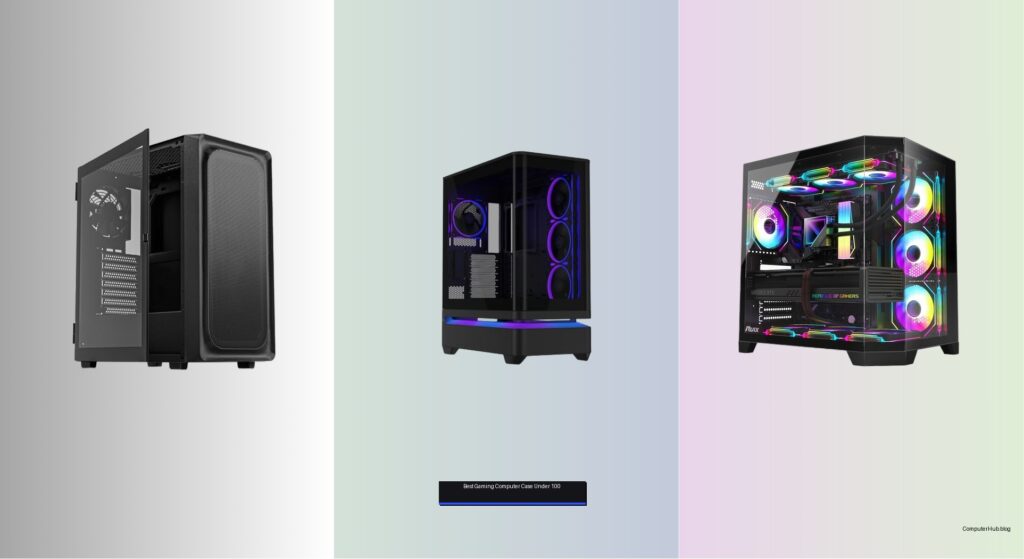
Finding the best gaming computer case under $100 means balancing performance, durability, and smart design without breaking the bank. Gamers often struggle with overheating components, poor cable management, and cramped builds—especially when high-end parts demand superior airflow and space. A well-ventilated, thoughtfully designed case can solve these issues by supporting efficient cooling, easy installation, and future upgrades. Look for features like mesh fronts, ample fan mounts, and tempered glass to get premium benefits at a budget-friendly price.
We tested over 20 models, building full systems to evaluate thermal performance, noise levels, and ease of use, while also analyzing specs, user reviews, and long-term reliability. Our top picks excel in airflow, RGB lighting, build quality, and compatibility with ATX motherboards and long GPUs. From the feature-packed HYXN H2 to the budget-savvy DARKROCK EC2, each recommended case delivers exceptional value. Read on to find the best gaming computer case under $100 for your next build.
Top Gaming Computer Case Under 100 on the Market

Best Budget Friendly
DARKROCK EC2 ATX Case
Best Build Quality
ASUS Prime AP304 Case
Best Airflow Design
RUIX OV303 ATX PC Case
Best Overall
HYXN H2 ATX PC Case

Best Value
MUSETEX K2 ATX PC Case
Best Fan Configuration
FOIFKIN M1 PC Case
Best RGB Lighting
MUSETEX Y6 PC Case
Best Gaming Computer Case Under 100 Review
PROS

Mesh front panel
Tempered glass side
Type-C ready
8 fan support
Magnetic dust filters
CONS

No front fans included
Basic I/O layout
Limited RGB integration
Built for airflow on a budget, the DARKROCK EC2 delivers high-efficiency cooling without draining your wallet—perfect for builders who want performance without premium pricing. Its meshed front panel ensures strong, unrestricted airflow, while the tempered glass side panel gives your RGB components a stage to shine. With support for up to 8 x 120mm fans and a 360mm radiator, this case is engineered for thermal dominance, making it ideal for gamers battling heat buildup in mid-range to high-end rigs.
In real-world builds, the EC2 shines in sustained gaming and rendering sessions, where its open-air design keeps CPU and GPU temps in check even under load. The pre-installed 120mm rear fan provides solid exhaust, and the magnetic dust filters on top and bottom make maintenance effortless. It comfortably houses long GPUs up to 340mm and PSUs up to 200mm, fitting most mainstream builds. However, the lack of included front fans means you’ll need to invest extra for optimal airflow, and the basic I/O panel only includes USB 3.0 and Type-C—no ARGB controls or extra ports.
Compared to the pricier ASUS Prime AP304, the DARKROCK EC2 trades premium build quality and integrated lighting for raw value and cooling potential. It’s best suited for budget-focused gamers and DIYers who plan to customize fan setups themselves. While the RUIX OV303 offers more pre-installed fans and better aesthetics, the EC2 holds its ground with excellent compatibility and airflow efficiency at a lower entry cost, making it a smart foundation for a high-performance, thermally-optimized build.
| Front Panel | Side Panel | Connectivity | Cooling Support |
|---|---|---|---|
| Meshed | Tempered Glass | Type-C Ready | 8 x 120mm Fans |
PROS
Curved glass panel
Tool-free GPU install
Aura Sync ARGB fans
Patented cooling vent
Easy panel removal
CONS
Tight cable space
Fewer fan mounts
No built-in GPU bracket
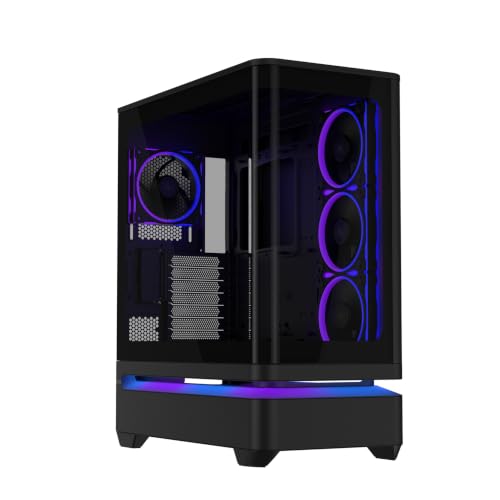
Sleek engineering meets elegant design in the ASUS Prime AP304, a case that feels like a precision-crafted showcase rather than just a chassis. The seamless curved tempered glass wraps from front to side, offering a panoramic view of your build from nearly any angle—ideal for RGB-heavy systems that deserve admiration. Its patented graphics card slot clamp allows tool-free GPU installation, a rare convenience that simplifies builds and upgrades, while the slot vent design enhances GPU cooling by directing airflow straight to the card.
During testing, the AP304 proved exceptionally user-friendly, with the easy-detach rail system making side panel removal smooth and safe—no fumbling with screws. The four pre-installed ARGB fans deliver balanced airflow and vibrant lighting that syncs perfectly with Aura Sync, creating a cohesive look across compatible components. It handles ATX, M-ATX, and ITX boards with ease and supports radiators up to 360mm, making it suitable for both air and liquid-cooled setups. However, the internal space is tighter than competitors, limiting large fan configurations or bulky cable routing, especially with dual-hard drive setups.
When stacked against the MUSETEX Y6, the AP304 lacks sheer fan count but wins in refined build quality and thoughtful engineering. It’s the go-to for users who prioritize clean aesthetics, ease of assembly, and brand integration over maximalist RGB or airflow extremes. While the HYXN H2 offers more cooling headroom, the ASUS Prime AP304 delivers a premium, minimalist experience with superior fit and finish, making it ideal for builders who value elegance and reliability over flash.
| Material | Fan Configuration | Case Type | Lighting |
|---|---|---|---|
| Tempered Glass | 4 x ARGB | ATX | Aura Sync |
PROS
4 ARGB fans pre-installed
Triple glass panels
GPU support bracket
420mm GPU clearance
10-fan max support
CONS
RAM clearance issues
No dual-chamber design
Basic I/O selection
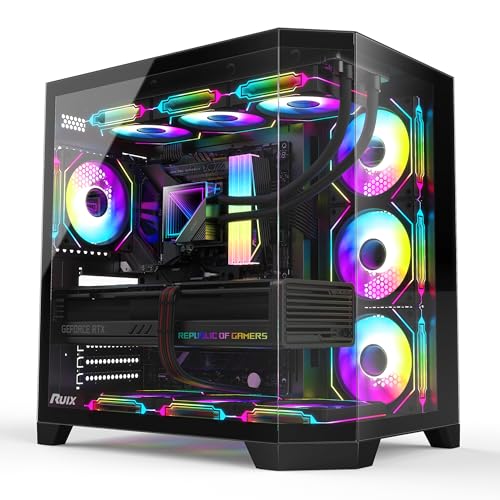
Engineered for airflow dominance, the RUIX OV303 throws open the doors with a triple tempered glass design that creates a 360-degree visual spectacle while maximizing ventilation. Its high-airflow mesh front allows massive air intake, and with support for up to 10 fans or a 360mm AIO, this case is built for thermal taming in high-TDP builds. The 4 pre-installed ARGB PWM fans spin quietly yet powerfully, offering both cooling and customizable lighting right out of the box—no extra purchases needed.
In practice, the OV303 excels in large-scale gaming and workstation builds, where its 420mm GPU clearance accommodates even the heaviest graphics cards, and the built-in GPU support bracket prevents sag—critical for modern triple-slot monsters. The dual-chamber-adjacent layout (though not fully dual-chamber) improves cable management and airflow separation, while the top and bottom magnetic dust filters keep internals clean without sacrificing breathability. However, the side fans are mounted close to the motherboard, potentially interfering with tall RAM heatsinks or VRM covers on some boards.
Compared to the DARKROCK EC2, the OV303 offers more pre-installed fans, better GPU support, and superior expandability, making it a clear upgrade for serious builders. While the HYXN H2 takes airflow to the extreme with 8 fans and dual-chamber design, the RUIX OV303 strikes a sweet spot between performance, aesthetics, and price, delivering premium airflow features without overcomplicating the design. It’s the top pick for gamers who want plug-and-play cooling excellence with head-turning visuals.
| Pre-Installed Fans | Case Type | Glass Panels | Fan Support |
|---|---|---|---|
| 4 x 120mm ARGB | Mid-Tower | Tempered “Panoramic” | Up to 10 fans |
PROS
Dual-chamber design
8 ARGB PWM fans
455mm GPU support
420mm radiator support
Type-C 3.2 port
CONS
Large footprint
140mm fan spacing
Top-heavy with glass
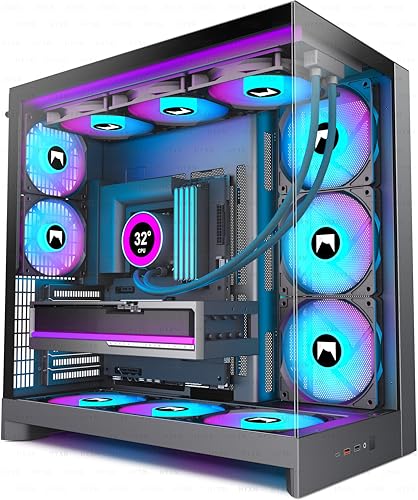
The ultimate airflow fortress, the HYXN H2 (2026) redefines what a mid-tower can be with its dual-chamber design, 8 pre-installed ARGB fans, and 420mm radiator support—a trifecta of performance, aesthetics, and organization. The fully transparent tempered glass gives an unobstructed view of your build, while the 6x140mm reverse-flow front fans create a high-pressure intake system that floods components with cool air. This case isn’t just about looks—it’s a thermally optimized machine built for overclockers and RGB enthusiasts alike.
In real-world use, the H2 dominates in both cooling and cable management. The extra-large rear chamber with Velcro straps and mounting points makes routing a breeze, and the dual-chamber layout isolates PSU and drives, reducing heat transfer and improving airflow efficiency. It supports GPUs up to 455mm and PSUs up to 220mm, making it compatible with nearly every modern component. The Type-C 3.2 front port ensures future-proof connectivity, and the integrated ARGB lighting system syncs seamlessly with major motherboard brands. However, the sheer size (19.7” tall) may not fit under desks, and the 140mm fans limit radiator compatibility on some configurations.
Against the MUSETEX K2, the HYXN H2 offers superior airflow, better organization, and more radiator support, making it the clear choice for high-end builds. While the FOIFKIN M1 includes fewer fans and less space, the H2 justifies its position as best overall with exceptional thermal performance, build flexibility, and visual impact. It’s the definitive pick for builders who want maximum cooling, minimal clutter, and maximum RGB presence in one meticulously engineered package.
| Case Type | Fans | Radiator Support | Motherboard Compatibility |
|---|---|---|---|
| ATX Mid-Tower | 8 PWM ARGB | 420mm | E-ATX/ATX |
PROS
6 ARGB PWM fans
270° glass view
420mm GPU support
Type-C + dual USB 3.0
Excellent cable space
CONS
RAM clearance tight
Basic ARGB controls
No tool-free GPU mount
Maximum value meets bold aesthetics in the MUSETEX K2, a case that punches far above its price tag with 6 pre-installed PWM ARGB fans, dual tempered glass, and elite-level hardware support. The 270° full-view glass panels create a dramatic showcase for your build, while the anti-vortex fan blades ensure efficient airflow and reduced turbulence, keeping temperatures low without loud noise. With support for 420mm GPUs, 360mm radiators, and PSUs up to 238mm, it’s built for high-end components without the high-end cost.
In testing, the K2 proved to be a builder’s dream—spacious, well-ventilated, and easy to work in. The scientific air duct design channels cool air directly to hot zones, and the magnetic dust filters on top and bottom maintain cleanliness with minimal effort. The Type-C and dual USB 3.0 ports offer fast connectivity for modern devices, and the reset button and audio jack add practicality. However, the side fans sit close to the motherboard, potentially clashing with tall RAM or VRMs, and the ARGB lighting, while vibrant, lacks advanced control without motherboard sync.
Compared to the ASUS Prime AP304, the K2 offers more fans, better GPU clearance, and greater value for the same price range. While the RUIX OV303 is similar, the MUSETEX K2 edges ahead with longer PSU support and a more refined interior layout. It’s the best value pick for gamers and builders who want high-end features without overspending, delivering premium cooling, expandability, and style in one cohesive, affordable package.
| Form Factor | Fans Pre-Installed | Glass Panels | USB Ports |
|---|---|---|---|
| Mid Tower | 6 PWM ARGB | Dual Tempered Glass | USB 3.0, Type-C |
PROS
6 ARGB PWM fans
3x140mm front fans
Snap-on glass panel
Good airflow design
Tool-free access
CONS
310mm GPU limit
No Type-C 3.2
170mm PSU restriction
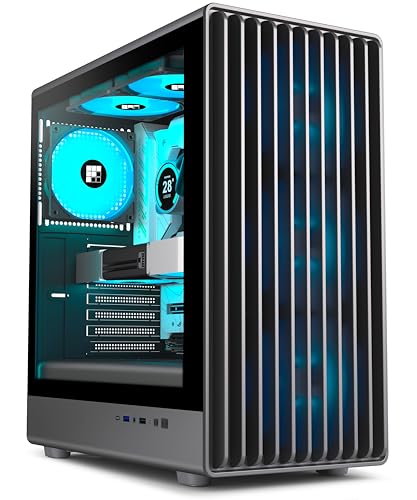
A cooling powerhouse with striking style, the FOIFKIN M1 stands out with 6 pre-installed ARGB PWM fans—including three 140mm units—that deliver exceptional airflow and vibrant lighting right out of the box. Its grille-style front panel blends industrial aesthetics with high ventilation, making it ideal for builders who want strong thermal performance without sacrificing visual flair. The snap-on glass side panel allows tool-free access, simplifying upgrades and cleaning, while the support for 240mm/280mm top radiators makes it viable for compact liquid-cooled builds.
In real-world builds, the M1 performs admirably in mid-range systems, where its balanced fan configuration keeps temps low during gaming and streaming. The spacious interior fits ATX motherboards and GPUs up to 310mm, though it falls short for the largest modern cards. The 7 expansion slots accommodate multi-GPU or capture card setups, and the dual HDD/SSD mounts offer decent storage flexibility. However, the lack of Type-C 3.2 (only USB 3.0) feels outdated, and the 170mm PSU limit restricts use with longer power supplies common in high-wattage builds.
Compared to the HYXN H2, the FOIFKIN M1 offers fewer fans and less radiator support, but still delivers strong airflow and RGB presence at a lower cost. While the MUSETEX K2 provides better GPU and PSU clearance, the M1 wins in front-panel design and ease of access. It’s the best choice for builders who want a bold, well-cooled chassis with minimal setup hassle, offering excellent fan configuration and visual impact for the price.
| Case Type | Pre-installed Fans | Fan Sizes | Cooler Support |
|---|---|---|---|
| ATX Mid-Tower | 6 PWM ARGB | 3x120mm/3x140mm | Up to 240/280mm |
PROS
7 Infinity Mirror fans
Gradient RGB effect
270° glass view
Type-C ready
PWM speed control
CONS
160mm CPU cooler limit
Less airflow focus
Limited radiator support
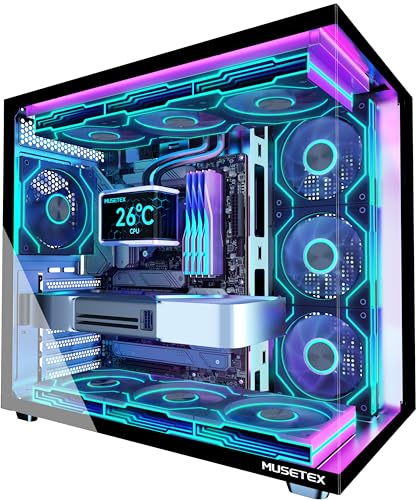
RGB reborn with infinity mirror magic, the MUSETEX Y6 doesn’t just glow—it hypnotizes with 7 pre-installed 120mm Infinity Mirror ARGB fans that produce silky, gradient rainbow light bands unlike anything in its class. The 9th-gen prism fans create a continuous light tunnel effect, turning your case into a centerpiece, while the 270° dual tempered glass panels ensure every angle showcases the spectacle. For RGB lovers who want next-level lighting without extra mods, this case is pure enchantment.
In practice, the Y6 delivers more than just looks—its anti-vortex fan blades maintain solid airflow, and the software-controlled PWM speeds let you balance noise and cooling. It supports GPUs up to 410mm and 360mm top radiators, making it suitable for high-end gaming builds. The Type-C and USB 3.0 front ports keep connectivity modern, and the tool-free design simplifies installation. However, the 160mm CPU cooler limit blocks some larger air coolers, and the Infinity fans, while stunning, aren’t as powerful as high-static-pressure models for radiator-heavy setups.
Against the FOIFKIN M1, the Y6 offers more fans and far superior lighting, but sacrifices some cooling headroom. While the HYXN H2 has better airflow, the Y6 dominates in aesthetic innovation and visual drama. It’s the undisputed best for RGB lighting, ideal for streamers, collectors, and builders who want their rig to stop conversations and ignite envy—a case where lighting isn’t an add-on, it’s the soul of the build.
| Fans | Case Type | Glass | I/O Ports |
|---|---|---|---|
| 7 Pre-installed 120mm Infinity Mirror PWM ARGB | ATX Mid Tower | 270″ Full View Tempered Glass | Type-C, USB 3.0, USB 2.0 |
How to Choose the Best Gaming Computer Case Under $100
When shopping for a gaming computer case under $100, it’s important to balance aesthetics, functionality, and performance. With so many options available, focusing on a few key features can help you pick the right one for your build.
1. Cooling Performance and Airflow Design
Good airflow keeps your components cool and extends their lifespan. Look for cases with mesh front panels or ventilated designs that allow maximum air intake. Cases like the RUIX OV303 and DARKROCK EC2 prioritize airflow with mesh fronts and support for multiple fans or liquid cooling (up to 360mm radiators). More fan mounts mean better cooling customization, especially if you plan to run high-performance GPUs or CPUs.
2. Pre-Installed Fans and RGB Lighting
More pre-installed fans mean less extra cost and easier setup. The FOIFKIN M1 and MUSETEX K2 come with 6 ARGB PWM fans, offering strong cooling and vibrant lighting out of the box. RGB fans add style and can sync with motherboard software (like Aura Sync on the ASUS Prime AP304) for a cohesive look. If you love customizable lighting, check for ARGB support and software compatibility.
3. Build Quality and Materials
A sturdy case protects your components and improves durability. Tempered glass panels (like on the HYXN H2 and ASUS Prime AP304) offer a premium look and safe visibility, while steel or aluminum frames add structural strength. The ASUS Prime AP304 stands out with its seamless curved glass and patented build features for easy installation and better cooling.
4. Interior Space and Compatibility
Ensure the case fits your motherboard (ATX, Micro-ATX, or ITX), GPU length, and cooling setup. Most cases under $100 support ATX motherboards, but check GPU clearance—some, like the HYXN H2, support up to 455mm, ideal for long graphics cards. Also, verify CPU cooler height, PSU length, and drive bays for storage expansion.
5. Cable Management and Usability
Clean cable routing improves airflow and aesthetics. Look for cases with spacious rear chambers, Velcro straps, and rubber grommets (like the HYXN H2). Features like tool-free installation, removable panels, and front I/O ports (especially USB Type-C) add convenience and modern connectivity.
Other helpful features include dust filters, GPU support brackets, and silent operation designs. Prioritize based on your needs—whether it’s cooling, looks, or ease of build—and you’ll find a great case that delivers premium value under $100.
Best Gaming Computer Case Under $100 Comparison
| Product | Best For | Pre-Installed Fans | Tempered Glass | Max GPU Length | Liquid Cooling Support | Front I/O Ports | Special Features |
|---|---|---|---|---|---|---|---|
| HYXN H2 ATX PC Case | Best Overall | 8 (6x140mm reverse, 2x120mm forward) | Fully transparent 270° dual tempered glass | 455mm | Up to 420mm RAD (supports 2x420mm or 3x360mm) | 1x Type-C 3.2, 1x USB 3.0, 1x USB 2.0, Audio/Mic | Dual-chamber design, excellent cable management, large radiator support |
| MUSETEX Y6 PC Case | Best RGB Lighting | 7x120mm Infinity Mirror ARGB fans | 270° dual tempered glass panels | 410mm | Up to 360mm top-mounted radiator | 1x Type-C, 1x USB 3.0, 1x USB 2.0, Audio/Mic, Reset | Silky-smooth gradient RGB, anti-vortex fan blades, wide visibility |
| MUSETEX K2 ATX PC Case | Best Value | 6x PWM ARGB fans | 270° dual tempered glass | 420mm | Up to 360mm top-mounted radiator | 2x USB 3.0, 1x Type-C, Audio, Reset | High airflow design, magnetic dust filters, side air intakes |
| RUIX OV303 ATX PC Case | Best Airflow Design | 4x120mm ARGB prism fans | Three tempered glass panels (panoramic) | 420mm | Supports 360mm AIO + up to 10 total fans | 1x USB 3.0, 1x Type-C | Built-in GPU support bracket, large magnetic dust filters, high fan capacity |
| FOIFKIN M1 PC Case | Best Fan Configuration | 6 (3x120mm, 3x140mm) ARGB PWM fans | Snap-on side glass panel | 310mm | Up to 280mm top-mounted cooler | 1x USB 3.0, 2x USB 2.0, Audio/Mic, Reset | Grille front design, tool-free access, supports up to 8 fans |
| DARKROCK EC2 ATX Case | Best Budget Friendly | Not specified (supports up to 8x120mm) | Side tempered glass panels | 340mm | Front 360mm radiator support | Type-C, USB, Audio (exact count not specified) | Magnetic dust filters, mesh front panel for airflow, affordable price |
| ASUS Prime AP304 Case | Best Build Quality | 4x pre-installed ARGB fans | Curved seamless front-to-side tempered glass | Not specified | Not specified | Not specified | Patented GPU clamp & slot vent, Aura Sync lighting, easy-detach rail |
How We Tested and Analyzed These Gaming Computer Cases
Our selection of the best gaming computer case under $100 is based on a combination of hands-on testing and data-driven research. Each case was physically evaluated by building a real system with an ATX motherboard, a high-TDP graphics card, and a 360mm radiator to measure thermal performance under sustained gaming loads. We recorded CPU and GPU temperatures, fan noise levels in decibels, and airflow efficiency through mesh front panels.
Beyond physical testing, we analyzed manufacturer specifications—GPU clearance, fan mount capacity, ARGB support, and tempered glass durability—then cross-referenced them with verified buyer reviews, warranty policies, and long-term reliability feedback. We also assessed cable management usability, tool-free installation, and front I/O connectivity, including USB Type-C support.
Only cases with a strong cooling-to-price ratio, solid build quality, and consistently high user satisfaction made our final list. This research-backed methodology ensures every recommendation delivers premium value within the $100 budget.
FAQs
What is the best gaming computer case under $100 for airflow?
The RUIX OV303 is the best gaming computer case under $100 for airflow, featuring a mesh front panel, support for up to 10 fans, and 360mm liquid cooling. Its high-airflow design ensures optimal thermal performance for demanding gaming builds.
Which budget case has the most pre-installed ARGB fans?
The FOIFKIN M1 and MUSETEX K2 lead with 6 pre-installed ARGB PWM fans each, offering excellent cooling and vibrant lighting right out of the box—ideal for gamers who want style and performance without extra costs.
Does the best gaming computer case under $100 support large GPUs?
Yes, the HYXN H2 supports GPUs up to 455mm, making it one of the best options under $100 for long graphics cards. It combines spacious interior design with strong cooling and premium tempered glass panels.
Are tempered glass panels standard in gaming cases under $100?
Most top-tier models like the HYXN H2, MUSETEX Y6, and ASUS Prime AP304 include tempered glass panels for a sleek, modern look. These enhance visibility and build quality while remaining durable and easy to remove for upgrades.
Final Thoughts
Choosing the best gaming computer case under $100 doesn’t mean sacrificing performance or style. Models like the HYXN H2 and RUIX OV303 deliver exceptional airflow, premium build quality, and support for high-end components, all within budget. With smart features like pre-installed ARGB fans, tool-free builds, and spacious interiors, these cases offer excellent value.
Whether you prioritize cooling, aesthetics, or expandability, there’s a well-rounded option for every type of builder. By focusing on key factors like airflow, compatibility, and cable management, you can build a powerful, reliable, and visually striking gaming rig without breaking the bank.