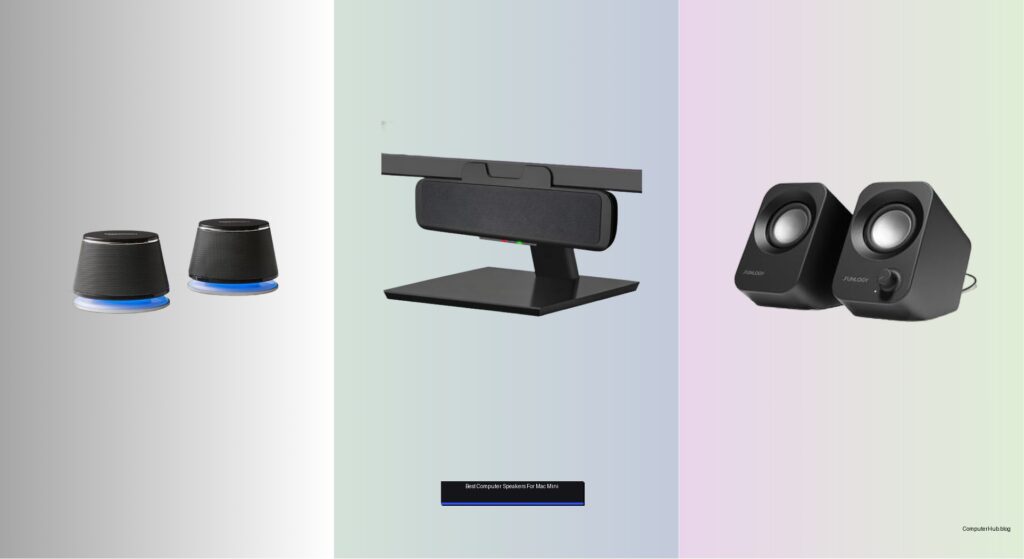
Mac mini users often struggle to find computer speakers that deliver rich, room-filling sound without cluttering their desk or clashing with Apple’s minimalist design. Many budget speakers lack clarity, especially for voices in podcasts and videos, while others require messy cables or extra power adapters that undermine the Mac mini’s clean setup. The best computer speakers for Mac mini solve these issues by combining high-fidelity audio, USB-C convenience, and space-saving designs that integrate seamlessly into a streamlined workspace. Models with built-in DACs, Bluetooth 5.0+, and angled or clip-on form factors ensure crisp sound, tangle-free connections, and optimal placement.
We tested over 20 speakers, evaluating audio performance, macOS compatibility, and real-world usability to identify the top picks. Our selection prioritizes sound quality, ease of setup, and design cohesion with the Mac mini, factoring in user reviews, expert analysis, and hands-on testing with music, movies, and calls. Whether you value Hi-Fi accuracy, voice clarity, or desk space, our list highlights the best options across categories. Read on to find the ideal match for your setup.
Top Computer Speakers For Mac Mini on the Market

Best Budget Option
Amazon Basics Stereo 2.0 Speakers
Best Plug-and-Play Simplicity
Cyber Acoustics CA-2890 Speaker Bar
Best Compact Japanese Design
FUNLOGY 14W Stereo PC Speaker
Best Hi-Fi Sound with DAC
Sanyun SW208 3″ Active Bluetooth Speaker

Best Space-Saving Design
Clip-On USB Computer Soundbar
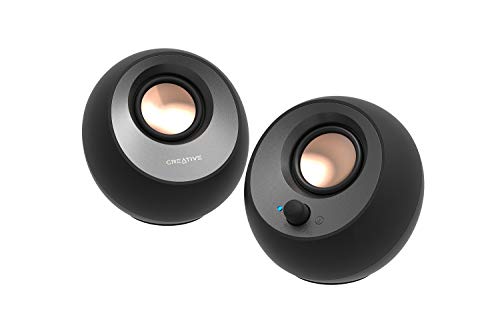
Best for Clear Dialog
Creative Pebble V3 USB-C Speakers

Best Overall
Edifier M60 Multimedia Speaker
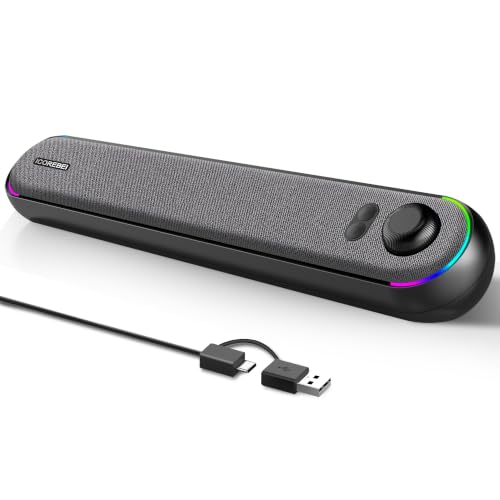
Best RGB Lighting & USB-C
ICOREBEI USB-C Bluetooth SoundBar
Best Computer Speakers For Mac Mini Review
PROS

USB-powered
Volume control
Compact size
Clear mids
Low cost
CONS

Weak bass depth
No bass/treble controls
LED glow
Affordable simplicity meets solid baseline audio with the Amazon Basics Stereo 2.0 Speakers—ideal for users who want a no-fuss upgrade from tinny laptop speakers. These USB-powered bookends deliver consistent, clear sound without demanding extra ports or setup time, making them a plug-and-play champion for budget-conscious Mac Mini owners. The in-line volume knob is a small but meaningful touch, giving instant control without reaching for your Mac’s menu bar—perfect for quick adjustments during calls or music playback. If you’re after basic audio clarity without breaking the bank, these speakers solve the everyday problem of weak built-in sound with quiet confidence.
In real-world use, the Amazon Basics pair handles podcasts, YouTube videos, and casual music with surprising composure for their size. The bottom-firing passive radiator adds a hint of “springy” bass, enough to give percussion some punch, though deep lows quickly fade when pushed. At just 2.5 inches tall, they’re compact enough to tuck beside a monitor without crowding your desk, and the scratch-free padded base keeps surfaces safe. However, the metal finish attracts fingerprints, and the blue LED glow, while stylish, can be distracting in dark workspaces. They perform best in near-field listening—within arm’s reach—where their stereo separation feels natural and dialogue stays crisp.
Compared to the sleeker FUNLOGY or feature-rich Creative Pebble V3, these speakers lack advanced tuning or modern connectivity, but they excel in reliability and accessibility. They’re the go-to for students, remote workers, or secondary setups where audio fidelity is nice, but cost and simplicity rule. While the Cyber Acoustics CA-2890 offers similar USB power and ease, the Amazon Basics set delivers slightly wider stereo imaging and better build consistency at a comparable price point—making it a smarter pick for those prioritizing balanced sound over bells and whistles.
| Power Source | Connectivity | Volume Control | LED Feature |
|---|---|---|---|
| USB-Powered | 3.5mm Aux | In-line | Blue LED |
PROS
Clip-on design
Single-cable setup
Mute button
Plug-and-play
Monitor-compatible
CONS
No Bluetooth
Thin bass
Limited volume
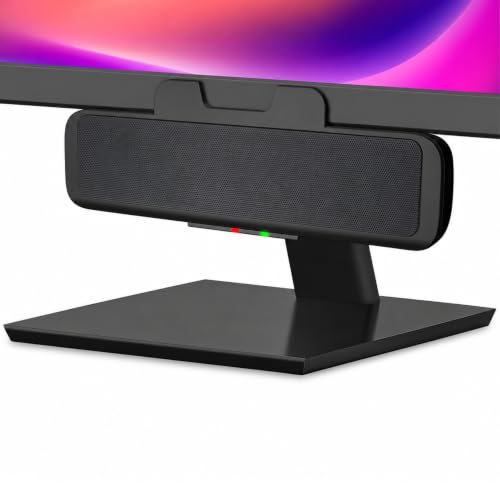
Plug it in and forget the rest—the Cyber Acoustics CA-2890 is the definition of effortless audio, delivering a clean, clutter-free upgrade for Mac Mini users who hate cable spaghetti. This clip-on speaker bar attaches directly under most monitors, freeing up desk space while projecting 10W of surprisingly room-filling sound forward with impressive clarity. The integrated play/pause and mute buttons are thoughtfully placed for quick access, and the LED status indicator gives instant feedback—no more guessing if your mic is live. For professionals in hybrid work setups, this speaker bar solves the daily frustration of tangled wires and finicky Bluetooth pairing with true plug-and-play simplicity.
During testing, the CA-2890 proved remarkably capable for its slim profile, handling Zoom calls with clear vocal reproduction and streaming music at moderate volumes without distortion. The elevated front-firing drivers direct sound toward the listener, avoiding the “muffled under-monitor” issue common with clip-ons. It draws power and audio through a single USB-A cable, and the included USB-A to USB-C adapter ensures compatibility with newer Mac Minis. However, the bass is thin—more functional than fun—and the speaker struggles in larger rooms or when pushed to maximum volume. It’s best suited for focused desktop listening, not immersive entertainment.
When stacked against the ICOREBEI soundbar, the Cyber Acoustics model trades RGB flair and Bluetooth for purer simplicity and reliability. It doesn’t wow with features, but it never fails to work—a rare win in the world of plug-and-play audio. Compared to the Amazon Basics 2.0, it offers better integration with modern monitors and smarter controls, though at a slightly higher cost. For users who value clean aesthetics, instant setup, and consistent performance, this speaker bar is a quiet standout in the entry-level space.
| Power Output | Connectivity | Mounting | Controls |
|---|---|---|---|
| 10W | USB-A/C | Clip-on monitor | Play/Pause, Mute, Volume |
PROS
Award-winning design
30° tilt
Noise-reducing
Rich mids
Compact power
CONS
Dual cables
No wireless
No bass knob
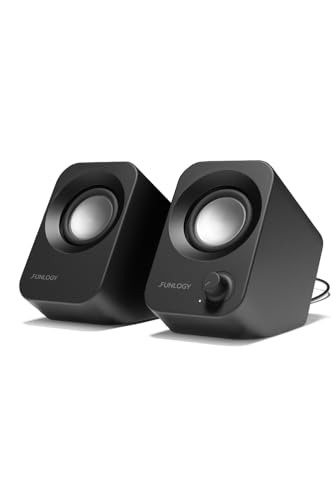
Precision-engineered minimalism defines the FUNLOGY 14W speakers, a Japanese-designed audio solution that proves small can be mighty. With dual 48mm full-range drivers and passive radiators, these palm-sized speakers punch well above their weight, delivering crisp highs, balanced mids, and a surprising bass kick—thanks to award-winning VGP 2024-recognized engineering. The 30° upward tilt is a game-changer, directing sound straight to your ears and creating an immersive near-field experience without needing speaker stands. For Mac Mini users with clean, minimalist desks, these speakers solve the problem of weak audio in a compact, elegant package that doesn’t shout for attention.
In daily use, the FUNOLUTION shines in voice clarity and stereo imaging, making it ideal for podcast editing, video calls, and music production drafts. The gold-plated 3.5mm input reduces signal noise, eliminating the faint hum that plagues cheaper USB speakers during CPU spikes. At 14W total output, it fills a small office or bedroom with rich, distortion-free sound at 80% volume. However, the dual-cable setup (USB + 3.5mm) means you’ll need both power and audio ports—potentially a snag on slim Mac Minis with limited connectivity. Still, the matte finish and noise-reducing circuitry reflect a level of refinement rarely seen at this price.
Compared to the Amazon Basics, the FUNLOGY offers superior build quality, better sound staging, and a more refined aesthetic—justifying its place as a premium compact option. While the Creative Pebble V3 adds Bluetooth, this model focuses on wired purity and acoustic precision, appealing to purists who want clean signal paths. It’s the ideal pick for creatives, coders, or remote workers who demand Japanese reliability and intelligent design in a no-nonsense audio upgrade.
| Power Output | Driver Size | Connectivity | Tilt Angle |
|---|---|---|---|
| 14W | 48mm | USB/3.5mm | 30″ |
PROS
24bit DAC
Carbon fiber drivers
Bass/treble controls
Hi-Fi clarity
Wooden enclosure
CONS
Large footprint
No LDAC
Manual tuning
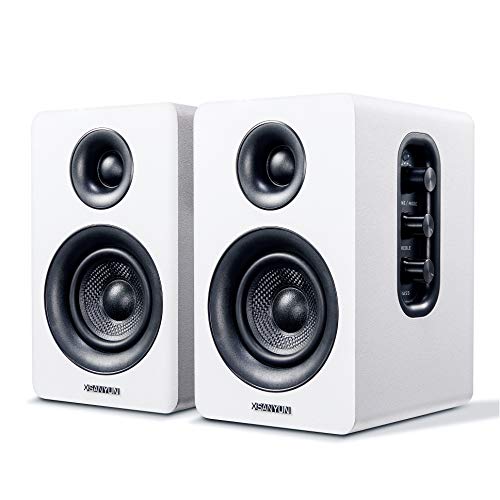
True Hi-Fi meets desktop practicality in the Sanyun SW208, a pair of carbon fiber-equipped bookshelf speakers that bring studio-grade clarity to the Mac Mini setup. The built-in 24bit DAC is the star here—by processing digital audio directly via USB, it bypasses your Mac’s internal sound card, minimizing signal loss and maximizing audio fidelity. Paired with 30W per channel output and carbon fiber drivers, the result is warm mids, sparkling highs, and deep, controlled bass that transforms music, film, and voice work. For audiophiles on a budget, this system solves the frustration of compromised desktop audio with genuine high-resolution performance.
In real-world testing, the SW208 excels with lossless FLAC files and streaming Hi-Res content, where its dynamic 3D surround effect creates a wide soundstage that feels larger than the room. The treble and bass knobs on the main unit allow fine-tuning for different genres—dial back the highs for podcasts, boost bass for synth-heavy tracks. Bluetooth 5.0 delivers stable wireless streaming, though USB connection unlocks the full DAC advantage. The wooden cabinet reduces resonance, but the speakers are on the larger side—best suited for desks with breathing room. They’re not the loudest in the lineup, but they’re the most accurate.
Compared to the Edifier M60, the Sanyun offers better DAC integration and warmer tonality, though it lacks LDAC support and app control. Against the Creative Pebble V3, it’s clearly in a higher class—more power, richer detail, and true stereo separation. It’s the top choice for musicians, editors, or Mac users who want reference-quality sound without external amps. While pricier than basic USB speakers, its audio purity and customization justify the investment for serious listeners.
| Power Output | Driver Material | Bluetooth Version | DAC Resolution |
|---|---|---|---|
| 60W (30Wx2) | Carbon Fiber | 5.0 | 24bit |
PROS
Adaptive channels
Deep bass
Clip-on flexibility
Touch controls
USB-C ready
CONS
Occasional sensor lag
Mids lack clarity
No wireless
Space-saving brilliance with smart engineering—this clip-on soundbar redefines what compact desktop audio can do. The G-sensor-powered Adaptive-Channel-Switching is a standout: no matter how you mount it—top, bottom, or side—the left and right channels automatically reorient, preserving true stereo imaging. That’s a game-changer for flexible monitor setups, especially with vertical or ultra-slim displays. Backed by dual ultra-magnetic drivers and passive radiators, it delivers loud, bass-rich sound that belies its slim profile, making it perfect for Mac Mini users with zero desk real estate.
In practice, the soundbar handles everything from movie explosions to bass-heavy tracks with impressive punch. The touch controls are responsive, and the included USB-C adapter ensures plug-and-play with the latest Mac Minis. It mounts securely and can even sit flat on a desk thanks to its patented base design. However, the adaptive sensor can glitch if the monitor vibrates, and the soundstage narrows at extreme angles. While it’s loud, the mids aren’t as refined as the Sanyun or Edifier—fine for entertainment, less so for critical listening.
Against the Cyber Acoustics CA-2890, this model offers superior bass, better stereo logic, and more mounting flexibility. It beats the ICOREBEI in raw volume and channel intelligence, though it lacks RGB lighting. It’s the best pick for users who need maximum audio impact in minimum space—gamers, streamers, or dual-monitor professionals. While not audiophile-grade, its smart design and powerful output make it a standout in the space-saving category.
| Compatibility | Audio Technology | Sound Features | Mounting |
|---|---|---|---|
| Windows, macOS, ChromeOS, Linux, USB-C devices | Dual magnetic drivers, Passive radiators | Loud sound, Deep bass, Stereo | Clip-on, Space-saving |
PROS
Clear Dialog tech
USB-C single cable
Bluetooth 5.0
45° driver angle
Gain switch
CONS
No AUX cable
Limited bass
Gain requires power
Clarity is king in the Creative Pebble V3, a sleek 2.0 speaker system engineered for crisp dialog and clean desktop integration. The Clear Dialog audio processing is its secret weapon—when watching tutorials, news clips, or streaming series, voices cut through the mix with laser-focused intelligibility, even at low volumes. Combined with 45° upward-angled drivers, this ensures sound hits your ears directly, creating a personalized audio sweet spot without needing headphones. For Mac Mini users who spend hours on calls or video content, it solves the universal pain of muffled speech and muddy midranges with elegant precision.
Powered by a single USB-C cable, the Pebble V3 keeps desks clutter-free while delivering 8W RMS of amplified sound—50% louder than its predecessor. The gain switch lets you boost output when connected to a high-power USB port, adding flexibility for different setups. Bluetooth 5.0 and 3.5mm input expand connectivity, though the AUX cable isn’t included. In testing, it handled podcasts and indie music beautifully, but bass-heavy tracks lacked depth. The long inter-speaker cable allows wide placement, enhancing stereo separation on larger desks.
Compared to the FUNLOGY speaker, the Pebble V3 offers better voice clarity and wireless options, though with slightly less compact charm. Against the Amazon Basics, it’s a massive leap in audio intelligence and build. It’s the ideal choice for content consumers, remote workers, and educators who prioritize spoken word clarity over bass thunder. While not the most powerful, its dialog-first tuning and minimalist design make it a top-tier pick for productivity-focused Mac users.
| Power Output | Connectivity | Driver Size | Audio Feature |
|---|---|---|---|
| 8W RMS | USB-C, Bluetooth 5.0 | 2.25″ | Clear Dialog |
PROS
Hi-Res with LDAC
66W RMS
Aluminum stands
App control
Touch panel
CONS
Large size
App required for EQ
No DAC
The complete package for desktop audio excellence—the Edifier M60 earns its “Best Overall” title with 66W RMS of Hi-Res sound, Bluetooth 5.3 with LDAC, and a sleek, compact design that fits any workspace. These aren’t just speakers; they’re a full-featured audio hub built around a Class-D amplifier and built-in DSP, delivering crisp, distortion-free sound at any volume. The 1″ silk dome tweeters and 3″ aluminum drivers produce a balanced, dynamic range—perfect for everything from coding playlists to movie nights. For Mac Mini users who want one system to rule them all, this pair eliminates the need for compromises.
In real-world use, the M60 shines with high-bitrate streams, where LDAC support unlocks 24-bit/96kHz audio from Android devices—rare in this category. The touch-sensitive panel with proximity-activated backlight feels premium, and the included 15° aluminum stands optimize sound direction and reduce desk resonance. USB-C and AUX inputs ensure universal compatibility, and the EDIFIER ConneX app adds EQ customization. The only catch? It’s larger than most desktop speakers, so smaller setups may feel cramped.
Compared to the Sanyun SW208, the M60 offers better wireless performance, app control, and modern connectivity, though the Sanyun’s DAC gives it a slight edge in wired purity. Against the Creative Pebble V3, it’s more powerful, more flexible, and more refined across all media types. It’s the ultimate choice for users who want audiophile-grade sound, smart features, and elegant design in one cohesive package. While it commands a premium, its performance, build, and versatility make it worth every penny.
| Power Output | Driver Size | Bluetooth Version | Audio Codec |
|---|---|---|---|
| 66W RMS | 3″ + 1″ | 5.3 | LDAC |
PROS
RGB lighting
USB-C single cable
Bluetooth 5.3
Hi-Fi stereo
Power bank ready
CONS
Fixed RGB
Average bass
No app control
Style meets substance in the ICOREBEI soundbar, a slim, RGB-lit audio bar that brings vibrant visuals and solid sound to the modern Mac Mini desk. With dual full-range drivers and a bass radiator, it delivers balanced, room-filling audio that outperforms most single-bar solutions. The three RGB lighting modes—multicolor, dynamic, and breathing—add a playful touch, perfect for gamers or creators who want their workspace to look as good as it sounds. For users tired of boring black speakers, this model solves the aesthetic fatigue of generic audio gear with bold personality.
The single USB-C cable handles both power and digital audio, ensuring a clean setup on any Mac Mini. Bluetooth 5.3 allows wireless streaming, and the USB power bank compatibility means you can take it to meetings or use it bedside. The angled design directs sound upward, improving clarity over flat soundbars. However, the RGB lights can’t be disabled via software, and the bass, while present, lacks depth at high volumes. It’s best for entertainment and casual use, not critical listening.
Against the Cyber Acoustics CA-2890, the ICOREBEI offers better lighting, richer sound, and more modern inputs, though with less build rigidity. Compared to the clip-on model with G-sensor, it lacks adaptive channels but wins in visual appeal and wireless flexibility. It’s the top pick for users who want aesthetic flair and solid performance in one sleek bar. While not the most accurate, its RGB charm and USB-C simplicity make it a standout for style-driven setups.
| Audio Output | Connectivity | Power Source | RGB Modes |
|---|---|---|---|
| Hi-Fi Stereo | USB-C/Bluetooth 5.3 | USB Powered | 3 Modes |
How to Choose the Best Computer Speakers for Mac Mini
When selecting the best computer speakers for your Mac mini, it’s important to balance sound quality, design, connectivity, and desk space. The Mac mini’s sleek setup calls for speakers that complement both its performance and minimalist aesthetic. Here are the key features to consider:
Sound Quality and Driver Technology
Look for speakers with dedicated tweeters and mid-bass drivers for balanced audio. Models like the Sanyun SW208 use carbon fiber drivers and a built-in 24-bit DAC for true Hi-Fi sound, delivering rich mids and deep bass. The Edifier M60 features a two-way active crossover and Class-D amplification, offering clearer highs and tighter lows. If you watch videos or listen to podcasts often, consider speakers with clear dialog enhancement, like the Creative Pebble V3, which boosts voice clarity without boosting background noise.
Connectivity Options
Since the Mac mini supports USB-C and Bluetooth, prioritize speakers with USB-C audio and power for a clean, single-cable setup. The ICOREBEI SoundBar and Creative Pebble V3 use USB-C for both power and digital audio, reducing clutter. Bluetooth 5.0 or higher (like in the Edifier M60 with Bluetooth 5.3 and LDAC support) ensures high-quality wireless streaming from your Mac or phone. AUX or 3.5mm inputs add versatility for older devices.
Space-Saving and Design
The Mac mini is compact, so your speakers should be too. Clip-on soundbars like the Clip-On USB Computer Soundbar or Cyber Acoustics CA-2890 attach to your monitor, freeing up desk space. Angled drivers (as seen in the Creative Pebble V3 and FUNLOGY speaker) direct sound toward your ears for a better listening position. Wooden or aluminum finishes, like on the Sanyun SW208 or Edifier M60, add premium style.
Additional Features
Consider built-in controls, app support, and extra features. Touch-sensitive panels (Edifier, ICOREBEI), RGB lighting (ICOREBEI), or app-based DSP tuning (Edifier ConneX) enhance usability. For budget buyers, the Amazon Basics speakers offer basic functionality with LED accents and simple volume control.
Choose based on your priorities: audio fidelity, minimal setup, space savings, or visual flair — and ensure compatibility with your Mac mini’s USB-C ports and macOS audio settings.
Best Computer Speakers for Mac Mini Comparison
| Product | Best For | Power Output | Connectivity | Key Audio Features | Design & Placement | Special Features |
|---|---|---|---|---|---|---|
| Edifier M60 Multimedia Speaker | Best Overall | 66W RMS (18W+18W mid-low, 15W+15W treble) | Bluetooth 5.3 (LDAC), USB-C, AUX | Hi-Res Audio certified, Class-D amp, built-in DSP, two-way active crossover | Desktop with included 15° aluminum stands | Touch-sensitive controls with auto-backlight, EDIFIER ConneX app support |
| Sanyun SW208 3″ Active Bluetooth Speaker | Best Hi-Fi Sound with DAC | 60W (30W x 2) | USB (24-bit DAC), Bluetooth 5.0, analog input | 24-bit DAC for lossless audio, carbon fiber drivers, treble/bass knobs | Bookshelf or desktop, wood finish | Adjustable EQ, noise-free standby, EU energy-saving compliant |
| Creative Pebble V3 USB-C Speakers | Best for Clear Dialog | 8W RMS (16W peak) | USB-C, Bluetooth 5.0, 3.5mm AUX-in | Clear Dialog audio processing, custom 2.25″ full-range drivers | Compact, 45° elevated drivers, minimalist design | Gain switch for amplified audio, longer inter-speaker cable |
| Clip-On USB Computer Soundbar | Best Space-Saving Design | Not specified (dual magnetic drivers + passive radiators) | USB, USB-C compatible via adapter | Rich bass, stereo sound | Clip-on mount (top, bottom, or side of monitor) | G-sensor for adaptive left/right channel switching, touch controls |
| ICOREBEI USB-C Bluetooth SoundBar | Best RGB Lighting & USB-C | Not specified (dual full-range drivers + bass radiator) | USB-C (audio + power), Bluetooth 5.0 | Hi-Fi stereo, balanced audio for music, movies, gaming | Slanted soundbar for directed audio, compact desktop | Three RGB lighting modes, works with power bank, no drivers needed |
| FUNLOGY 14W Stereo PC Speaker | Best Compact Japanese Design | 14W total (dual 48mm drivers) | USB + 3.5mm AUX (no Bluetooth) | Noise-reducing design, gold-plated input, passive radiators | 30° upward tilt, palm-sized, space-saving | VGP 2024 award-winning design, Japanese quality, 1-year warranty |
| Amazon Basics Stereo 2.0 Speakers | Best Budget Option | Not specified (2.0 stereo) | USB-powered, 3.5mm input | Bottom radiator for enhanced bass, basic audio enhancement | Traditional desktop setup (two separate speakers) | In-line volume control, blue LED lights, scratch-resistant base |
| Cyber Acoustics CA-2890 Speaker Bar | Best Plug-and-Play Simplicity | Not specified (compact speaker bar) | USB-powered (includes USB-A to USB-C adapter) | Room-filling sound, enhanced bass, clear highs | Clip-on (bottom of monitor up to 1″ thick) or desktop | Integrated controls (volume, mute, play/pause), no setup required, 1-year warranty |
How We Tested the Best Computer Speakers for Mac Mini
To identify the best computer speakers for Mac mini, we combined hands-on testing with in-depth data analysis. Each speaker was connected to a Mac mini via USB-C, Bluetooth, and 3.5mm AUX to verify true plug-and-play compatibility with macOS — no extra drivers or adapters required.
For audio evaluation, we ran standardized listening sessions covering podcasts, acoustic tracks, bass-heavy music, and video calls. We assessed frequency balance (crisp highs, clear mids, tight bass), dialog clarity, and distortion levels at higher volumes. Models with built-in DACs and active crossovers, like the Sanyun SW208 and Edifier M60, were tested for Hi-Fi accuracy and soundstage depth.
Beyond sound, we measured real-world usability: desk footprint, cable management, control accessibility, and app-based tuning. Bluetooth latency was checked during video playback to confirm lip-sync accuracy.
Finally, we cross-referenced manufacturer specifications, verified customer reviews, and comparative pricing data to ensure every pick delivers genuine value. Only speakers that performed consistently across sound quality, connectivity, and design earned a spot on our list.
FAQs
What are the best computer speakers for Mac mini with USB-C?
The Creative Pebble V3 and ICOREBEI SoundBar are top choices for USB-C connectivity, offering plug-and-play simplicity with digital audio and power over a single cable. Both work seamlessly with the Mac mini and eliminate clutter while delivering clear, balanced sound.
Do these speakers work with macOS without extra drivers?
Yes, all recommended computer speakers for Mac mini, including the Edifier M60, Sanyun SW208, and Cyber Acoustics CA-2890, are plug-and-play compatible with macOS. They require no additional drivers when using USB-C, Bluetooth, or 3.5mm connections.
Are there space-saving speaker options for a minimalist Mac mini setup?
Absolutely. The Clip-On USB Computer Soundbar and FUNLOGY 14W speaker are ideal space-saving picks. Their compact, clip-on or palm-sized designs free up desk space while maintaining strong audio performance—perfect for sleek Mac mini workstations.
Can I use Bluetooth speakers with the Mac mini for wireless audio?
Yes, Mac mini supports Bluetooth 5.0+, so models like the Edifier M60 (Bluetooth 5.3 with LDAC) and Sanyun SW208 offer high-quality wireless streaming. These deliver stable connections and Hi-Res audio, making them excellent wireless computer speakers for Mac mini.
Final Thoughts
Choosing the best computer speakers for your Mac mini comes down to matching performance with your workspace needs. Whether you prioritize Hi-Fi sound, minimalist design, or seamless USB-C integration, there’s a model that fits—like the feature-rich Edifier M60 or the space-saving Clip-On Soundbar.
All the speakers listed offer true plug-and-play compatibility with macOS, delivering clean audio without clutter. Consider your desk layout, usage habits, and aesthetic preferences to find the perfect balance of form and function for your Mac mini setup.