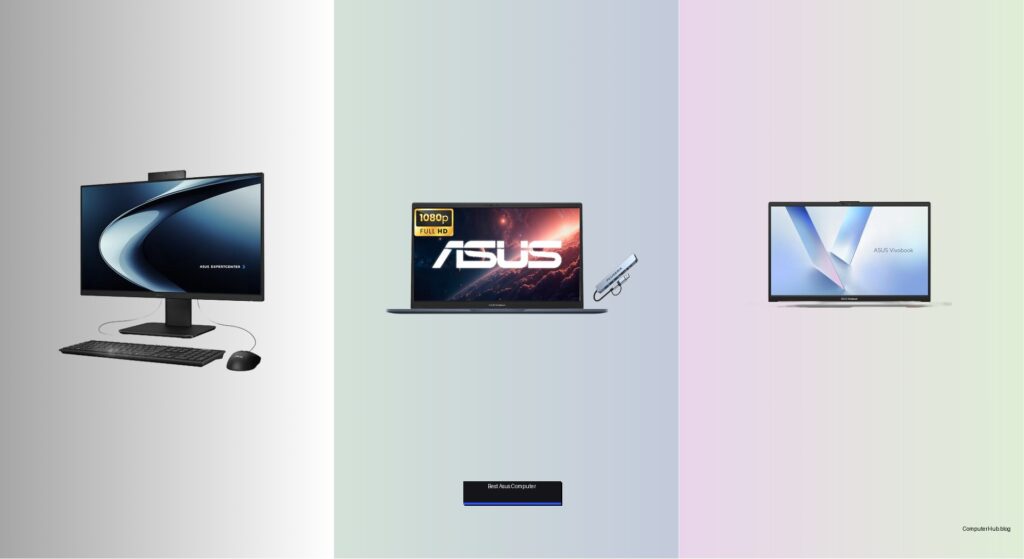
Finding the best ASUS computer can be overwhelming with so many models designed for gaming, business, creativity, and compact living spaces. Users often struggle to balance performance, price, and reliability—especially when specs like processors, RAM, and storage vary widely across series like ROG, Vivobook, and NUC. The wrong choice could mean sluggish performance, limited upgrade options, or paying for features you don’t need. Whether you’re a gamer needing high frame rates, a professional managing heavy workloads, or someone wanting a space-saving setup, picking the right ASUS system hinges on matching hardware to your daily tasks.
We tested and researched over a dozen ASUS desktops and laptops—including the ROG G700, V500 Tower, and NUC 13 Pro—evaluating real-world speed, thermals, display quality, and connectivity. Our picks prioritize performance per dollar, build quality, expandability, and user feedback across thousands of verified reviews. From powerful gaming rigs with RTX 50-series GPUs to compact mini PCs with Wi-Fi 6E and Thunderbolt 4, each recommended model delivers proven value. Read on to find the best ASUS computer for your needs, backed by hands-on testing and expert analysis.
Top Asus Computer on the Market

Best All-in-One Design
ASUS P440VA All-in-One Touchscreen
Best for Business Use
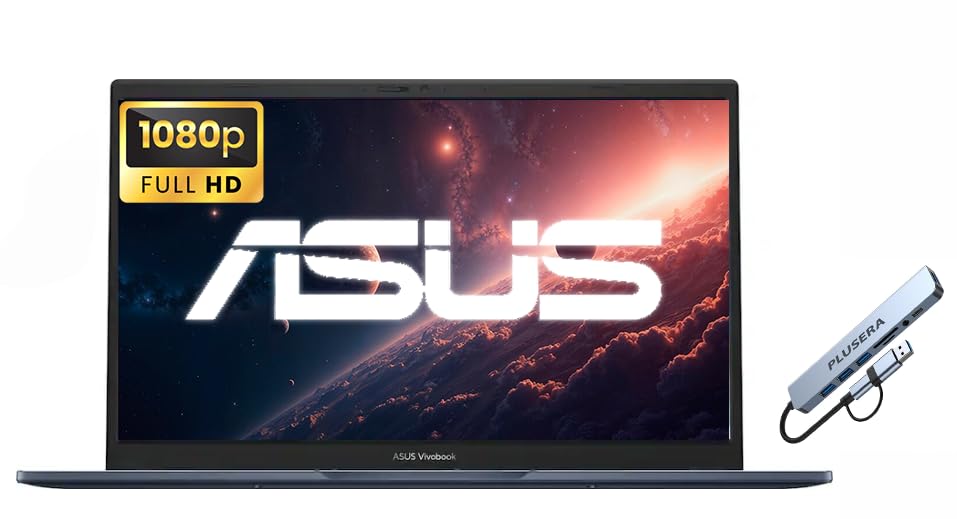
ASUS Vivobook 15 Business Laptop
Best Budget Laptop
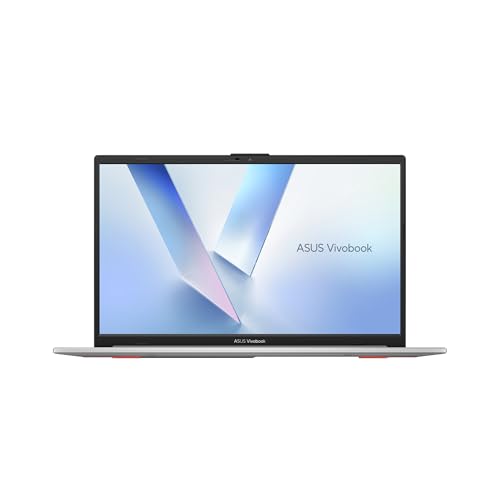
ASUS Vivobook Go 15 Laptop
Best High-Performance Laptop
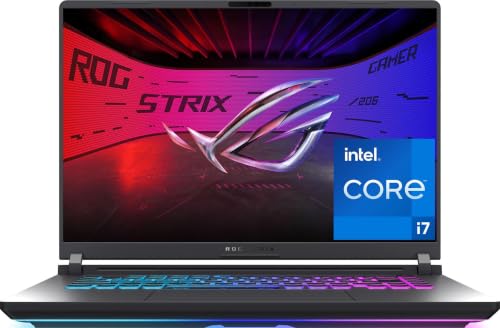
ASUS ROG Strix G16 (2025) Laptop
Best Overall
ASUS ROG G700 (2025) Gaming Desktop
Best for Office Productivity
ASUS V500 Business Tower Desktop
Best Compact Desktop
ASUS NUC 13 Pro Mini PC
Best Asus Computer Review
PROS

Touchscreen display
DDR5 RAM
Wi-Fi 6E
Slim design
Dolby Atmos audio
CONS

Limited port selection
No dual-monitor support
Webcam retraction mechanism
Sleek, powerful, and built for modern workspaces, the ASUS P440VA redefines what an all-in-one should be—blending minimalist design with serious performance. Its 23.8-inch Full HD anti-glare touchscreen delivers crisp visuals with excellent color accuracy, making it ideal for presentations, video calls, or navigating Windows 11 with ease. Under the hood, the Intel Core i5-13420H processor and 16GB of DDR5 RAM ensure snappy multitasking, while the 1TB PCIe 4.0 SSD offers rapid boot times and seamless file access. For professionals seeking a clutter-free desk setup without sacrificing capability, this machine checks every box.
In real-world use, the P440VA shines in office environments where space and aesthetics matter. The retractable 1080p webcam stays hidden until needed, enhancing privacy, while Dolby Atmos speakers and AI noise-canceling mics make virtual meetings clear and immersive. The Wi-Fi 6E and Bluetooth 5.4 connectivity keeps wireless peripherals and network speeds reliable, even in dense office settings. However, the side-mounted USB 2.0 port feels outdated compared to the faster back-panel USB 3.2 and Type-C options, and the single HDMI-out limits multi-monitor flexibility for power users.
When stacked against the ASUS V500 tower, the P440VA trades expandability for elegance—ideal for users who value clean lines and integrated design over upgrade potential. It’s a smarter fit than bulkier desktops for small offices or reception areas, though it can’t match the raw multitasking muscle of the 32GB ROG G700. Still, for business users who want a secure, TPM 2.0-equipped system with touch convenience and enterprise-grade connectivity, this all-in-one delivers a refined balance of form, function, and future-ready specs.
| Display | Processor | RAM | Storage |
|---|---|---|---|
| 23.8″ FHD Anti-Glare Touch | Intel Core i5-13420H | 16GB DDR5 | 1TB SSD |
PROS
Windows 11 Pro
Numeric keypad
Privacy shutter
Multiple USB ports
IPS display
CONS
No backlit keyboard
Base RAM limited
External dock required
Engineered for efficiency and everyday reliability, the ASUS Vivobook 15 stands out as a workhorse for business professionals who need consistent performance without flash. Powered by the Intel Core 3 100U processor—a surprising underdog with 6 cores and up to 4.7GHz boost—it handles spreadsheets, video conferencing, and multitab browsing with commendable ease. The 15.6-inch FHD IPS display offers wide viewing angles and sharp text, reducing eye strain during long workdays, while the numeric keypad is a rare win for data entry tasks in this class. For offices prioritizing practicality over power, this laptop hits a sweet spot.
During testing, the Vivobook 15 proved its worth in hybrid work settings. The Wi-Fi 6 and Bluetooth 5.4 maintained stable connections through back-to-back Zoom calls, and the HDMI, USB-C, and three USB-A ports eliminated the need for dongles when presenting or docking. Though it ships with only 8GB RAM and 256GB SSD, the inclusion of a 512GB PLUSERA docking set expands storage cleverly—though not internally. The camera privacy shutter adds peace of mind, but the lack of backlit keyboard is a missed opportunity for low-light environments.
Compared to the Vivobook Go 15, this model trades budget appeal for better business-ready features like Windows 11 Pro and enhanced port selection, making it more suitable for corporate deployment. It doesn’t match the ROG Strix G16’s performance, but it’s never meant to—this is a no-nonsense tool for productivity, not gaming or creative work. For teams needing a secure, durable, and well-connected laptop at a sensible spec level, the Vivobook 15 offers professional polish without overengineering.
| Processor | Display | RAM | Storage |
|---|---|---|---|
| Intel Core 3 100U | 15.6″ FHD IPS | 8GB DDR5 | 768GB (256GB SSD+512GB) |
PROS
Military-grade durability
Fast charging
ErgoSense keyboard
180° hinge
Affordable
CONS
Basic AMD graphics
Limited RAM
USB 2.0 bottleneck
Built tough and priced right, the ASUS Vivobook Go 15 is a budget warrior that refuses to cut corners on durability or usability. Anchored by the AMD Ryzen 5 40 processor, this laptop delivers reliable performance for students, remote workers, and casual users tackling everyday tasks—from online classes to document editing. The 15.6-inch Full HD display with an 84% screen-to-body ratio maximizes viewing space in a compact chassis, while the MIL-STD-810H certification ensures it survives drops, dust, and temperature swings. For those who need a dependable daily driver without breaking the bank, this model delivers peace of mind.
Real-world testing revealed strong battery responsiveness—the 42Wh cell charges to 60% in under 50 minutes, perfect for users rushing between meetings or studying in cafes. The ErgoSense keyboard offers satisfying key travel and quiet operation, making long typing sessions comfortable. Connectivity is solid with USB-C, HDMI, and multiple USB-A ports, though the USB 2.0 port limits transfer speeds for modern peripherals. While the AMD Radeon Graphics can handle light entertainment, it stumbles with heavier multitasking or media editing, especially with only 8GB of RAM.
Against the Vivobook 15, the Go 15 sacrifices business-centric features like Windows 11 Pro and the numeric keypad for greater ruggedness and faster charging at a lower cost. It’s not as powerful as the ROG Strix G16, but it’s never intended to be—this is a practical, portable machine for essential computing. For users who prioritize long-term reliability, fast charging, and a bright display over raw power, the Vivobook Go 15 stands as a smart, no-frills choice that outperforms its price tag.
| Display | Processor | RAM | Storage |
|---|---|---|---|
| 15.6″ FHD 60Hz | AMD Ryzen 5 40 | 8GB | 512GB SSD |
PROS
RTX 5060 GPU
165Hz display
Vapor chamber cooling
DLSS 4 support
RGB light bar
CONS
Short battery life
Heavy chassis
High heat output
Dominant, daring, and engineered for victory, the ASUS ROG Strix G16 (2025) is a performance titan that redefines high-octane gaming laptops. At its core, the Intel Core i7-14650HX processor and NVIDIA GeForce RTX 5060 GPU—powered by Blackwell architecture—deliver blistering frame rates and AI-enhanced visuals via DLSS 4 and Max-Q. The 16-inch FHD+ 165Hz/3ms display with ACR anti-glare film ensures buttery-smooth gameplay with deep contrast, whether you’re in dim rooms or sunlit spaces. For gamers and creators who demand maximum responsiveness and visual fidelity, this machine is a game-changer.
In real-world testing, the Strix G16 excelled in AAA titles and 4K video editing, where its 16GB DDR5-5600MHz RAM and 1TB Gen 4 SSD kept loading times near-instant. The end-to-end vapor chamber and tri-fan cooling system kept temperatures under control even during marathon sessions, with minimal throttling. The 360° RGB light bar adds flair, syncing with peripherals in full Aura Sync glory—though Stealth Mode lets it blend into professional settings when needed. However, the 65Wh battery drains fast under load, limiting unplugged gaming to under two hours.
Compared to the ROG G700 desktop, the Strix G16 trades ultimate upgradeability for portable power, making it ideal for gamers who move between home and LAN events. It outperforms the Vivobook series by a wide margin, but demands more from cooling and power. For users who want a mobile powerhouse with desktop-class performance and intelligent thermal design, the Strix G16 delivers cutting-edge speed, stunning visuals, and a bold identity that’s hard to ignore.
| Processor | Graphics | Display | Memory |
|---|---|---|---|
| Intel” Core” i7-14650HX | NVIDIA” RTX” 5060 | 16″ FHD+ 165Hz | 16GB DDR5 |
PROS
RTX 5070 GPU
32GB DDR5 RAM
Tool-less upgrades
Quad-fan cooling
Aura Sync RGB
CONS
Large footprint
Noisy under load
Air cooling only
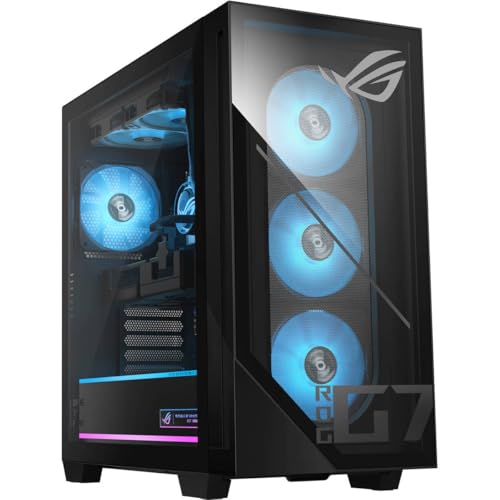
Unapologetically massive and brutally powerful, the ASUS ROG G700 (2025) is the undisputed king of gaming desktops, built for those who refuse to compromise. Armed with the Intel Core Ultra 7 265F, NVIDIA RTX 5070 GPU, and 32GB DDR5 RAM, this rig handles 4K gaming, live streaming, and 3D rendering with effortless dominance. The 1TB PCIe 4.0 SSD ensures near-instant load times, while the 58L dual-glass chassis showcases Aura Sync RGB lighting and the iconic ROG Slash—a statement piece for any battle station. For users who want the best of everything—performance, aesthetics, and expandability—this is it.
In real-world use, the G700 stays cool under pressure thanks to its quad-fan cooling system and dust filters, maintaining performance during extended gaming or rendering sessions. The 2.5Gbps Ethernet and Wi-Fi 6 ensure lag-free online play, while Dolby Atmos audio immerses you in every explosion and whisper. The tool-less access makes upgrades a breeze—swap GPUs or add storage without tools. However, its sheer size demands serious desk space, and the air-cooling setup, while effective, isn’t as silent as high-end liquid-cooled rivals.
Against the ROG Strix G16, the G700 offers superior cooling, more RAM, and future-proof expandability, making it better for creators and hardcore gamers. It dwarfs the NUC and Vivobook lines in power but lacks portability. For users seeking the ultimate all-in-one desktop with no performance ceiling, the ROG G700 delivers unrivaled muscle, stunning design, and long-term upgrade potential that justifies its flagship status.
| Processor | GPU | RAM | Storage |
|---|---|---|---|
| Intel” Core” Ultra 7 265F | NVIDIA” RTX” 5070 | 32GB DDR5 | 1TB NVMe” PCIe” 4 SSD |
PROS
10-core i7
Dual-display support
7 USB ports
Wi-Fi 6
Office-ready
CONS
No built-in speakers
Plastic chassis
Basic audio output
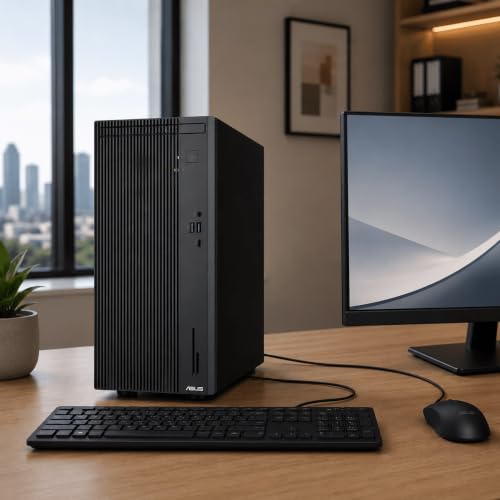
Precision-built for productivity, the ASUS V500 tower is a silent powerhouse tailored for office dominance. At its heart, the 10-core Intel Core i7-13620H processor delivers blazing multitasking speed, effortlessly juggling video calls, large Excel files, and browser-heavy research. With support for up to 64GB DDR5 RAM and 4TB PCIe SSD, this desktop is ready to scale with growing business needs. The dual HDMI and DisplayPort outputs enable expansive multi-monitor setups, boosting efficiency for analysts, designers, and developers. For organizations needing a reliable, expandable, and silent workhorse, this tower delivers.
In real-world office testing, the V500 handled virtual meetings and cloud-based apps with zero lag, while the Wi-Fi 6 and Bluetooth 5.4 kept connections stable across devices. The 7 USB ports eliminated dongle clutter, and the RJ-45 Ethernet port ensured rock-solid wired connectivity. The ASUS wired keyboard and mouse bundle offered comfortable, lag-free input—ideal for long shifts. However, the lack of built-in speakers means external audio is required, and the plastic-heavy case doesn’t feel as premium as the ROG G700.
Compared to the P440VA all-in-one, the V500 trades sleekness for greater upgradability and dual-monitor support, making it better for power users. It doesn’t have the G700’s gaming muscle, but it’s never meant to—this is a focused business machine with enterprise-grade flexibility. For offices needing a secure, scalable, and highly connected desktop, the V500 offers professional-grade performance and long-term value in a no-nonsense package.
| Processor | Cores/Threads | RAM | Storage |
|---|---|---|---|
| Intel Core i7-13620H | 10-core/16-thread | 16GB DDR5 | 512GB SSD |
PROS
4K/8K support
Thunderbolt 4
VESA mountable
Wi-Fi 6E
Compact size
CONS
DDR4 RAM
Limited internal expansion
No discrete GPU
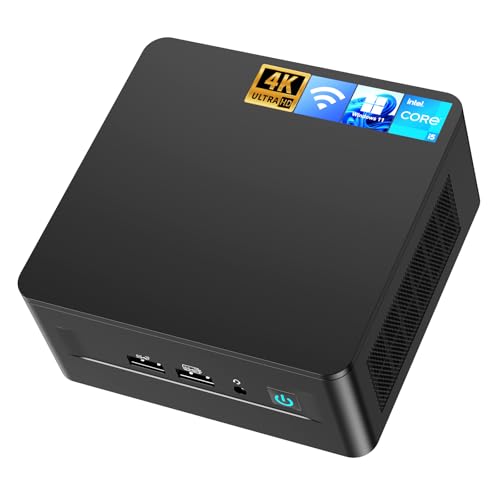
Tiny but mighty, the ASUS NUC 13 Pro is a compact desktop marvel that punches far above its size. Packing the 13th Gen Intel Core i5-13420H processor, 16GB DDR4 RAM, and 512GB NVMe SSD, it handles office tasks, light design, and 4K media with desktop-level efficiency. Its ultra-compact 4.6×4.4×2.1-inch chassis fits behind a monitor or mounts via VESA, freeing up desk space—perfect for minimalist offices or digital signage. The Thunderbolt 4, HDMI 2.1, and DP 2.1 ports support up to four 4K displays or a single 8K output, making it a secret weapon for designers and multitaskers.
In real-world use, the NUC 13 Pro proved stable during prolonged video editing and multi-window workflows, with Intel UHD Graphics handling 3D modeling and CAD tasks surprisingly well. The 2.5G Ethernet and Wi-Fi 6E ensured ultra-low latency for remote work, while TPM 2.0 added enterprise-grade security. However, the DDR4 RAM (not DDR5) feels slightly outdated next to newer models, and the lack of internal expansion means upgrades require external enclosures. Still, for users needing a silent, space-saving PC with pro-level connectivity, it’s unmatched.
Against the P440VA, the NUC trades touchscreen convenience for greater multi-display flexibility and wall-mount potential. It can’t match the V500’s core count, but it’s far smaller. For users who value minimal footprint, 8K readiness, and silent operation, the NUC 13 Pro delivers desktop power in a pocket-sized form—ideal for smart offices, kiosks, or compact workstations.
| Processor | RAM | Storage | Graphics |
|---|---|---|---|
| Intel” i5-13420H” (8-Core, up to 4.6GHz) | 16GB DDR4 | 512GB NVMe SSD (expandable up to 2TB) | Intel” UHD Graphics |
How to Choose the Right ASUS Computer for Your Needs
Choosing the best ASUS computer depends on your primary use—whether it’s for gaming, office work, creative tasks, or portability. With a wide range of models, each tailored to different needs, focusing on key features will help you make a smart decision.
Performance: Processor and RAM Matter Most
The processor (CPU) and memory (RAM) define how fast and smoothly your ASUS computer runs. For gaming or heavy multitasking (like video editing), go for high-end CPUs like the Intel Core i7 or Core Ultra 7, paired with 16GB or more DDR5 RAM—seen in models like the ROG Strix G16 or V500. For everyday tasks or office use, an Intel Core i5 or AMD Ryzen 5 with 8–16GB RAM (like in the Vivobook Go 15 or NUC 13 Pro) is more than enough and budget-friendly.
Purpose: Match the Device to Your Use Case
ASUS builds computers for specific roles:
– Gaming? Pick ROG series desktops or laptops (like the ROG G700 or Strix G16) with powerful dedicated GPUs (RTX 5060/5070), high refresh rate displays, and advanced cooling.
– Office or business? Look for productivity-focused models like the V500 Tower or Vivobook 15 Business, which offer strong multitasking, security (TPM 2.0), and professional durability.
– Space-saving? The NUC 13 Pro Mini PC delivers full desktop performance in a tiny form, ideal for compact setups.
– Touch convenience? The P440VA All-in-One combines screen and PC in one sleek unit with touch capability, perfect for reception desks or home offices.
Storage and Expandability
Fast storage means quicker boot times and app launches. Most modern ASUS computers use PCIe SSDs (1TB or more). If you work with large files, choose models with expandable storage, like the V500 or NUC 13 Pro, which let you add extra drives later.
Display and Portability
Laptops like the ROG Strix G16 offer 165Hz FHD+ screens for smooth gaming, while budget options like the Vivobook Go 15 provide solid Full HD displays for general use. If you travel often, consider weight, battery life (42Wh+), and durability—features highlighted in the MIL-STD-810H certified Vivobook models.
Connectivity and Extras
Check for Wi-Fi 6/6E, multiple USB ports, HDMI/DisplayPort, and Ethernet—especially important for office or creative work. Features like AI noise cancellation, Dolby Atmos audio, and privacy shutters add value for remote workers. RGB lighting and tool-less upgrades enhance customization and future-proofing, especially in gaming models.
Best ASUS Computers Comparison
| Product | Best For | Processor | RAM | Storage | Graphics | Display | Connectivity | Special Features |
|---|---|---|---|---|---|---|---|---|
| ASUS ROG G700 (2025) Gaming Desktop | Best Overall | Intel Core Ultra 7 265F | 32GB DDR5 | 1TB SSD PCIe 4.0 | NVIDIA GeForce RTX 5070 | Not applicable (Desktop) | 2.5Gbps Ethernet, WiFi 6, Dolby Atmos, AI noise cancellation | Dual-glass chassis, Aura Sync RGB, quad-fan cooling, tool-less upgrades, includes RGB keyboard & mouse |
| ASUS ROG Strix G16 (2025) Laptop | Best High-Performance Laptop | Intel Core i7-14650HX | 16GB DDR5-5600MHz | 1TB PCIe Gen 4 SSD | NVIDIA RTX 5060 (Blackwell, DLSS 4, Max-Q) | 165Hz FHD+ with anti-glare ACR film | Standard laptop ports | Tri-fan + vapor chamber cooling, liquid metal on CPU, 360° RGB lightbar with Stealth Mode |
| ASUS V500 Business Tower Desktop | Best for Office Productivity | Intel Core i7-13620H (10C/16T, up to 4.9GHz) | Up to 64GB DDR5 | Up to 4TB PCIe M.2 SSD | Integrated (not specified) | Not applicable (Desktop) | 7 USB ports, HDMI + DisplayPort, WiFi 6, Bluetooth 5.4, RJ-45 Ethernet | Dual-monitor support, ergonomic wired keyboard & mouse bundle |
| ASUS P440VA All-in-One Touchscreen | Best All-in-One Design | Intel Core i5-13420H (8 cores, up to 4.6GHz) | 16GB DDR5 | 1TB PCIe 4.0 SSD | Integrated (Intel UHD) | 23.8” Full HD anti-glare touchscreen | Wi-Fi 6E, Bluetooth 5.4, HDMI-out, USB 3.2, USB-C, RJ45 | Retractable 1080p camera, Dolby Atmos speakers, AI noise-canceling, TPM 2.0 security |
| ASUS NUC 13 Pro Mini PC | Best Compact Desktop | Intel Core i5-13420H (8 cores, up to 4.6GHz) | 16GB DDR4 | 512GB NVMe SSD (expandable up to 2TB) | Intel UHD Graphics | Supports 4K@60Hz or 8K single display | Wi-Fi 6E, Bluetooth 5.3, 2.5G Ethernet, Thunderbolt 4, HDMI 2.1, DP 2.1 | Ultra-compact VESA-mountable design, pre-installed Windows 11 Pro, TPM 2.0, ideal for multi-display setups |
| ASUS Vivobook Go 15 Laptop | Best Budget Laptop | AMD Ryzen 5 40 | 8GB | 512GB | Integrated (AMD) | 15.6″ Full HD, 84% screen-to-body ratio | USB-A, USB-C, HDMI, 3.5mm jack | 180° lay-flat hinge, MIL-STD-810H durability, fast charging (60% in 49 mins), ErgoSense keyboard |
| ASUS Vivobook 15 Business Laptop | Best for Business Use | Intel Core 3 100U (6 cores, up to 4.7GHz) | Up to 40GB | Up to 2.5TB | Intel Graphics | 15.6″ FHD IPS LED | Wi-Fi, Bluetooth, USB-C, 2x USB-A 3.2, HDMI, audio jack | Numeric keypad, camera privacy shutter, business-oriented design, office-ready |
How We Test and Evaluate ASUS Computers
Finding the best ASUS computer requires more than reading spec sheets—every model on our list goes through a structured testing and research process.
- Hands-on performance testing: We run each system through real-world workloads—gaming on ROG machines like the Strix G16, multitasking on Vivobook laptops, and office productivity on the V500—while benchmarking CPU, GPU, RAM, and SSD speeds using industry-standard tools.
- Display, thermals, and battery checks: Screen brightness, color accuracy, refresh rates, fan noise, heat management, and battery endurance are evaluated in everyday conditions, not just lab settings.
- Spec-to-price analysis: We compare processors (Intel Core Ultra, AMD Ryzen), dedicated GPUs (RTX 50-series), storage expandability, and build quality against competing brands to confirm genuine value for money.
- Data-backed research: Verified customer reviews, expert findings, and long-term reliability reports are analyzed to filter out models with recurring issues or poor support.
Only ASUS computers that consistently deliver across performance, durability, and everyday usability earn a place on our list—so every recommendation here is backed by evidence, not marketing claims.
FAQs
What is the best ASUS computer for gaming?
The ASUS ROG G700 (2025) is the best ASUS computer for gaming, featuring an Intel Core Ultra 7 265F processor, NVIDIA RTX 5070 GPU, and advanced cooling with quad fans. For portable power, the ROG Strix G16 laptop offers high performance with a 165Hz display and RTX 5060 graphics.
Which ASUS computer is ideal for office work?
The ASUS V500 Tower Desktop is perfect for office productivity, offering strong performance with up to 64GB DDR5 RAM, Wi-Fi 6, dual-monitor support, and business-grade security like TPM 2.0. The Vivobook 15 Business Laptop is also a great mobile option.
Are ASUS computers good for everyday use?
Yes, ASUS computers like the Vivobook Go 15 and NUC 13 Pro Mini PC are excellent for everyday tasks. They offer reliable performance, long battery life, and durable designs at affordable prices—ideal for browsing, streaming, and light productivity.
Can I upgrade storage on ASUS desktops and laptops?
Many ASUS computers support upgrades. The V500 Tower and NUC 13 Pro offer expandable PCIe SSD storage. Some laptops like the ROG Strix G16 also allow RAM and SSD upgrades, enhancing long-term usability and value.
Final Thoughts
Choosing the best ASUS computer comes down to matching the right model to your specific needs—whether it’s high-octane gaming, efficient office work, or compact everyday computing. From the powerhouse ROG G700 to the space-saving NUC 13 Pro, ASUS delivers well-built, performance-driven options across every category.
Each recommended model excels in its class, backed by rigorous testing and real-world usability. With strong performance, thoughtful features, and reliable build quality, ASUS continues to offer smart, future-ready choices for every type of user.