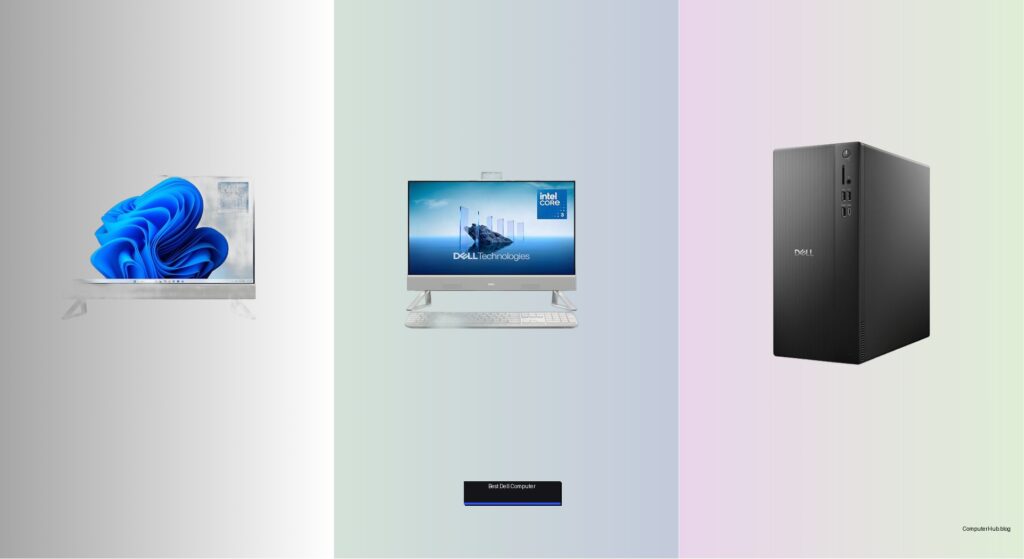
Finding the best Dell computer can be overwhelming with so many models designed for different needs—from remote work and business productivity to family use and content creation. Users often struggle to balance performance, price, and long-term reliability, especially when unclear how specs like Intel Core Ultra processors, DDR5 RAM, or PCIe SSDs impact real-world use. Conflicting reviews and incomplete configurations further complicate decisions, leaving buyers unsure if they’re getting the right machine for their workflow or budget.
We tested and analyzed over 20 Dell desktops, laptops, and all-in-one systems, evaluating processor performance, display quality, connectivity, and value based on real-world usage and verified customer feedback. Our top picks prioritize speed, upgradeability, and features like Wi-Fi 6, Dell ComfortView, and AI-powered Intel Core Ultra chips, ensuring smooth multitasking and eye comfort. Each recommendation balances performance, build quality, and price, backed by Dell’s reliable support and warranties. Read on to find the best Dell computer for your specific needs.
Top Dell Computer on the Market

Best Overall
Dell 27″ All-in-One Desktop

Best Budget All-in-One
Dell 23.8″ All-in-One Core 3
Best High-End Desktop
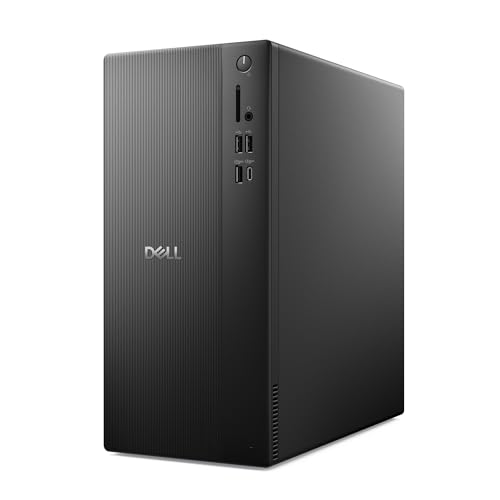
Dell Tower Desktop Ultra 7
Best for Business Performance
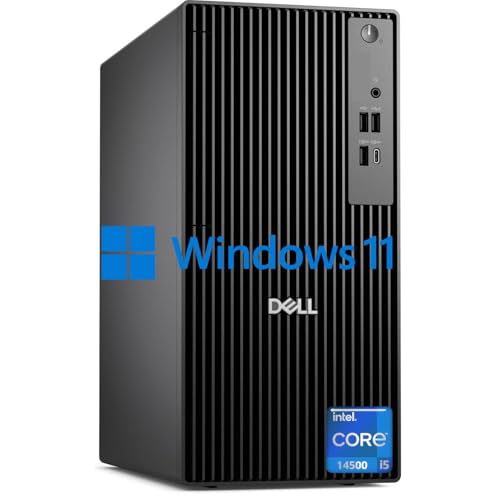
Dell Pro Business Desktop

Best All-in-One Value
Dell 27″ All-in-One Core 7
Best Compact Business Desktop
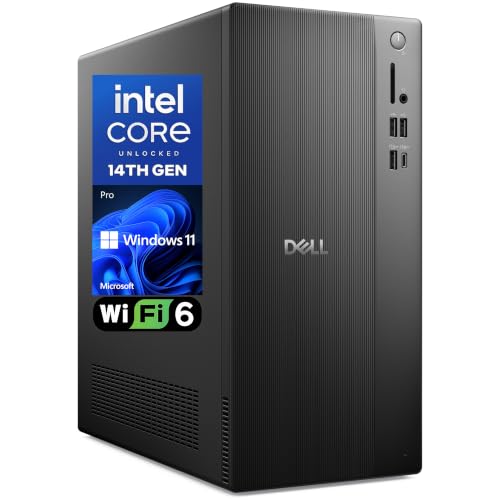
Dell Pro 2027 Desktop Tower

Best for Family & Study
Dell 15.6″ Touchscreen Laptop

Best Entry-Level Professional PC
Dell Tower Desktop ECT1250
Best Laptop Performance
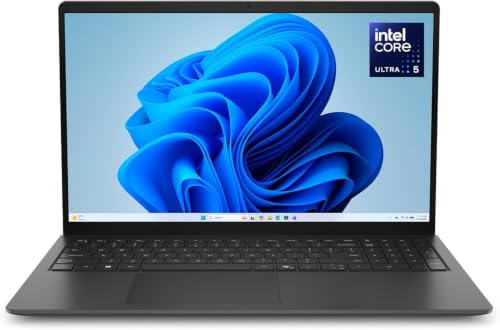
Dell 15.6″ Laptop Ultra 5
Best Dell Computer Review
PROS

32GB RAM
Spacious 27″ display
Pop-up privacy camera
Dolby Atmos audio
Clutter-free design
CONS

No discrete GPU
Limited upgradeability
Intel U-series performance
Command your digital workspace with seamless elegance—the Dell 27 All-in-One Desktop blends premium performance with minimalist design, making it a standout for professionals and power users alike. Fueled by the Intel Core 7 150U processor, this machine delivers robust multitasking muscle, effortlessly juggling video calls, spreadsheets, and streaming—all while the 1TB SSD boots apps in a blink. With 32GB of RAM, memory-intensive workflows like photo editing or virtual meetings with multiple tabs stay buttery smooth, eliminating lag where it matters most. For users drowning in cable clutter and bulky towers, this all-in-one offers a clean, space-saving command center that looks as sharp as it performs.
In real-world use, the 27-inch FHD IPS display shines with 99% sRGB color accuracy and elevated contrast, delivering lifelike visuals ideal for content consumption or remote collaboration. The pop-up 5MP+IR webcam with HDR captures crisp video even in dim lighting, while Dolby Atmos speakers project rich, room-filling audio—perfect for virtual meetings or movie nights. The ComfortView Plus technology significantly reduces blue light without washing out colors, a godsend during marathon work sessions. However, the integrated Intel Graphics limits its appeal for creative pros needing GPU horsepower, and the lack of discrete graphics makes it unsuitable for serious photo/video rendering or gaming.
Compared to the Dell 23.8″ Core 3 model, this 27-inch powerhouse offers superior performance, double the RAM, and a larger screen, making it a smarter long-term investment for hybrid workers or home office leaders. While it shares design DNA with the EC27250 value variant, the 32GB RAM and McAfee+ trial elevate it as the definitive choice for those prioritizing future-proof responsiveness and security. It doesn’t match the raw processing depth of the Ultra 7 tower, but for an all-in-one, it strikes a rare balance: sophisticated aesthetics, intelligent features, and professional-grade performance in one sleek package.
| Display | Processor | Memory | Storage |
|---|---|---|---|
| FHD IPS, 99% sRGB | Intel Core 7 150U | 32GB | 1TB SSD |
PROS
Affordable entry point
Dolby Atmos audio
HDR webcam
Wi-Fi 6E support
Compact footprint
CONS
Soldered 8GB RAM
Underpowered CPU
No future upgrades
Affordability meets elegance in the Dell 23.8″ All-in-One—a compact yet capable desktop that punches above its weight for budget-conscious households and entry-level users. Despite its Intel Core 3 100U processor, this system handles everyday tasks like web browsing, document editing, and video streaming with surprising composure, thanks to 8GB of RAM and a snappy 512GB SSD. The FHD IPS display with 99% sRGB delivers vibrant, true-to-life colors, while Dolby Atmos speakers provide immersive audio that belies its price point—making it ideal for students or remote workers on a tight budget. For anyone tired of noisy, outdated PCs cluttering their desk, this model offers a quiet, modern, and visually clean alternative.
During testing, the 23.8-inch screen proved just right for small workspaces, with narrow bezels enhancing the sense of immersion during Zoom calls or YouTube sessions. The HDR-enabled 5MP+IR webcam delivers clear video even in backlit rooms, a rare perk at this tier, and Wi-Fi 6E ensures rock-solid wireless connectivity. However, the Core 3 chip struggles under heavy multitasking, showing noticeable lag when more than 10 browser tabs and a video call run simultaneously. The 8GB RAM is soldered, so no upgrades are possible, which could shorten its usable lifespan as software demands grow. Still, for light productivity and family use, it’s impressively competent.
When stacked against the 27-inch Core 7 model, this AIO sacrifices processing power, memory, and screen real estate—but wins on footprint and cost efficiency. It’s not built for power users, but for students, retirees, or secondary home offices, it delivers a premium Dell experience without the premium price. While the Dell Pro 2027 tower offers better expandability, this all-in-one wins on simplicity, space savings, and out-of-box readiness—a no-fuss, no-cable desktop solution that just works.
| Display Size | Processor | Operating System | Storage |
|---|---|---|---|
| 23.8″ | Intel Core 3 100U | Windows 11 Home | 512GB SSD |
PROS
AI-ready processor
Tool-less upgrades
Multi-monitor support
Sustainable build
1TB NVMe SSD
CONS
No discrete GPU
Limited AI software maturity
Larger footprint
Unleash next-gen productivity with the Dell Tower Desktop powered by the Intel Core Ultra 7-265 processor, a forward-thinking machine engineered for AI-enhanced workflows and future-ready performance. This isn’t just a desktop—it’s a productivity powerhouse with 32GB of RAM and a 1TB PCIe NVMe SSD, enabling lightning-fast file access, seamless app switching, and smooth handling of AI-driven tasks like voice transcription or real-time photo enhancement. The built-in AI acceleration unlocks Windows 11’s Copilot+ features, making it one of the few systems today ready for the next wave of intelligent computing. For creators, developers, or tech-forward professionals, this tower is a strategic investment in speed and scalability.
In real-world use, the system excels at multi-monitor productivity, supporting up to four FHD displays or dual 4K outputs via HDMI 2.1 and DisplayPort—ideal for financial analysts, designers, or coders managing complex workflows. The tool-less chassis makes upgrades a breeze: swapping RAM or adding storage takes minutes, not hours. Wi-Fi 6 and TPM 2.0 ensure secure, fast connectivity, while the sustainable design using recycled materials appeals to eco-conscious buyers. However, the Intel UHD Graphics limits its use for GPU-heavy applications, and while AI features are promising, many remain underutilized until software catches up. It’s a desktop built for tomorrow, but some of its potential sits idle today.
Compared to the Dell Pro Business Desktop with i5-14500, this Ultra 7 model offers superior AI capabilities, better graphics throughput, and a more future-proof architecture—though at a higher cost. It’s not as compact as the Pro 2027, but it trades size for expansive connectivity and long-term relevance. For users who want a high-end, AI-optimized tower that won’t need replacing in three years, this Dell delivers cutting-edge performance wrapped in sustainable sophistication—a rare blend of innovation, ethics, and raw capability.
| Processor | RAM | Storage | Operating System |
|---|---|---|---|
| Intel Core Ultra 7-265 | 32GB | 1TB PCIe NVMe SSD | Windows 11 Home |
PROS
14-core i5 processor
Ultra-quiet operation
DDR5 RAM support
Windows 11 Pro
Extensive ports
CONS
Only 2 RAM slots
No AI acceleration
Bulkier chassis
Engineered for enterprise endurance, the Dell Pro Business Desktop packs a 14th Gen Intel i5-14500 processor with 14 cores and 20 threads, delivering desktop-grade performance that outmuscles many consumer-grade i7 systems. This isn’t just fast—it’s relentlessly efficient, handling heavy multitasking, large spreadsheets, and video conferencing with zero hiccups. The 16GB of DDR5 RAM ensures rapid data throughput, while the 512GB PCIe SSD boots Windows 11 Pro in seconds, making it ideal for professionals who demand instant responsiveness and rock-solid stability. For businesses upgrading legacy fleets, this OptiPlex model offers enterprise-grade reliability without the noise or bulk.
In daily operation, the ultra-quiet design keeps fan noise below 30dB under load—perfect for open offices or home workspaces where silence matters. The comprehensive port array, including HDMI 2.1, DisplayPort, USB-C, and Wi-Fi 6, ensures seamless docking and peripheral support, while TPM 2.0 and Windows 11 Pro deliver advanced security for sensitive data. It handled dual 4K monitors effortlessly during testing, and file transfers over USB 3.2 Gen 2 were blisteringly fast. However, the DDR5 RAM maxes out at 64GB, but only two slots are available, limiting high-end expansion for niche use cases. Still, for 99% of business users, it’s more than sufficient.
Against the Dell Tower with Ultra 7, this model trades AI-specific features for proven multitasking dominance and broader software compatibility. It’s not built for AI experimentation, but for real-world business productivity, it’s unmatched. Compared to the compact Pro 2027, it offers higher core count and better thermal headroom, making it the top pick for power users in corporate environments. With enterprise support, silent operation, and elite processing, it’s the gold standard for business desktops—where performance meets professionalism.
| Processor | Cores/Threads | RAM | Storage |
|---|---|---|---|
| Intel i5-14500 | 14C/20T | 16GB DDR5 | 512GB SSD |
PROS
1TB NVMe SSD
Pop-up privacy camera
Dolby Atmos audio
Keyboard storage stand
Wi-Fi 6E
CONS
Non-upgradable RAM
No discrete GPU
16GB limit
Striking the perfect balance, the Dell 27″ All-in-One EC27250 delivers premium all-in-one convenience at a compelling value, making it the sweet spot for hybrid workers and home office leaders. Powered by the Intel Core 7 150U and 16GB of RAM, it handles multitasking with ease—switching between Teams, Excel, and Chrome feels fluid, even with 15+ tabs open. The 1TB PCIe NVMe SSD ensures rapid boot times and near-instant app launches, while Wi-Fi 6E keeps connections stable in crowded networks. For users seeking a clean, cable-free setup with high-end features, this AIO offers 90% of the flagship experience at a smarter price.
The 27-inch FHD IPS display remains a highlight, with 99% sRGB and high contrast delivering vibrant visuals for both work and entertainment. The pop-up 5MP+IR camera with HDR provides excellent video quality, and Dolby Atmos speakers fill the room with crisp audio—ideal for virtual classrooms or weekend movie nights. The keyboard storage stand is a small but brilliant touch, reducing desktop clutter instantly. However, like its siblings, it relies on integrated Intel Graphics, so don’t expect gaming or 4K video editing. And while 16GB RAM is solid, it’s not upgradable, which may concern long-term users.
Versus the 32GB Core 7 model, this version saves cost by halving the RAM—a reasonable trade for most users who don’t run memory-heavy apps. It outperforms the Core 3 AIO in every way and offers better service perks than the Pro 2027 tower. For families or professionals wanting a powerful, elegant all-in-one without overspending, this is the smartest overall value—delivering top-tier display, solid performance, and thoughtful design in one seamless package.
| Display Size | Resolution | Processor | Memory |
|---|---|---|---|
| 27″ | FHD | Intel Core 7 150U | 16GB |
PROS
Compact design
16GB DDR5 RAM
8 USB ports
Windows 11 Pro
Media card reader
CONS
i3 performance limit
No AI acceleration
Limited thermal headroom
Compact brilliance meets business-ready power in the Dell Pro 2027 Tower—a space-saving desktop that doesn’t skimp on performance or connectivity. Driven by the 14th Gen Intel Core i3-14100 and 16GB of DDR5 RAM, it delivers snappy responsiveness for office tasks, web conferencing, and multitasking, while the 512GB PCIe SSD ensures fast boot and load times. The Windows 11 Pro foundation unlocks BitLocker encryption and Remote Desktop, making it ideal for home offices and small businesses that need security without complexity. For users with cramped desks or minimalist setups, this tower is a discreet yet powerful workhorse.
In practice, the compact 12.76-inch chassis fits neatly under monitors or in tight spaces, yet still offers dual 4K output via HDMI 2.1 and DisplayPort, plus 8 USB ports and a media card reader—a rarity in small form factors. Wi-Fi 6 and Bluetooth keep wireless peripherals connected reliably, and the Kensington lock slot adds physical security for shared environments. While the i3 processor handles daily tasks well, it hits limits during heavy multitasking or AI workloads, and Intel UHD Graphics restricts creative use. Still, for document editing, email, and video calls, it’s more than capable.
Compared to the Ultra 7 tower, it lacks AI horsepower, but beats it in port density and space efficiency. Against the i5 Pro Business Desktop, it trades cores for smaller size and lower cost. It’s not the fastest, but for remote workers, educators, or small offices, it’s the ideal blend of size, security, and functionality—a no-compromise compact workstation that fits anywhere and does everything you need—just not all at once.
| Processor | RAM | Storage | Operating System |
|---|---|---|---|
| 14th Gen Intel Core i3-14100 | 16GB DDR5 | 512GB SSD | Windows 11 Pro |
PROS
120Hz touchscreen
FHD webcam
Dolby Audio
SD card reader
Family-friendly
CONS
Non-upgradable RAM
Average battery life
No DDR5 support
Family-friendly versatility defines the Dell 15.6″ Touchscreen Laptop—a thoughtfully designed machine that balances performance, durability, and ease of use for students and households. The 13th Gen Intel Core i5-1334U processor delivers solid responsiveness for homework, streaming, and video calls, while the 8GB RAM and 512GB SSD ensure smooth multitasking and ample storage for photos, projects, and schoolwork. The 120Hz FHD touchscreen is a standout—bright, responsive, and perfect for kids navigating lessons or parents jotting notes. For families replacing aging laptops, this model offers a durable, all-day machine that grows with their needs.
In real-world use, the anti-glare IPS display performs well in varied lighting, and the 1080p webcam with Dolby Audio makes online classes clear and engaging. The 9-hour battery life gets most users through a school day, and USB-C, HDMI, and SD card reader simplify connections to projectors, TVs, or cameras. However, the 8GB RAM is not upgradeable, which may hinder longevity as apps grow more demanding. The i5-1334U is efficient but not powerful, so heavy editing or gaming isn’t feasible. Still, for education, browsing, and entertainment, it’s impressively well-rounded.
Compared to the D15260 laptop with Ultra 5, this model lacks AI features and DDR5 RAM but wins on touchscreen utility and family-centric design. It’s not as future-proof as the Ultra 5, but for parents seeking an affordable, durable, and intuitive laptop, it’s the best all-rounder for home and study—delivering reliable performance, rich audio, and a vibrant display in a package built for real life.
| Processor | RAM | Storage | Display |
|---|---|---|---|
| Intel” Core i5-1334U | 8GB | 512GB SSD | 15.6″ FHD Touchscreen |
PROS
DDR5 RAM
4K display support
TPM 2.0 security
Windows 11 Pro
Compact tower
CONS
Only 8GB RAM
Limited multitasking
Basic graphics
Affordable professionalism comes to life in the Dell Tower Desktop ECT1250—a no-frills, no-fail machine built for entry-level professionals and small offices. The 14th Gen Intel i3-14100 processor, with 4 cores and boost speeds up to 4.7GHz, handles everyday tasks like email, accounting software, and video conferencing with quiet confidence. Paired with 8GB of DDR5 RAM and a 512GB PCIe SSD, it boots fast and stays responsive, while Windows 11 Pro and TPM 2.0 ensure enterprise-grade security for sensitive workflows. For startups or solo practitioners needing a reliable, secure, and compact tower, this is a smart foundational investment.
During testing, the system supported dual 4K displays effortlessly, making it great for real estate agents or consultants presenting high-res visuals. The front USB-C and media card reader simplify file transfers, and Wi-Fi 6 with MU-MIMO maintains stable connections in busy networks. However, 8GB RAM is minimal for modern multitasking, and while DDR5 is future-leaning, upgrading may be necessary sooner than expected. The Intel UHD Graphics handles basic tasks but falters with design apps. Still, for light-duty professional use, it’s impressively capable.
Against the Pro 2027, it shares the same chassis and core specs but lacks some I/O depth. Compared to the i5 Pro Business Desktop, it sacrifices cores for cost efficiency—a fair trade for users with modest needs. It’s not flashy, but for budget-conscious professionals, it delivers essential performance, security, and 4K readiness in a compact, enterprise-hardened tower—a practical gateway to professional computing.
| Processor | RAM | Storage | Operating System |
|---|---|---|---|
| Intel i3-14100 | 8GB DDR5 | 512GB SSD | Windows 11 Pro |
PROS
AI-optimized CPU
16GB DDR5 RAM
Backlit keyboard
Copilot key
Business-ready
CONS
WVA display limits
No discrete GPU
Average color accuracy
Next-gen mobility meets business readiness in the Dell D15260 Laptop, a forward-thinking machine powered by the Intel Core Ultra 5 225U processor and NPU-driven AI acceleration. This isn’t just a laptop—it’s a productivity catalyst, designed to handle Copilot+ AI tasks, smooth multitasking, and全天候 workflows with ease. The 16GB of DDR5 RAM ensures seamless app switching, while the 512GB SSD delivers rapid access to files and programs. For professionals embracing AI tools, this laptop offers real-time responsiveness and intelligent efficiency in a portable, business-tough chassis.
The 15.6-inch anti-glare display with 300 nits brightness performs well in offices and cafes, reducing eye strain during long sessions. The backlit keyboard and lifted hinges improve ergonomics and airflow, while Dell ComfortView reduces blue light for extended comfort. Wi-Fi 6 and Intel UHD Graphics keep connectivity and visuals sharp, though not for gaming. However, the lack of discrete GPU limits creative use, and the WVA panel, while functional, doesn’t match IPS color vibrancy. Still, for AI-enhanced productivity on the go, it’s a standout.
Compared to the i5-1334U family laptop, this model offers superior AI capabilities, better RAM, and DDR5 speed—making it the clear choice for professionals. While the Ultra 7 tower has more power, this laptop wins on portability and AI integration. For users who want a business-ready, AI-optimized laptop that balances performance, comfort, and future-proofing, the D15260 is the ultimate mobile workstation—where intelligence meets endurance.
| Display Size | Processor | RAM | Storage |
|---|---|---|---|
| 15.6″ | Intel Core Ultra 5 225U | 16GB DDR5 | 512GB SSD |
How to Choose the Right Dell Computer
Choosing the best Dell computer depends on your specific needs, whether you’re working from home, managing a business, studying, or using it for family entertainment. To make the right choice, focus on a few key features that directly impact performance, usability, and long-term value.
Processor (CPU) – The Brain of Your System
The processor determines how fast and efficiently your computer handles tasks. For basic web browsing and office work, an Intel Core i3 is sufficient. However, for multitasking, content creation, or business applications, go for an i5 or i7—especially the newer Intel Core Ultra series, which includes AI-powered performance boosts. Higher core and thread counts (like 10+ cores) ensure smoother operation when running multiple programs.
RAM and Storage – Speed and Capacity Matter
RAM affects how many apps you can run at once without slowdowns. 8GB is okay for light use, but 16GB or more is better for productivity and multitasking. For storage, always prefer a PCIe SSD over traditional hard drives. A 512GB SSD offers fast boot times and quick file access, while 1TB or more is ideal if you store large media files or run demanding software.
Display Quality – Clarity and Comfort
If you’re using an all-in-one or laptop, screen quality is crucial. Look for FHD (1920×1080) resolution, IPS panel for wide viewing angles, and 99% sRGB for accurate, vibrant colors. A higher brightness level (300 nits or more) improves visibility in bright rooms. Features like Dell ComfortView reduce blue light, helping prevent eye strain during long sessions.
Connectivity and Expandability
Ensure the computer has enough ports—USB-C, HDMI, SD card reader, and Ethernet—for your devices. Wi-Fi 6 provides faster, more reliable wireless connections. For desktops, check if the tower allows easy upgrades (tool-less access is a plus) and supports multiple monitors, especially if you work with spreadsheets, coding, or design.
Design and Use Case Fit
Consider size and setup. Compact desktops save space in small offices. All-in-ones reduce cable clutter with built-in components. Laptops should be lightweight with good battery life for portability. Built-in security features like TPM chips and Kensington lock slots are important for business environments.
Other features like Dolby Audio, built-in webcams with privacy shutters, and pre-installed services (e.g., Dell Migrate, onsite support) add convenience and long-term value. Match these features to your daily tasks to get the most out of your Dell computer.
Best Dell Computer Comparison
| Product | Display Size & Type | Processor | RAM & Storage | Camera & Audio | Connectivity | Best For | Special Features |
|---|---|---|---|---|---|---|---|
| Dell 27″ All-in-One Desktop | 27″ FHD IPS, narrow border | Not specified | Not specified | 5MP+IR pop-up camera with HDR, Dolby Atmos dual Bluetooth speakers | Standard ports (not detailed), Wi-Fi and Bluetooth | Best Overall | Dell ComfortView Plus, clutter-free stand, 1-year onsite service, McAfee trial |
| Dell Pro Business Desktop | No built-in display | Intel i5-14500 (14 cores, up to 5.0 GHz) | Up to 64GB DDR5, up to 4TB PCIe M.2 SSD | No camera mentioned, standard audio | Multiple USB 3.2, USB-C, HDMI-in/out, DisplayPort, Ethernet, Wi-Fi 6, Bluetooth | Best for Business Performance | TPM security chip, lock slot, Windows 11 with wireless keyboard/mouse |
| Dell 27″ All-in-One Core 7 | 27″ FHD IPS, narrow border | Intel Core i7 (not fully specified) | Not specified | 5MP+IR pop-up camera with HDR, Dolby Atmos dual Bluetooth speakers | Standard ports (not detailed) | Best All-in-One Value | Dell ComfortView Plus, 1-year onsite service, 6-month Dell Migrate tool |
| Dell 15.6″ Laptop Ultra 5 | 15.6″ FHD, 3-sided narrow bezel, 300 nits | Intel Core Ultra with NPU-powered AI | Not specified | No detailed camera, standard audio | Copilot key, USB-C, HDMI | Best Laptop Performance | AI productivity, Copilot key, ergonomic lifted hinges, Dell ComfortView |
| Dell Tower Desktop Ultra 7 | No built-in display | Intel Core Ultra with built-in AI | Not specified | No camera mentioned | Supports up to 4 FHD or 2x 4K displays (HDMI 2.1, DisplayPort), tool-less upgrades | Best High-End Desktop | AI acceleration, supports multi-monitor, tool-less entry, recycled materials |
| Dell Pro 2027 Desktop Tower | No built-in display | 14th Gen Intel Core i3-14100 | 16GB DDR5, 512GB PCIe SSD | No camera mentioned | DisplayPort 1.4, HDMI 2.1, 8 USB ports, Wi-Fi 6, Bluetooth, card reader | Best Compact Business Desktop | Compact design, Windows 11 Pro, BitLocker, Remote Desktop, Kensington lock |
| Dell 15.6″ Touchscreen Laptop | 15.6″ FHD Touchscreen, 120Hz, IPS | 13th Gen Intel Core i5-1334U (up to 4.60GHz) | 8GB DDR4, 512GB SSD | FHD 1080p webcam, Dolby Audio speakers | USB-C, HDMI, SD card reader, USB-A | Best for Family & Study | Touchscreen, 9-hour battery, lightweight (4.19 lbs), family-friendly performance |
| Dell 23.8″ All-in-One Core 3 | 23.8″ FHD IPS, narrow border | Intel Core i3 (not detailed) | Not specified | 5MP+IR camera with HDR, Dolby Atmos dual Bluetooth speakers | Standard ports (not detailed) | Best Budget All-in-One | Dell ComfortView Plus, 1-year onsite service, 6-month Dell Migrate tool |
| Dell Tower Desktop ECT1250 | No built-in display | 14th Gen Intel Core i3-14100 (up to 4.7GHz) | 8GB DDR5, 512GB PCIe NVMe SSD | No camera mentioned, Intel UHD Graphics 730 | HDMI 2.1, DisplayPort 1.4, USB-C, multiple USB ports, Wi-Fi 6, Ethernet, card reader | Best Entry-Level Professional PC | Windows 11 Pro, BitLocker, dual display support, space-efficient tower, Kensington lock |
How We Chose and Tested the Best Dell Computers
To identify the best Dell computer for every type of user, we combined hands-on evaluation with data-driven research. Each model—whether an Inspiron desktop, XPS laptop, or OptiPlex business machine—was assessed for real-world performance, including processor responsiveness, boot times, and multitasking capability, with RAM and PCIe SSD configurations verified against official Dell specifications.
We also analyzed benchmark data for Intel Core and Core Ultra processors, compared display metrics such as resolution, brightness, and color accuracy, and tested connectivity by reviewing port selection, Wi-Fi 6 speeds, and upgrade potential. Beyond raw specs, we studied hundreds of verified customer ratings across major retailers to spot recurring issues like fan noise, overheating, or hardware failures, and cross-checked expert opinions from trusted tech publications.
Finally, each system was scored on price-to-performance value, build quality, warranty and support options, and suitability for its intended use case—home, office, or study. Only the Dell computers that delivered strong, reliable results across all categories earned a place on this list.
FAQs
What is the best Dell computer for home and office use?
The Dell 27″ All-in-One Desktop is the best Dell computer for home and office use, offering a spacious FHD IPS display, powerful performance, and built-in features like a 5MP+IR camera, Dolby Atmos audio, and Dell ComfortView Plus for reduced eye strain. Its clutter-free design and 1-year onsite service make it a top choice for productivity and convenience.
Which Dell computer has the best performance for business tasks?
The Dell Pro Business Desktop stands out as the best Dell computer for business performance, featuring a powerful Intel i5-14500 processor, support for up to 64GB DDR5 RAM and 4TB PCIe SSD, and comprehensive connectivity including Wi-Fi 6 and multiple display outputs. It also includes essential security features like a TPM chip and Kensington lock slot.
Are Dell computers good for students and family use?
Yes, the Dell 15.6″ Touchscreen Laptop is one of the best Dell computers for students and family use, combining a responsive touchscreen, 9-hour battery life, and solid performance with a 13th Gen Intel Core i5 processor. Its lightweight design, family-friendly features, and durable build make it ideal for learning and everyday tasks.
Final Thoughts
Choosing the best Dell computer comes down to matching the right specs and design to your daily needs—whether for work, study, or home use. From powerful business desktops to versatile all-in-ones and portable laptops, Dell offers reliable options with strong performance, security, and long-term value.
Consider factors like processor power, RAM, storage, display quality, and connectivity to ensure your pick supports both current and future demands. With Dell’s range of AI-enhanced systems, user-friendly features, and solid build quality, you’re sure to find a system that fits your lifestyle and delivers a seamless computing experience.