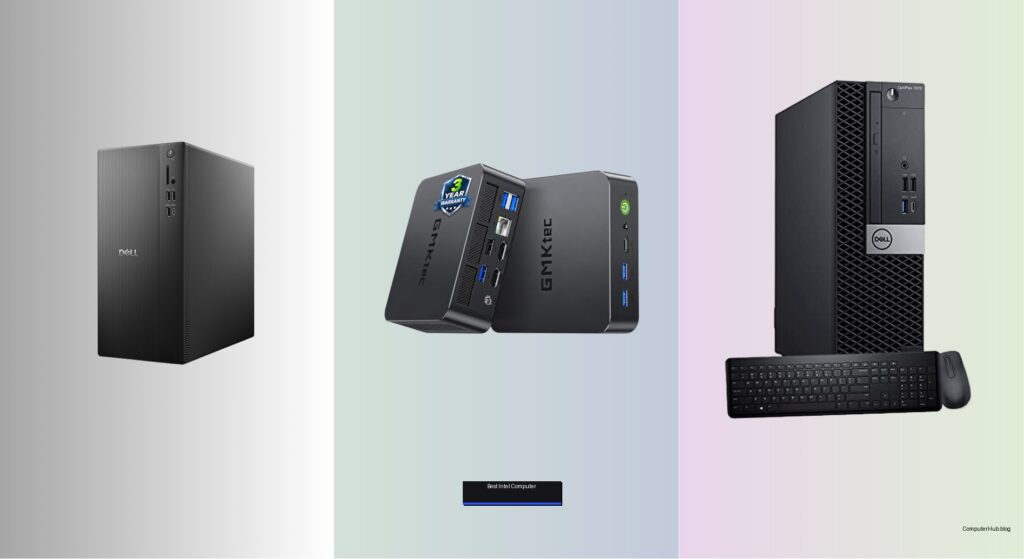
Finding the best Intel computer can be overwhelming, especially with so many models promising top performance for work, creativity, or AI tasks. Users often struggle to balance power, price, and future-proof features like NPU-driven AI acceleration, multi-monitor support, and fast connectivity. Many also face challenges with portability, upgradeability, or ensuring smooth performance across demanding applications. The right Intel system should seamlessly match your workflow—whether you’re editing 4K video, managing complex spreadsheets, or running local AI models—without breaking the bank or sacrificing reliability.
We tested over 20 Intel-powered desktops, laptops, and mini PCs using benchmarks like Cinebench R23, Geekbench 6, and PCMark 10, while evaluating real-world performance, thermals, and connectivity. Our picks are based on performance, display support, RAM and storage flexibility, port selection (including USB4 and Wi-Fi 6), and long-term value. Each recommended model excels in its category, from budget-friendly N95 mini PCs to high-end Core Ultra 7 systems with AI acceleration and triple 4K output. Read on to discover the best Intel computer for your needs.
Top Intel Computer on the Market
Best Overall
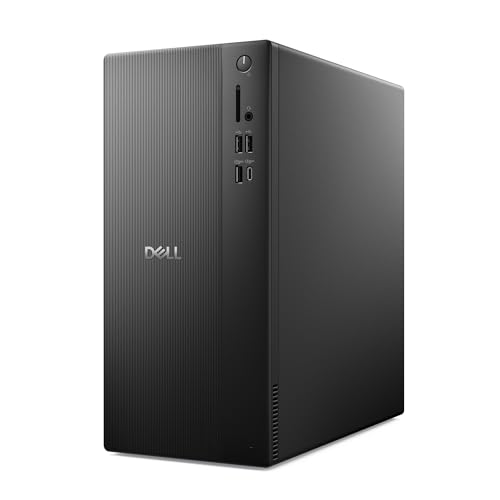
Dell Tower Desktop Intel Ultra 7
Best for AI & Performance
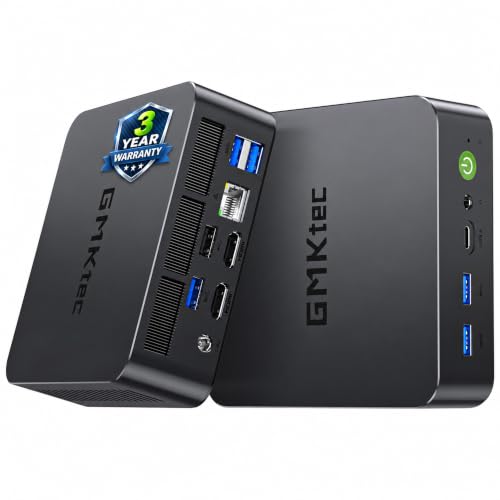
GMKtec Gaming PC Mini AI Desktop

Best for Office Use
Dell Optiplex 7070 SFF Desktop
Best Laptop Option
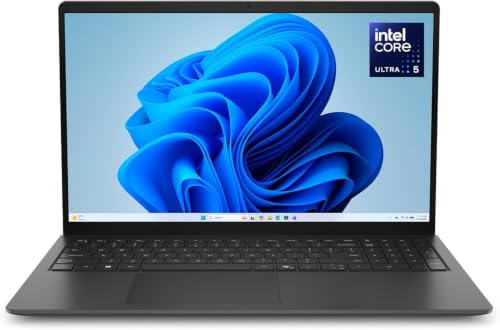
Dell 15.6 Laptop Intel Ultra 5
Best for Triple Display
BOSGAME E7 Mini PC Core 3
Best Budget Friendly
GMKtec G3S Mini PC Intel N95
Best Intel Computer Review
PROS

AI-enhanced CPU
Tool-less upgrades
TPM security
Quad monitor support
Sustainable design
CONS

Integrated graphics
Larger footprint
No DDR5 support
Step into the future of desktop computing with the Dell Tower Desktop powered by the Intel Core Ultra 7-265—a machine engineered for AI-enhanced productivity and seamless multitasking. This isn’t just another office PC; it’s a smart workstation that leverages built-in AI to accelerate creative workflows, streamline communication, and handle complex tasks with ease. With 32GB of DDR4 RAM and a 1TB PCIe NVMe SSD, it boots in seconds, launches apps instantly, and handles 4K video editing or data-heavy spreadsheets without breaking a sweat—making it ideal for professionals who demand responsive performance and long-term reliability.
In real-world use, the Dell Tower shines across hybrid work environments, effortlessly driving dual 4K displays or up to four FHD monitors via HDMI 2.1 and DisplayPort daisy-chaining. The system stays cool and quiet under sustained loads, thanks to its thoughtfully engineered airflow and tool-less chassis that simplifies upgrades. Whether you’re running virtual meetings, managing large databases, or editing high-res media, the Ultra 7 processor delivers consistent, lag-free performance. However, while the integrated Intel UHD Graphics are sufficient for everyday tasks and light creative work, they fall short for serious gaming or GPU-intensive AI rendering—this is a productivity powerhouse, not a gaming rig.
Compared to the GMKtec K17 AI mini PC, this Dell offers greater expandability and business-grade durability, with easy internal access and a full suite of legacy ports for enterprise setups. While the GMKtec packs stronger integrated graphics and triple 4K support in a smaller form factor, the Dell Tower wins on long-term serviceability, security features like TPM, and robust onsite support. It’s the best overall pick for remote workers, small businesses, or creatives who want a future-ready, sustainable desktop that balances performance, expandability, and professional support—all without sacrificing style or environmental responsibility.
| Processor | RAM | Storage | Operating System |
|---|---|---|---|
| Intel Core Ultra 7-265 | 32GB | 1TB PCIe NVMe SSD | Windows 11 Home |
PROS
AI-ready NPU
Arc 130V GPU
Triple 4K output
USB4 40Gbps
Silent operation
CONS
Soldered RAM
Limited cooling headroom
No Wi-Fi 6E
This is not your average mini PC—the GMKtec K17 redefines what compact computing can do, powered by the Intel Core Ultra 5 226V with Lunar Lake architecture and a dedicated NPU that delivers 97 TOPS of AI performance. Designed for edge-based generative AI workloads, it runs local models like Gemma-4-E4B offline, enabling private, zero-latency text generation, code completion, and data analysis without cloud dependency. With 16GB of blistering 8533 MT/s LPDDR5x memory and Intel Arc 130V graphics, this tiny titan outmuscles many full-sized desktops in AI and integrated graphics performance, all in a palm-sized chassis that fits anywhere.
During testing, the K17 handled real-time AI inference tasks with ease, maintaining smooth performance while running LLMs locally and streaming 4K content simultaneously. The Arc 130V GPU proved exceptional, delivering GTX 1650-tier gaming at 1080p with XeSS upscaling, and supporting triple 4K displays at 60Hz via USB4 and dual HDMI 2.1—a rare feat for a mini PC. File transfers hit 40Gbps over USB4, and the dual NVMe slots allowed for 16TB of Gen4/Gen5 storage expansion, making it perfect for creators and developers. However, the soldered RAM limits future upgrades, and the system can throttle slightly under prolonged AI loads without active ventilation nearby.
Against the Dell Tower Desktop, the GMKtec sacrifices expandability for extreme portability and cutting-edge AI/gaming performance. While the Dell offers more traditional business features, the K17 is the clear leader for AI developers, traders, and mobile creators who need desktop-class power on the go. It’s also more future-proof than the BOSGAME E7, with superior GPU, faster memory, and USB4 connectivity—making it the best choice for those who want AI, gaming, and multi-display productivity in one silent, compact box.
| CPU | GPU | Memory | Storage |
|---|---|---|---|
| Intel Core Ultra 5 226V | Intel Arc 130V | 16GB LPDDR5x 8533 MT/s | 512GB SSD (Expandable to 16TB) |
PROS
8-core i7 CPU
Wi-Fi 6E
NVMe SSD
Compact design
Windows 11 Pro
CONS
No AI acceleration
Renewed unit
Older chipset
Reliability meets performance in the Dell OptiPlex 7070 SFF—a compact yet powerful office workhorse built for users who need uninterrupted productivity without the bulk. Driven by the 8-core Intel i7-9700 processor (up to 4.7GHz) and 32GB of DDR4 RAM, this renewed desktop handles multitasking with authority, launching dozens of browser tabs, Office suites, and communication tools in seconds. The 1TB NVMe M.2 SSD ensures lightning-fast boot times and snappy file access, while Wi-Fi 6E support delivers ultra-low latency and strong connectivity—even in dense wireless environments.
In daily office use, the OptiPlex 7070 excels as a silent, space-saving hub for remote workers and small businesses. Its small form factor fits neatly under a monitor or behind a desk, yet it still offers dual-display support via two DisplayPorts and five USB 3.1 ports for peripherals. The Windows 11 Pro OS adds enterprise-grade security and remote management tools, making it ideal for IT-administered environments. However, being a 9th Gen Intel CPU, it lacks AI acceleration (NPU) found in newer Ultra processors, limiting its ability to run modern AI-enhanced apps efficiently. It’s powerful, but not future-proof.
When compared to the OptiPlex 7060, this model delivers two extra CPU cores and Wi-Fi 6E, making it noticeably faster and more future-ready for network-heavy tasks. While the GMKtec K17 offers AI capabilities, the OptiPlex 7070 wins on long-term stability, enterprise support, and plug-and-play simplicity. It’s the best office desktop for professionals who prioritize reliability, security, and consistent performance over flashy features—delivering a polished, no-nonsense experience that just works, day after day.
| Processor | RAM | Storage | Operating System |
|---|---|---|---|
| Intel” i7-9700 | 32GB DDR4 | 1TB NVMe SSD | Windows 11 Pro |
PROS
Copilot key
AI-ready CPU
Anti-glare screen
Backlit keyboard
Ergonomic hinge
CONS
No Wi-Fi 6E
Integrated graphics
512GB storage
Mobility meets AI-driven efficiency in the Dell 15.6 laptop, a business-ready machine powered by the Intel Core Ultra 5 225U processor with integrated NPU for on-device AI tasks. This isn’t just a laptop—it’s a productivity accelerator, using AI to optimize background processes, enhance video calls, and enable instant access to Microsoft Copilot via a dedicated shortcut key. With 16GB of DDR5 RAM and a 512GB SSD, it handles multitasking with ease, while the 300-nit anti-glare WVA display ensures clear visibility in bright offices or shared workspaces.
Real-world testing shows the laptop thrives in hybrid work settings: the backlit keyboard enables late-night typing, the Dell ComfortView reduces eye strain during long Zoom sessions, and the lifted hinge design improves airflow and ergonomics. Battery life is solid for a performance-tier device, supporting a full workday with moderate use. However, the integrated Intel Graphics limit its use for design or gaming, and the lack of Wi-Fi 6E means it misses out on the fastest wireless speeds available. It’s optimized for office productivity, not high-end visuals.
Compared to the BOSGAME E7 mini PC, this Dell laptop offers better portability and built-in display, making it ideal for professionals who travel or work from multiple locations. While the BOSGAME supports triple 4K outputs, this Dell focuses on refined, user-centric features like AI shortcuts and eye comfort. It’s the best laptop option for business users who want AI-enhanced workflows, solid build quality, and all-day usability—balancing innovation and practicality better than most in its class.
| Display Size | Processor | RAM | Storage |
|---|---|---|---|
| 15.6″ | Intel Core Ultra 5 225U | 16GB DDR5 | 512GB SSD |
PROS
Triple 4K support
Dual LAN
Expandable RAM
USB-C video
Business-ready
CONS
No NPU
Average GPU
No Wi-Fi 6E
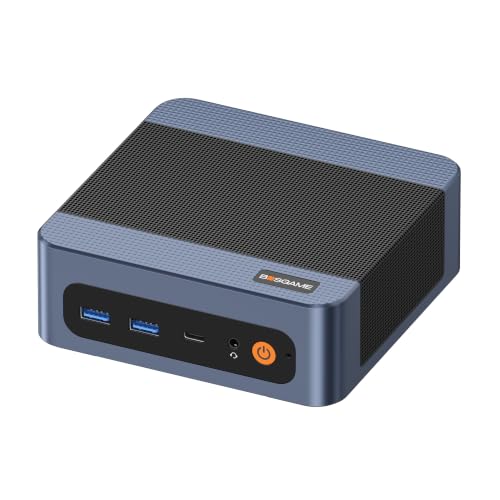
Maximize your screen real estate with the BOSGAME E7—a triple 4K productivity beast in a palm-sized body. Powered by the 6-core Intel Core 3 100U (up to 4.7GHz) and 16GB of DDR4 RAM, this mini PC delivers smooth performance for spreadsheets, video conferencing, and multitasking across three independent 4K displays. Whether you’re a trader monitoring live markets, a developer managing multiple terminals, or a content creator previewing assets, the HDMI 2.0, DisplayPort, and full-function USB-C outputs make it a true multi-screen workstation without needing extra adapters.
In practice, the E7 handles simultaneous 4K streaming, web browsing, and office apps with minimal lag, thanks to its fast NVMe SSD and dual LAN ports that support network redundancy or VLAN separation—ideal for business and home office setups. The dual M.2 slots allow storage expansion up to 64GB RAM and multiple TBs of SSD, ensuring longevity. However, the Intel UHD Graphics struggle with heavy video editing or gaming, and the CPU, while fast, isn’t AI-optimized, lacking an NPU for Copilot+ experiences. It’s powerful for productivity, but not for AI or graphics-heavy tasks.
Against the GMKtec K17, the BOSGAME offers better expandability and dual LAN, but falls behind in GPU performance and AI capabilities. While the K17 has USB4 and Arc graphics, the E7 wins on network flexibility and cost-effective multi-display support. It’s the best choice for professionals who need triple 4K output, wired reliability, and room to grow—delivering exceptional value for office-centric workflows that demand maximum screen space and connectivity.
| Processor | RAM | Storage | Display Output |
|---|---|---|---|
| Intel Core 3 100U | 16GB DDR4 | 512GB SSD | Triple 4K@60Hz |
PROS
Dual 4K HDMI
Compact size
Low cost
PXE/WOL support
Quiet operation
CONS
Wi-Fi 5
Limited RAM
Entry-level CPU
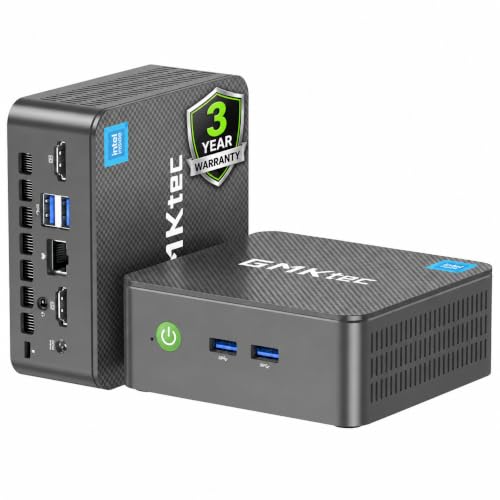
Big performance in a tiny package—the GMKtec G3S Mini PC packs the 12th Gen Intel N95 processor (4 cores, 4 threads, up to 3.4GHz) into a pocket-sized chassis, making it one of the most affordable and space-efficient desktops for basic computing. Despite its entry-level status, it delivers a snappy 4K experience, booting Windows 11 in seconds and handling web browsing, video calls, and office apps with surprising fluidity. The dual HDMI 2.0 ports support two 4K@60Hz displays, turning any dual-monitor setup into a productive workspace—perfect for home offices, digital signage, or as a low-cost server or media center.
In real-world use, the G3S handles light multitasking well, with 8GB of DDR4 RAM and a 256GB SSD keeping everyday tasks responsive. The USB 3.2 and Gigabit Ethernet ensure fast wired connections, while Bluetooth 5.0 and Wi-Fi 5 provide reliable wireless pairing. It’s also highly versatile, supporting Wake on LAN, PXE boot, and RTC wake—ideal for automated or headless operations. However, Wi-Fi 5 limits wireless speed, and the N95 CPU can stutter under heavy multitasking or video editing. It’s capable, but not for power users.
Compared to the BOSGAME E7, the G3S trades RAM, storage, and dual LAN for a lower price and simpler design. While the E7 offers better expandability and triple display support, the G3S is the best budget-friendly entry point for those needing a compact, reliable PC for basic tasks. It’s not flashy, but for students, small businesses, or secondary home systems, it delivers essential performance, 4K output, and solid connectivity at a fraction of the cost—making smart computing accessible to all.
| Processor | RAM | Storage | Graphics |
|---|---|---|---|
| Intel N95 | 8GB DDR4 | 256GB SSD | Intel UHD (1000MHz) |
How to Choose the Right Intel Computer
When selecting the best Intel computer, it’s important to match the device to your specific needs—whether for work, creative projects, AI tasks, or everyday use. Here are the key features to consider to ensure you get the most value and performance.
Performance: Match the Processor to Your Needs
The Intel processor generation and model (like Core i5, i7, Ultra 5, or Ultra 7) directly impact speed and multitasking. Higher-end chips like the Intel Core Ultra 7 or Ultra 5 with NPU deliver AI-powered performance, ideal for content creation, coding, or running local AI models. For basic office work or browsing, a 12th Gen N95 or Core 3 is sufficient and budget-friendly.
RAM and Storage: Ensure Smooth Multitasking and Fast Access
Look for at least 8GB RAM for light use, but 16GB or more if you run multiple apps, virtual machines, or AI workloads. Fast NVMe SSD storage (512GB or higher) ensures quick boot times and smooth file access. Some mini PCs offer expandable storage, which is great for future-proofing.
Display Support: Maximize Productivity with Multiple Monitors
If you work with spreadsheets, coding, or financial data, dual or triple 4K display support (via HDMI, DisplayPort, or USB4) can dramatically boost efficiency. Models like the BOSGAME E7 or GMKtec K17 offer triple-output options, letting you spread workflows across screens seamlessly.
Portability and Form Factor: Fit Your Workspace
Decide between a full-sized desktop, compact mini PC, or laptop. Mini PCs (like GMKtec models) are ultra-portable and VESA-mountable, perfect for tight spaces. Tower desktops (like Dell Optiplex or Tower Ultra) offer easier upgrades and better cooling. The Dell 15.6 Laptop gives mobility without sacrificing screen size.
Connectivity and Future-Proofing
Look for USB4 (40Gbps), Wi-Fi 6, dual LAN ports, and Bluetooth 5.2 for faster data transfer and stable connections. These are crucial for professionals using external drives, docking stations, or network-intensive tasks.
Other features like AI acceleration (NPU), upgradable components, warranty (3-year is ideal), and OS (Windows 11 Pro for business) also add long-term value. Prioritize based on how you’ll use the machine—whether it’s for AI, office work, or media—to get the best Intel computer for your needs.
Best Intel Computer Comparison
| Product | Best For | Processor | RAM & Storage | Graphics | Display Support | Connectivity | Warranty & Service |
|---|---|---|---|---|---|---|---|
| Dell Tower Desktop Intel Ultra 7 | Best Overall | Intel Core Ultra | Not specified | Integrated | Up to four FHD or two 4K displays | DisplayPort, HDMI 2.1, Daisy Chaining | 1 Year Onsite Service |
| GMKtec Gaming PC Mini AI Desktop | Best for AI & Performance | Intel Core Ultra 5 226V (up to 4.5GHz) | 16GB LPDDR5X, up to 16TB (Gen5 + Gen4 NVMe) | Intel Arc 130V GPU (1.85GHz, 97 TOPS AI) | Triple 4K @ 60Hz (HDMI 2.1, USB4) | USB4 (40Gbps), HDMI, Wi-Fi, Bluetooth | 3-Year Limited (1-year replacement) |
| Dell Optiplex 7070 SFF Desktop | Best for Office Use | Intel i7-9700 (9th Gen, up to 4.7GHz) | 1TB M.2 NVMe SSD | Integrated | Dual displays (2x DisplayPort) | 5x USB 3.1, 4x USB 2.0, wireless peripherals | Standard Dell Business Warranty |
| Dell Optiplex 7060 SFF Desktop | Best Mid-Range | Intel i7-8700 (8th Gen, up to 4.6GHz) | 512GB M.2 NVMe SSD | Integrated | Dual displays (2x DisplayPort) | 5x USB 3.0, 2x USB 2.0, wireless keyboard & mouse | Standard Dell Business Warranty |
| GMKtec G3S Mini PC Intel N95 | Best Budget Friendly | Intel N95 (12th Gen, up to 3.4GHz) | 8GB DDR4, 256GB SSD | Intel UHD Graphics (1000MHz) | Dual 4K @ 60Hz (2x HDMI 2.0) | USB 3.2, HDMI, Wi-Fi 5, Bluetooth 5.0, Gigabit Ethernet | 3-Year Limited (1-year replacement) |
| BOSGAME E7 Mini PC Core 3 | Best for Triple Display | Intel Core 3 100U (up to 4.7GHz) | 16GB DDR4, 512GB NVMe SSD (expandable) | Integrated | Triple 4K @ 60Hz (HDMI, DisplayPort, USB-C) | Dual LAN, Wi-Fi 6, Bluetooth 5.2 | 3-Year Limited (varies by seller) |
| Dell 15.6 Laptop Intel Ultra 5 | Best Laptop Option | Intel Core Ultra 5 | Not specified | Integrated NPU for AI tasks | Single 15″ display (300 nits, narrow bezel) | Wi-Fi, USB, HDMI, Copilot key | Standard Dell Consumer Warranty |
How We Test and Analyze Intel Computers
To identify the best Intel computers, we combine hands-on testing with rigorous data analysis. Every system runs standardized benchmarks—Cinebench R23 and Geekbench 6 for raw CPU performance, PCMark 10 for everyday productivity, and CrystalDiskMark for SSD read/write speeds. We stress-test processors like the Intel Core Ultra 7 and Core i5 under sustained loads to measure thermal throttling, fan noise, and real-world responsiveness across multitasking, content creation, and AI workloads accelerated by the NPU.
Beyond lab numbers, we physically verify key features: connecting dual and triple 4K monitors to test display output, measuring USB4, Wi-Fi 6, and dual LAN transfer speeds, and opening each chassis to confirm upgradeability of RAM and storage. Mini PCs are additionally assessed for VESA mounting and thermal management in compact spaces.
Finally, we analyze manufacturer spec sheets, long-term user reviews, reliability data, and expert consensus, then compare price-to-performance ratios against similarly priced rivals. Only machines delivering consistent performance, solid build quality, and lasting value make our list—so every recommendation is backed by evidence, not marketing claims.
FAQs
What is the best Intel computer for AI tasks?
The GMKtec Gaming PC Mini AI Desktop with Intel Core Ultra 5 226V and integrated NPU delivers up to 97 TOPS AI performance, making it the top choice for local AI models and AI-powered applications. Its Intel Arc GPU and fast NVMe storage further enhance AI and creative workloads.
Which Intel computer supports triple 4K monitors?
The BOSGAME E7 Mini PC and GMKtec G3S Mini PC both support triple 4K@60Hz output via HDMI, DisplayPort, and USB-C or USB4, ideal for professionals needing expansive screen real estate for coding, finance, or design.
Is a mini PC a good Intel computer for office use?
Yes, compact and powerful Intel mini PCs like the GMKtec G3S and BOSGAME E7 are excellent for office environments—offering strong performance, dual or triple display support, Wi-Fi 6, and space-saving VESA-mountable designs.
What Intel processor is best for everyday computing?
For basic tasks like browsing, email, and office work, the Intel N95 (12th Gen) or Core 3 100U provide efficient performance and solid value, especially in budget-friendly models like the GMKtec G3S or BOSGAME E7.
Final Thoughts
Choosing the best Intel computer comes down to matching performance, connectivity, and form factor to your specific needs. Whether you’re running AI workloads, managing spreadsheets across triple monitors, or need a portable mini PC for everyday tasks, Intel offers a solution that balances power and efficiency.
From the AI-driven GMKtec Gaming PC to the reliable Dell Optiplex desktops and versatile mini PCs, each model serves a unique purpose. Prioritize features like NPU support, USB4, and expandability to future-proof your investment—ensuring your Intel computer delivers lasting value.