You spend hours at your desk every day—your office computer setup should do more than just function. The best office computer setup boosts comfort, sharpens focus, and maximizes productivity. Whether you’re a remote worker, student, or hybrid gamer-professional, this guide delivers everything you need to build a high-performance workspace. From budget-friendly corner desks to premium curved workstations, we break down top-rated products, ergonomic essentials, and smart layout strategies—so you can create a space that truly supports your work style.
We’ll cover desk types, chair pairings, tech upgrades, lighting, and proven organization tips—all backed by real pricing, product data, and user insights. You’ll learn how to reduce eye strain, manage cables, and choose between all-in-one bundles or modular builds. By the end, you’ll know exactly how to design a comfortable, efficient, and inspiring office—without guesswork.
Choose the Right Desk Configuration

Your desk sets the tone for your entire workspace. The right shape and size improve posture, save space, and support your workflow. Here’s how to pick the best option for your needs.
Pick L-Shaped or Corner Desks for Small Spaces
L-shaped and corner desks make the most of unused room corners—ideal for compact home offices. The Furnulem L-Desk (CZWPZVGHWP) at $92.99 features an ergonomic curve, RGB lighting, built-in power outlets, and a monitor stand—perfect for multitaskers. It’s 45% off, making it a high-value pick. For tighter budgets, the Furnulem Corner Desk (CZWPZVGH42) at $46.99 includes a cup holder and headphone hook, great for students or part-time remote workers.
Visual cue: Look for reversible models like the CZWPZVGHTR, so you can switch between left- and right-facing layouts based on your room.
Opt for Ultrawide Curved Desks for Premium Ergonomics
The Arozzi Arena series delivers top-tier comfort with its ultrawide curved design. Priced from $279.99 to $329.99, these desks support dual or ultrawide monitors with a seamless sweep that reduces neck strain. All seven color variants—including Gunmetal Galaxy and Sakura—hold a perfect 5-star rating from 784 reviews, proving long-term satisfaction.
Pro tip: The Frozen Grey model offers the deepest discount—$100 off—making it the best value in the premium tier.
Use Modular Workstations for Multi-Tasking Zones
If you need separate areas for printing, writing, and computing, the FurniFact 5-Piece Workstation Set ($727.51) is unmatched. It includes:
• Writing desk
• Computer desk
• Corner table
• Printer table
• File cabinet
This transitional honey-finish set is ideal for large rooms where dedicated zones improve workflow. Though pricier, it eliminates the need for future furniture purchases.
Build a Complete Ergonomic Bundle

A desk alone isn’t enough. The best office setups combine furniture, seating, and storage for full-body comfort and organization.
Invest in All-in-One Office Kits
The Emma + Oliver Work From Home Kit (J3ZHFXZ559) at $559.99 includes:
• Contemporary black wood desk
• Ergonomic mesh office chair
• Three-drawer filing cabinet
This bundle saves time and ensures design cohesion. It’s $9 cheaper than the leather-mesh variant and ideal for remote professionals who want a polished, functional space in one purchase.
Common mistake to avoid: Skipping the chair. A $50 desk with a $200 chair beats a $300 desk with a $50 chair—your spine will thank you.
Match Chair Type to Work Duration
• Mesh chairs (Emma + Oliver): Best for 6+ hour workdays—breathable and supportive
• Leather-mesh hybrids: Slightly softer but warmer; better for cooler rooms
• Adjustable armrests and lumbar support: Non-negotiable for long-term use
No chairs are listed separately in the data, so prioritize bundles that include ergonomically rated seating.
Upgrade with Smart Tech and Accessories
Hardware matters, but the right tech accessories turn a basic desk into a productivity powerhouse.
Add Power Outlets and USB Hubs
Desks like the Furnulem series with built-in power outlets and USB ports eliminate cable clutter and keep devices charged. This is critical if you use:
• Multiple monitors
• Laptops
• Phones
• Headsets
Pro tip: Position outlets on the desk’s front or side edge—never the back—to avoid awkward reaching.
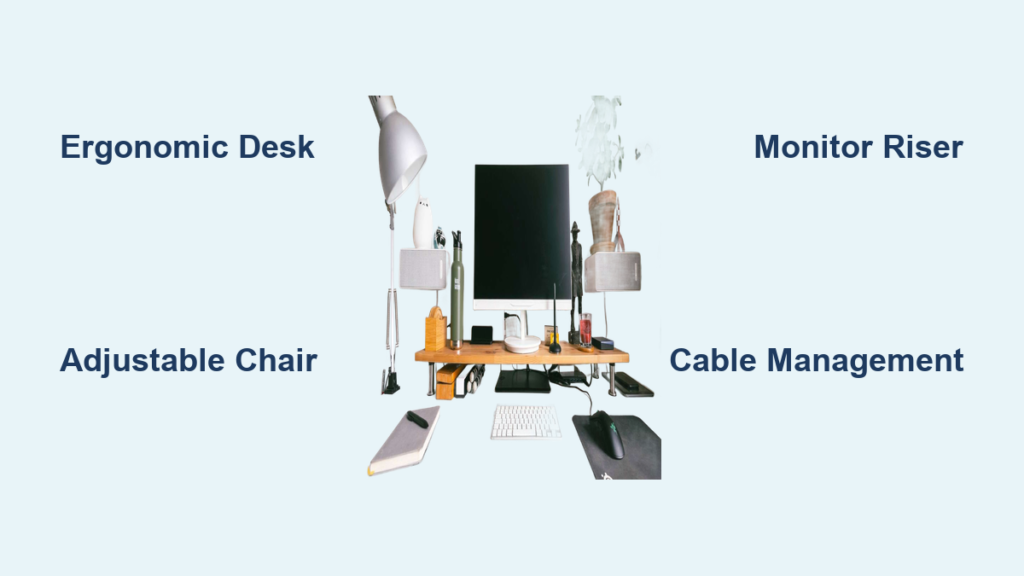
Use Monitor Stands and Risers
A monitor riser lifts your screen to eye level, reducing neck strain. All Furnulem and Arozzi desks include or support monitor stands. For added benefit:
• Place laptops on risers with external keyboards
• Use blue light filters during evening hours
• Pair with adjustable desk lamps to reduce glare
Warning: Screens too low or too high cause chronic posture issues. The top of your monitor should align with your eye level.
Optimize for Productivity and Focus
Even the best hardware fails without smart workspace habits. These proven strategies boost concentration and efficiency.
Position Desk Near Natural Light
Natural light improves mood and alertness. Place your desk near a window—but avoid direct sunlight on the screen to prevent glare. If that’s unavoidable, use:
• Adjustable blinds
• Anti-glare monitor filters
• Task lighting from the side
Time estimate: Rearranging your room for optimal light takes under 30 minutes—worth every second.
Keep Workspace Clutter-Free
A clean desk equals a clear mind. Use these tools:
• Cable management sleeves (not included in product data but highly recommended)
• Drawer organizers (included in Emma + Oliver and FurniFact sets)
• Headphone hooks (standard on Furnulem corner desks)
Expert note: The brain processes visual clutter as stress. Even small messes reduce focus.
Use Noise-Canceling Headphones
For shared homes or noisy environments, noise-canceling headphones are essential. Pair them with:
• Smart speakers for voice commands
• Webcams for seamless video calls
• Wireless printers to reduce device congestion
Prevent Eye Strain and Physical Fatigue

Long work hours demand proactive health measures. These accessories protect your vision and posture.
Install Blue Light Blocking Filters
Extended screen time disrupts sleep and causes digital eye strain. Blue light filters—either screen overlays or software (like f.lux)—reduce harsh blue wavelengths. Combine with:
• 20-20-20 rule: Every 20 minutes, look 20 feet away for 20 seconds
• Matte screen finishes (available on most modern monitors)
Choose Adjustable Features for Long-Term Comfort
Look for desks with:
• Adjustable feet (included in Furnulem CZWPZVGHHQ)
• Reversible layouts (CZWPZVGHTR and CZWPZVGHHQ)
• Ergonomic monitor placement
Even fixed desks can be upgraded with adjustable monitor arms or sit-stand converters (not listed in data but widely available).
Personalize for Motivation and Style
Your office should reflect your personality. A space you enjoy is a space you’ll use effectively.
Select Colors That Inspire You
• Black desks (Furnulem, Emma + Oliver): Professional, minimalist
• Pink (Furnulem CZWPZVGHW2): Playful, creative—great for streamers
• Sakura, Deep Purple, White/Pink (Arozzi): Expressive, modern
Design insight: Color impacts mood. Blue promotes calm, red boosts energy, green reduces stress.
Add Plants and Artwork
Even small touches make a difference:
• Low-maintenance plants (snake plant, pothos) improve air quality
• Motivational quotes or artwork boost morale
• Custom desk mats or mouse pads add flair
These aren’t listed in the product data—but they’re low-cost, high-impact upgrades.
Compare Top Products by Budget Tier

Not all setups cost the same. Here’s how to choose based on your budget.
Best Budget Setup: Under $100
Top Pick: Furnulem Corner Desk (CZWPZVGH42) – $46.99
• Includes: Monitor stand, cup holder, headphone hook
• Compact footprint
• 31% off original price
Ideal for: Students, part-time workers, small apartments
Upgrade path: Add a $50 ergonomic chair and $20 monitor riser later.
Best Mid-Range Setup: $100–$300
Top Pick: Arozzi Arena – Gunmetal Galaxy ($279.99)
• 5-star rating (784 reviews)
• 20% off original price
• Curved design for ergonomic comfort
Why it wins: Proven user satisfaction, premium look, wide surface
Pair with: Wireless keyboard/mouse and LED desk lamp
Best Premium Bundle: $500+
Top Pick: Emma + Oliver Kit (J3ZHFXZ559) – $559.99
• Complete setup: Desk, chair, file cabinet
• Professional aesthetic
• No assembly guesswork
Best for: Full-time remote workers who want everything at once
Make Smart Purchase Decisions
With so many options, use these criteria to avoid buyer’s remorse.
Prioritize User Reviews When Available
Only the Arozzi Arena series has verified reviews—all 7 variants rated 5/5 stars. That consistency is rare and signals exceptional quality. For unreviewed products (like Furnulem or Emma + Oliver), rely on:
• Brand reputation
• Feature density
• Discount depth
Red flag: No reviews + high price = higher risk.
Analyze Price vs. Features
| Desk Model | Price | Key Features | Best For |
|---|---|---|---|
| Furnulem CZWPZVGH42 | $46.99 | Monitor stand, cup holder | Budget users |
| Arozzi Arena | $279.99 | Curved, 5-star rated | Ergonomics |
| Emma + Oliver Kit | $559.99 | Chair + cabinet included | Complete setup |
| FurniFact Set | $727.51 | 5-piece modular | Large spaces |
Value king: Arozzi Gunmetal Galaxy—premium features at 20% off.
Key Takeaways for Building Your Best Office Computer Setup
The best office computer setup isn’t about spending the most—it’s about aligning your desk, chair, tech, and environment with how you work. Whether you choose a $47 corner desk or a $727 modular suite, prioritize ergonomics, reduce eye strain, and personalize your space. With the right foundation, you’ll work smarter, stay healthier, and enjoy your time at the desk.
Next step: Audit your current workspace. Identify one upgrade—like a monitor riser, cable sleeve, or chair—that improves comfort or efficiency, and make the purchase this week.
Frequently Asked Questions About Best Office Computer Setup
What are the essential items for a home office setup?
A complete home office setup requires:
• Comfortable desk (ergonomic design preferred)
• Ergonomic chair
• Reliable computer or laptop
• Monitor for multitasking
• Keyboard and mouse
• Proper lighting
• Organizational accessories (filing cabinets or shelves)
These core components ensure functionality, comfort, and productivity.
How can I reduce eye strain during long work hours?
Use blue light blocking filters, adjust screen brightness to match ambient light, and follow the 20-20-20 rule: every 20 minutes, look at something 20 feet away for 20 seconds. Pair this with matte screen finishes and adjustable desk lamps to minimize glare.
What tech accessories improve productivity?
High-speed Wi-Fi routers, wireless printers, webcams, USB hubs, and smart speakers enhance connectivity and workflow. Desks with built-in power outlets—like the Furnulem series—reduce cable clutter and keep devices charged.
How do I choose the right desk size for my space?
Measure your room and leave at least 2–3 feet of walking space around the desk. For small rooms, choose corner or L-shaped desks. For large spaces, consider modular sets or curved desks. Reversible models like CZWPZVGHTR offer layout flexibility.
Is it better to buy a desk and chair separately or as a bundle?
Bundles like the Emma + Oliver kit save time, ensure design cohesion, and often include storage. If you already have a chair or need specific features, buying separately gives more control. But for most users, a complete ergonomic bundle is the smarter choice.
Which desk has the best user reviews?
The Arozzi Arena series holds a perfect 5-star rating from 784 verified reviews across all seven color variants. This consistent feedback makes it the most trusted option for long-term satisfaction and ergonomic performance.