Shipping a computer tower might seem straightforward, but one misstep—like leaving the GPU in place or using flimsy packaging—can lead to thousands in damage. The best way to ship a computer tower is through careful disassembly, double-boxing with high-quality padding, and using insured, tracked shipping from a reliable carrier. Whether you’re relocating, selling your PC, or sending it for repair, following a precise method drastically reduces the risk of internal damage during transit. This guide walks you through every essential step—from removing sensitive components to choosing the right carrier and service—so your system arrives intact and ready to boot.
You’ll learn how to protect fragile parts like the motherboard and GPU, why double-boxing is non-negotiable for long-distance shipping, and how professional packing services can save you time and stress. With real-world tips, carrier comparisons, and expert-approved techniques, you’ll ship your tower with confidence.
Remove Sensitive Components Before Shipping
Leaving high-value parts inside increases the risk of impact damage. Removing and packaging them separately is the most effective way to protect your system.
Why You Should Remove the GPU
The graphics card is heavy and prone to bending or cracking during drops. Always remove the GPU before shipping. Unlock the PCIe retention clip and gently pull it straight out. Place it in its original box or a rigid anti-static container, then wrap the PCIe edge in bubble wrap to protect the contacts.
How to Safely Detach the CPU Cooler
Whether air or liquid-cooled, the CPU cooler must be removed. For AIO liquid coolers, drain all coolant first—shipping liquid-filled systems is prohibited by carriers and risks leaks. Store the cooler in an anti-static bag or padded case, and never stack items on top.
Should You Take Out RAM and SSDs?
Yes. While more durable than other parts, RAM and SSDs can become dislodged during rough handling. Remove RAM sticks and store them in anti-static bags. For SSDs, use original packaging or a small foam-lined box to prevent connector damage.
How to Secure the Motherboard
If the motherboard stays in the case, fill empty drive bays and PCIe slots with foam or bubble wrap to prevent internal movement. If shipping without the case, wrap the motherboard in an anti-static bag and place it in a rigid box with at least 2 inches of cushioning on all sides.
Pack the Tower Using Double-Boxing for Maximum Protection

The best way to ship a computer tower is with double-boxing. This method uses two boxes with a thick layer of padding between them to absorb shocks and prevent crushing.
Step-by-Step: How to Double-Box a PC Tower
- Use a sturdy inner box—ideally the original manufacturer’s packaging.
- Place 3 inches of packing material (bubble wrap, air pillows, or peanuts) at the bottom of the outer box.
- Center the inner box in the outer box.
- Fill all gaps around the inner box with cushioning until it doesn’t shift when gently shaken.
- Seal both boxes using the H-taping method.
This setup meets ISTA drop-test standards and is recommended for high-value or long-distance shipments.
What to Use Instead of Original Packaging
If you don’t have the original box, wrap the tower in anti-static bubble wrap and secure it with tape. Then place it in a new, oversized corrugated box. Use foam corner protectors for added rigidity, especially on sharp edges.
Best Packing Materials to Use (And What to Avoid)
Use:
• High-density foam inserts
• Anti-static bubble wrap
• Molded packing peanuts
• Air pillows
Avoid:
• Crushed paper (compresses easily)
• Grocery bags (no structural support)
• Thin plastic wrap (offers no cushioning)
Choose the Right Box and Seal It Properly
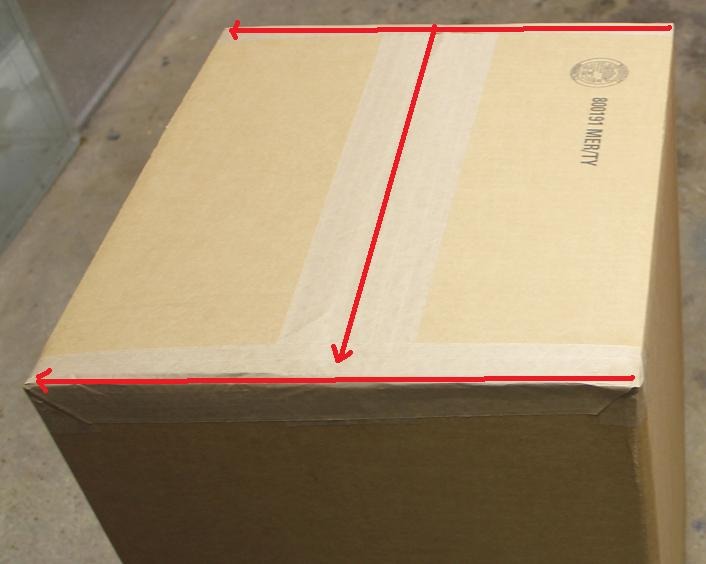
A poorly sealed or undersized box can collapse under pressure. Use the right materials and sealing technique to ensure structural integrity.
What Size Box Should You Use?
For single-box shipping, choose a box 2–3 inches larger than the tower on all sides. For double-boxing, the outer box must be at least 6 inches larger than the inner box in every dimension. This ensures enough space for protective cushioning.
How to Seal the Box With the H-Taping Method
The H-taping method reinforces all seams and prevents the box from bursting open:
• Apply tape across the top and bottom flaps.
• Run vertical strips down each side seam.
• Use at least three strips of 2-inch-wide packing tape.
• Repeat on the bottom of the box.
This technique is required by carriers for heavy electronics and is standard in professional packing.
Label the Box for Safe Handling
Clear labeling helps carriers handle your package with care and ensures it’s transported upright.
Where to Place “Fragile” and “This Side Up” Labels
Affix “Fragile” and “This Side Up” labels on at least two visible sides of the box. While not legally binding, these warnings increase the chance of careful handling, especially during sorting.
Why the Shipping Label Should Go on Top
Always place the shipping label on the top of the box. This increases the likelihood the package will be transported upright and makes scanning easier for delivery drivers.
Choose the Right Shipping Service for Your Needs
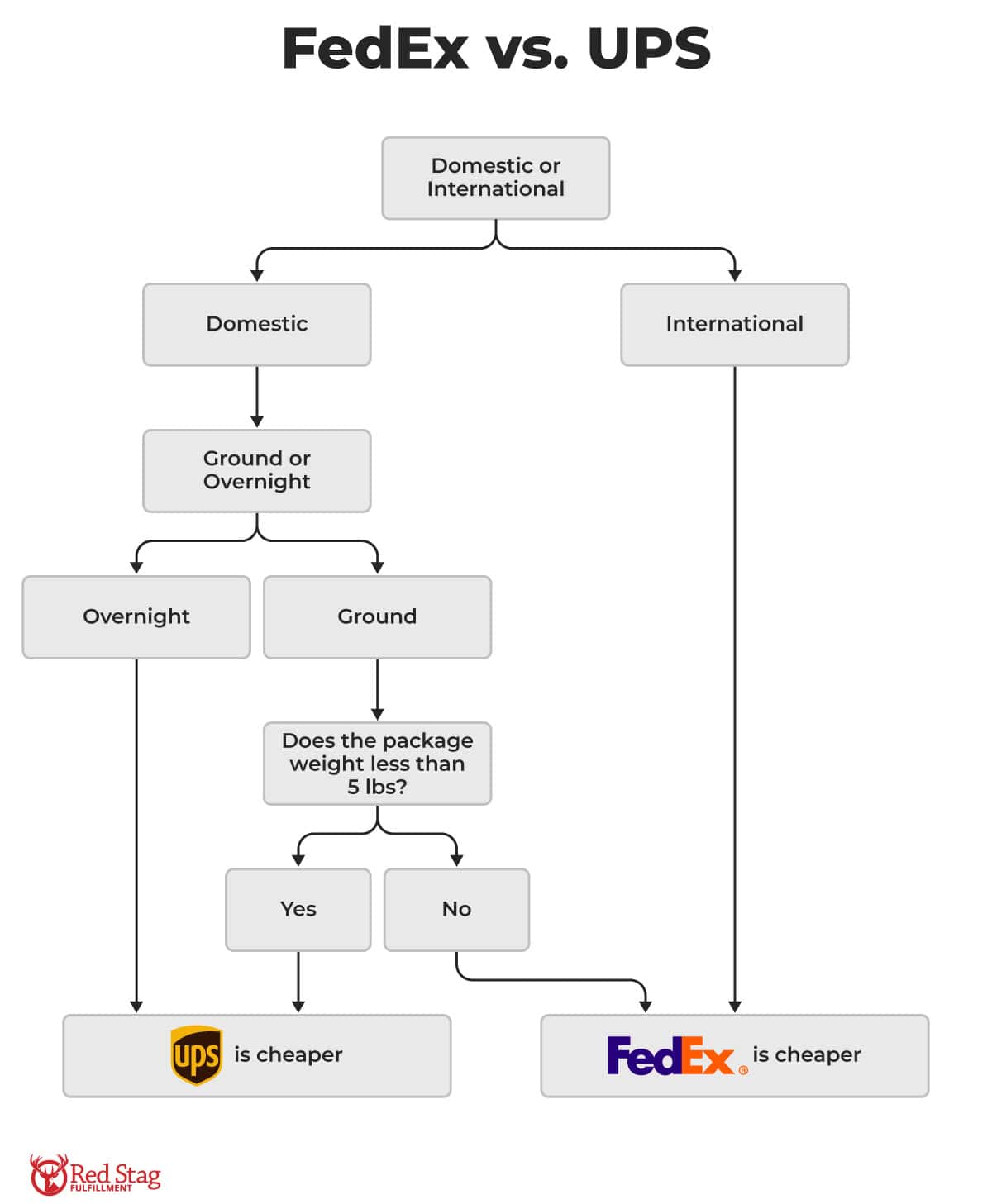
Not all carriers offer the same level of protection or speed. Pick one that matches your budget, timeline, and system value.
FedEx vs. UPS: Which Is Better for Shipping a PC?
Both offer reliable options:
FedEx:
• FedEx Express Saver: 2–3 business days, ideal for urgent domestic shipments
• FedEx Ground: 1–5 days, cost-effective for standard deliveries
• FedEx Freight: Best for multiple towers or enterprise equipment
UPS:
• UPS Next Day Air®: Fastest option for high-value systems
• UPS Ground: Affordable and widely available
For heavy packages (up to 150 lbs), both carriers support large shipments with proper packaging.
When to Use Professional Packing Services
The UPS Store and FedEx Office offer certified packing experts who use ISTA-tested materials. Their Pack & Ship Guarantee covers lost or damaged items when packed and shipped using their supplies—ideal for peace of mind. You can also bring a pre-packed tower for a professional evaluation.
Insure Your Shipment and Add Tracking
Even with perfect packing, accidents happen. Insurance and tracking protect your investment and provide visibility.
How to Declare Value for High-End Systems
Most carriers offer declared value programs. For a fee, you can insure your PC up to its full value. Always declare value for systems worth over $500. Add signature confirmation to prevent unattended drop-offs.
Why You Should Save All Packaging After Delivery
If your PC arrives damaged, keep all packaging. Carriers require it for damage claims. Without it, your claim may be denied—even with insurance.
Avoid Common Shipping Hazards
Certain mistakes can void insurance or lead to rejected shipments. Stay aware of these risks.
Never Ship With Batteries or Liquids
Remove the CMOS battery and never ship liquid-cooled systems with coolant. Both are restricted by carriers due to leakage and safety risks. AIO coolers must be drained, dried, and sealed before shipping.
Avoid Shipping During Extreme Weather
High heat or freezing temperatures can damage electronics. Avoid shipping during heatwaves or winter storms. If necessary, use insulated packaging or schedule delivery during milder conditions.
Track and Confirm Delivery
Stay informed and ensure your PC arrives safely.
How to Set Up Email Tracking Notifications
Use the carrier’s tracking tool to add up to three email addresses. Get alerts when the package ships, is in transit, and is delivered. This helps coordinate delivery and spot delays early.
What to Do When the PC Arrives
Have the recipient inspect the box for dents, tears, or water damage before opening. If damage is visible, take photos and notify the sender immediately. Do not discard packaging until the system is confirmed working.
Frequently Asked Questions About Shipping a Computer Tower
Can I ship a PC without removing the GPU?
No. The GPU is one of the most vulnerable components. Leaving it installed increases the risk of bending or cracking during transit. Always remove and pack it separately.
Is double-boxing really necessary?
Yes, especially for long-distance or international shipments. Double-boxing with at least 6 inches of clearance on all sides provides superior shock absorption and is recommended by professionals.
Should I use the original PC box?
Absolutely. The original manufacturer’s packaging is designed for your specific model and offers the best fit and protection. Use it as the inner box in a double-boxing setup.
Can I use The UPS Store to pack and ship my PC?
Yes. The UPS Store has certified packing experts who use ISTA-tested materials. Their Pack & Ship Guarantee covers lost or damaged items when packed and shipped using their supplies.
What happens if my PC arrives damaged?
The sender must report the damage immediately to the shipping location. The recipient should save all packaging. The carrier will investigate, but claims may be denied if packaging is missing or improper.
How much does it cost to ship a computer tower?
Costs vary based on weight, distance, service level, and insurance. Ground shipping typically ranges from $20–$60 domestically. Expedited or insured shipping can exceed $100. Professional packing adds $20–$50.
Key Takeaways for Safely Shipping Your Computer Tower
The best way to ship a computer tower combines meticulous disassembly, double-boxing with quality materials, and insured, tracked shipping. Always remove the GPU, CPU cooler, RAM, and SSDs, and pack them separately in anti-static containers. Use double-boxing with at least 6 inches of clearance and seal with the H-taping method. Label clearly, choose a reliable carrier, and insure high-value systems.
For maximum protection, consider professional packing services like The UPS Store or FedEx Office. They use tested materials and offer guarantees. Finally, save all packaging until the system is confirmed working—this is critical for claims. Follow these steps, and your PC will arrive safely, every time.