Learning computer networking doesn’t have to be overwhelming — but it does require the right strategy. Whether you’re aiming for a career in IT, cybersecurity, or cloud infrastructure, the best way to learn computer networking is through a blend of structured learning, hands-on practice, and real-world problem solving. You don’t need a degree, but you do need a clear roadmap. Top engineers agree: start with how data moves across networks, use interactive tools like Cisco Packet Tracer, and follow proven paths such as the Google IT Support Certificate or CCNA curriculum. These frameworks teach not just what happens, but why — down to the packet level.
Jumping straight into subnetting or BGP without context leads to confusion. Instead, begin by asking: What happens when you type google.com and press enter? This simple question ties together DNS, TCP, routing, and firewalls. Experts emphasize starting with the fundamentals, using visual tools, and building small labs early. As one network architect put it, “Once you understand the core concepts, moving between technologies becomes effortless.” This guide delivers a step-by-step, battle-tested method to go from zero knowledge to job-ready skills — using free simulators, certifications, and real troubleshooting exercises.
Start with How Data Travels Across the Internet
Build a mental model of network communication before diving into protocols or configurations.
Watch Visual Explanations of Internet Basics
Begin with animated, story-driven videos that answer: How does your request reach a website? These make abstract ideas concrete:
- “How the Internet Works” by TED-Ed – A 5-minute breakdown of devices, servers, and data flow
- “The Internet in 5 Minutes” by Techquickie – Explains IP, DNS, and routing in plain language
These show how your browser request travels through routers, switches, and cables — giving you context before learning technical terms.
Map the Journey of a Network Request
Use this simple flow to visualize data movement:
1. Your device connects via Wi-Fi or Ethernet
2. It sends a request to your router
3. The router forwards it through your ISP to the destination server
4. The response returns along the same path
Understanding this path makes IP addresses, DNS, and firewalls much easier to grasp.
Learn Essential Networking Terminology First
You can’t master networking without speaking the language. Focus on these foundational terms.
Core Definitions Every Beginner Must Know
| Term | Function |
|---|---|
| IP Address | Unique identifier for a device (e.g., 192.168.1.1) |
| MAC Address | Hardware ID of a network interface (used only on local networks) |
| Router | Directs traffic between different networks (e.g., home network and internet) |
| Switch | Connects devices within the same network |
| Subnet | A smaller segment of a larger network |
| DHCP | Automatically assigns IP addresses to devices |
| ARP | Finds a device’s MAC address when you know its IP |
| BGP | Protocol routers use to share routing info across the internet |
Clear Up Common Confusions
- IP addresses guide packets, not identify users: They tell devices where to send data, not who receives it.
- Default route = “the internet is over here”: Your router uses this to forward traffic not meant for your local network.
- MAC addresses are local-only: They’re replaced once traffic leaves your LAN.
Reinforce these with Khan Academy or Cisco’s free Networking Fundamentals course on Coursera.
Practice Networking with Free Simulators

Theory alone won’t build job-ready skills. You need hands-on experience — safely and affordably.
Use Free Network Simulation Tools
Simulators let you build, break, and fix networks without buying hardware.
Top Tools for Beginners
| Tool | Best For | Cost |
|---|---|---|
| Cisco Packet Tracer | Learning CCNA concepts visually | Free (for students) |
| GNS3 | Advanced emulation with real OS images | Free |
| EVE-NG | Professional lab environments | Free/Paid |
| Wireshark | Capturing and analyzing traffic | Free |
Pro Tip: Start with Packet Tracer. It won’t get you a CCNP, but it’s perfect for CCNA-level labs. Drag and drop routers, switches, and PCs, then configure them using real CLI commands.
Try the “What Happens When” Deep Dive
Study the GitHub repo: What happens when you type google.com?
This detailed walkthrough covers DNS lookup, TCP handshake, HTTP request, and more — tying together all networking layers. It’s the ultimate conceptual glue.
Master the TCP/IP and OSI Models

These frameworks explain how data moves across networks. Focus on TCP/IP — it’s what powers the real internet.
The 5-Layer TCP/IP Model (Google Course Version)
- Physical: Cables, Wi-Fi signals
- Data Link: MAC addresses, switches (Ethernet)
- Network: IP addresses, routing (IP, ARP)
- Transport: End-to-end delivery (TCP, UDP)
- Application: User-facing services (HTTP, DNS, SMTP)
Each layer adds a header (encapsulation) and removes it (decapsulation) at the destination.
Why These Models Matter
- TCP ensures reliable delivery (used by web browsers, email)
- UDP is faster but unreliable (used by video streaming, gaming)
- DNS translates domain names to IP addresses
- DHCP gives your device an IP automatically
Use Wireshark packet captures to see encapsulation in action.
Learn IP Addressing and Subnetting Step by Step
One of the most challenging — but essential — networking skills.
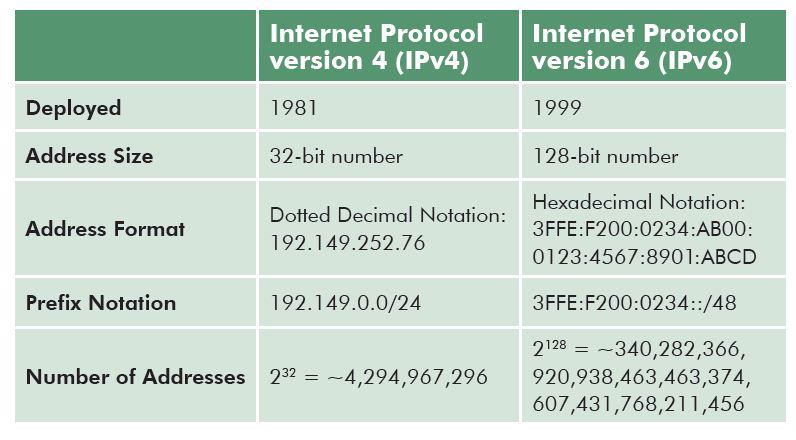
Understand IPv4 vs. IPv6
- IPv4: 32-bit addresses (e.g., 192.168.1.1) – limited supply
- IPv6: 128-bit addresses (e.g., 2001:db8::1) – virtually unlimited
Most networks still use IPv4, but IPv6 is growing — especially in cloud environments.
Practice Subnetting Basics
Subnetting divides large networks into smaller, manageable ones.
Start with:
– Private IP ranges: 192.168.x.x, 10.x.x.x, 172.16.x.x–172.31.x.x
– Subnet masks: 255.255.255.0 = /24 (254 usable IPs)
– Binary math: Convert between decimal and binary
Practice with:
– Online subnet calculators
– YouTube tutorials: Search “subnetting for beginners”
– Packet Tracer labs that require IP planning
Build a Home Lab for Real-World Practice

Nothing beats hands-on experience. Set up your own lab — even with minimal gear.
Option 1: Physical Home Lab
- Buy used Cisco routers/switches from eBay (~$50–$100 each)
- Use old PCs or Raspberry Pis as servers
- Connect them with Ethernet cables
Many people sell homelabs after passing CCNA — great way to get affordable gear.
Option 2: Virtual Lab (No Hardware Needed)
Use GNS3 or EVE-NG to run virtual network devices on your PC.
Benefits:
– No extra hardware
– Save and restore lab states
– Simulate complex topologies
Setup Tip: Start small — one router, one switch, two PCs — then expand.
Follow a Proven Learning Roadmap
Self-study works — but only with a clear plan. Use these structured programs.
Google IT Support Professional Certificate (Coursera)
One of the best beginner-friendly paths.
Course: The Bits and Bytes of Computer Networking
– 6 modules, ~30 hours total
– Covers TCP/IP, DNS, DHCP, Wi-Fi, troubleshooting
– Includes hands-on labs and quizzes
– Ends with a shareable certificate
Why it works:
– Taught in plain English
– Builds from zero knowledge
– Rated 4.7/5 by over 52,000 learners
Enrollment Options:
– Free trial available
– Financial aid for those who qualify
– Part of a full IT career track
Cisco Networking Academy (Free CCNA Prep)
Cisco’s official free learning platform.
What you get:
– Full CCNA curriculum (200-301)
– Interactive labs
– Quizzes and practice exams
– Access to Packet Tracer
Best for: Learners serious about enterprise networking roles.
Earn Entry-Level Certifications
Certifications validate your knowledge and open job doors.
CompTIA Network+
- Vendor-neutral: Applies to any network environment
- Covers: Cabling, IP addressing, wireless, security, troubleshooting
- Ideal for: Help desk, field tech, junior network roles
Cisco CCNA (200-301)
The gold standard for foundational networking.
What it covers:
– Routing and switching
– VLANs, STP, OSPF
– Security fundamentals
– Network automation basics
Study Tips:
– Use O’Reilly.com for official Cisco guides and videos
– Watch NetworkChuck on YouTube for fun, practical labs
– Read RFCs (e.g., RFC 791 for IP, RFC 793 for TCP) — they’re surprisingly readable
Time Commitment: 100+ hours for most learners.
Troubleshoot Networks Like a Real Engineer
Real network engineers spend more time fixing problems than building networks.
Use Essential Command Line Tools
Learn these key commands:
| Command | Purpose |
|---|---|
ping |
Test connectivity (uses ICMP) |
traceroute / tracert |
See the path packets take |
ipconfig (Windows) / ifconfig (Linux/macOS) |
View IP address and gateway |
nslookup / dig |
Test DNS resolution |
netstat |
Show active connections and ports |
Lab Exercise: Simulate a broken network in Packet Tracer and use these tools to diagnose the issue.
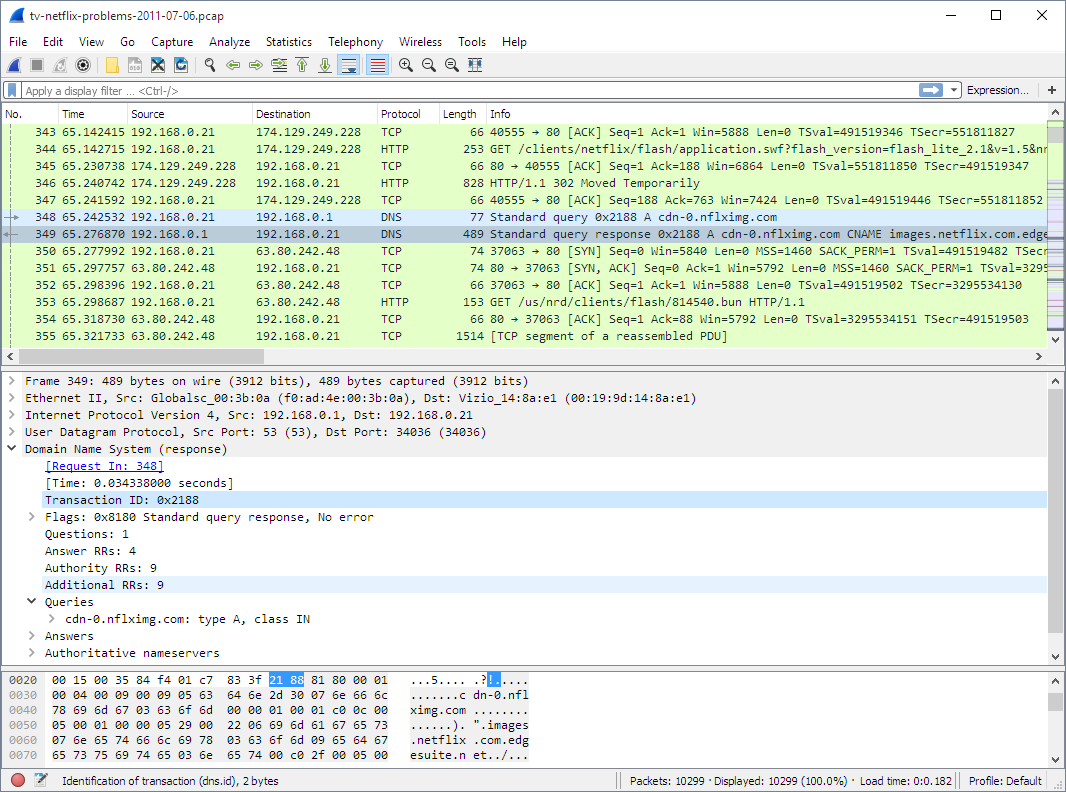
Analyze Traffic with Wireshark
Capture real packets and answer questions like:
– Is the TCP handshake completing?
– Is DNS returning the correct IP?
– Are there retransmissions (sign of packet loss)?
Start with guided tutorials — don’t just capture traffic blindly.
Join Networking Communities for Faster Learning
Learning in isolation slows progress. Engage with others.
Top Networking Communities
- Reddit: r/networking, r/ITCareerQuestions
- Forums: Cisco Community, Stack Overflow
- YouTube: NetworkChuck, David Bombal, Kevin Wallace
Ask questions like:
– “Why does my ping fail but traceroute work?”
– “How do I set up VLANs in Packet Tracer?”
– “What’s the difference between static and dynamic routing?”
You’ll learn faster by seeing how others solve problems.
Specialize with Advanced Certifications
Once you’ve mastered the basics, focus on high-demand specialties.
For Enterprise Networks: CCNP
CCNP Enterprise:
– ENCOR: Core technologies (routing, switching, security)
– ENARSI: Advanced routing (BGP, OSPF, route redistribution)
CCNP Security:
– Firewalls, VPNs, secure network design
For Cloud Networking: AWS Certifications
- AWS Certified Advanced Networking – Specialty
- AWS SysOps Administrator
- AWS DevOps Engineer
These are critical for hybrid cloud environments (e.g., AWS to colocation).
Know When to Bring in a Professional
Not every problem should be a learning opportunity — especially in production.
The Consultant Rule
If you’re overwhelmed:
– Hire a network engineer to set up complex infrastructure
– Learn by observing, not by risking outages
– Offer them a job if they do a great job
It’s better to gain trust by delivering results than to fail while learning on the job.
Frequently Asked Questions About Learning Computer Networking
What is the fastest way to learn computer networking?
The fastest way is to combine free courses like Google’s IT Certificate with hands-on practice in Cisco Packet Tracer. Focus on the TCP/IP model, IP addressing, and troubleshooting tools. Set daily goals and build small labs. Expect 3–6 months of consistent effort to reach job-ready skills.
Do I need a degree to learn networking?
No, you don’t need a degree. Many network engineers start with certifications like CompTIA Network+ or CCNA. Employers value hands-on skills and proven knowledge more than formal education. Build a portfolio of labs and projects to showcase your abilities.
Is CCNA still worth it in 2024?
Yes, CCNA is still highly valuable. It covers routing, switching, security, and automation — all essential for modern networks. It’s respected by employers and opens doors to roles in IT support, cybersecurity, and cloud networking.
How important is subnetting in real-world networking?
Subnetting is critical. It helps organize networks, improve performance, and enhance security. While tools can calculate subnets, understanding the logic behind them is essential for troubleshooting and design. Practice regularly with online tools and simulators.
Can I learn networking without buying equipment?
Yes, you can learn entirely without hardware. Use free tools like Packet Tracer, GNS3, and Wireshark to simulate real networks. These let you configure routers, analyze traffic, and practice troubleshooting — all on your laptop.
What should I learn after CCNA?
After CCNA, specialize based on your goals:
– Enterprise networks: Pursue CCNP Enterprise
– Security: Study CCNP Security or CompTIA Security+
– Cloud: Aim for AWS Certified Advanced Networking or Azure Network Engineer
Also consider learning Python for network automation.
Key Takeaways for Mastering Computer Networking
The best way to learn computer networking is structured, hands-on, and goal-driven. Start with free courses like Google’s IT Certificate or Cisco’s Networking Academy. Use simulators to practice. Master core concepts like TCP/IP, subnetting, and routing. Earn Network+ or CCNA. Then specialize.
Expect 3–6 months of consistent effort — but the payoff is a high-demand, well-paying career in tech. Focus on understanding why things work, not just how to configure them. Build a portfolio of labs, join communities, and don’t be afraid to ask for help. With the right approach, you can go from beginner to job-ready faster than you think.