Cloud computing is no longer optional—it powers everything from Netflix to AI assistants and is reshaping how businesses operate. With demand for cloud skills soaring and salaries rising, now is the perfect time to enter the field. But the best way to learn cloud computing isn’t about passively watching videos or reading articles. It’s about combining foundational knowledge with real-world practice, certifications, and project-based learning that builds job-ready skills.
If you’re overwhelmed by where to start, you’re not alone. Many beginners jump into advanced tools without understanding core concepts like networking or virtualization. Others get stuck in tutorial loops without building anything tangible. This guide reveals the proven path: start with fundamentals, pick one cloud provider, build daily hands-on labs, earn key certifications, and create a portfolio that stands out to employers. You’ll go from zero to cloud-proficient in months—not years.
Master Foundational IT Skills First
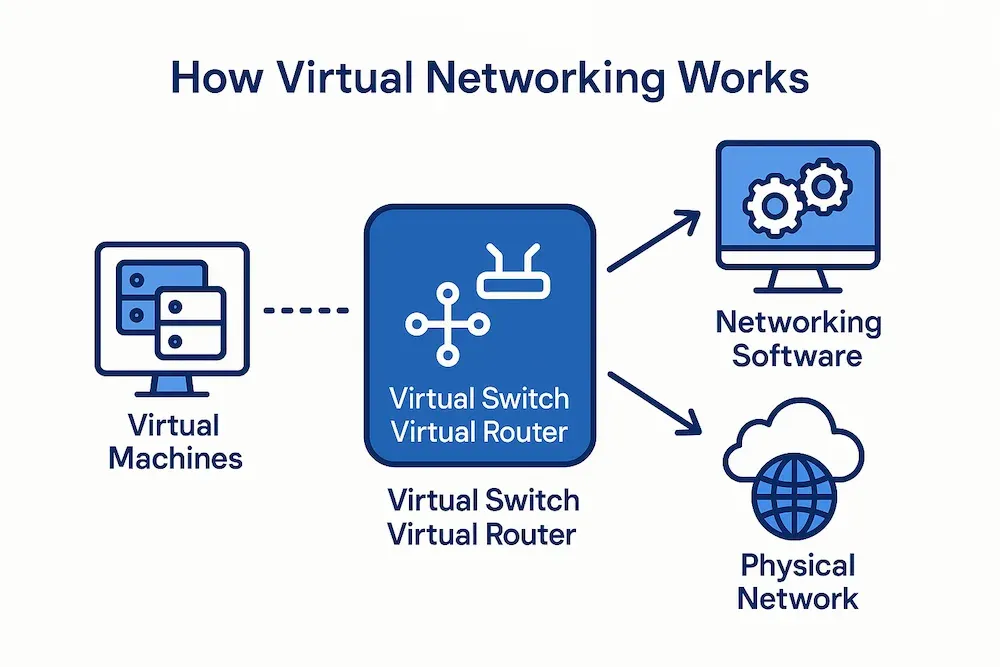
Before using any cloud platform, build a strong base in essential IT concepts. Without them, cloud services will seem confusing and abstract.
Learn Networking Essentials
Cloud environments rely on networking. Focus on practical knowledge:
– IP addressing and subnetting (understand CIDR notation like /24)
– How DNS translates domain names to IP addresses
– The role of firewalls, routers, and security groups
– Core protocols like TCP/IP, HTTP/HTTPS, and SSH
Use free resources like Cisco’s Networking Basics or YouTube labs to visualize data flow. Practice drawing simple network diagrams with public and private subnets.
Get Comfortable with Linux and Virtualization
Most cloud servers run on Linux. Install Ubuntu in VirtualBox and practice:
– Navigating the file system (cd, ls, pwd)
– Editing files with nano or vim
– Managing permissions using chmod and chown
– Starting and stopping services with systemctl
Understand how virtual machines (VMs) work—what a hypervisor does and how CPU, RAM, and storage are shared across instances.
Start Simple Scripting for Automation
Automation is at the heart of cloud engineering. Choose one language to begin:
– Bash for Linux task automation
– Python for broader cloud integrations (e.g., AWS Boto3)
– PowerShell if targeting Azure environments
Write scripts to back up files, check disk usage, or restart services. This builds habits used daily by cloud professionals.
Pick One Cloud Provider and Go Deep
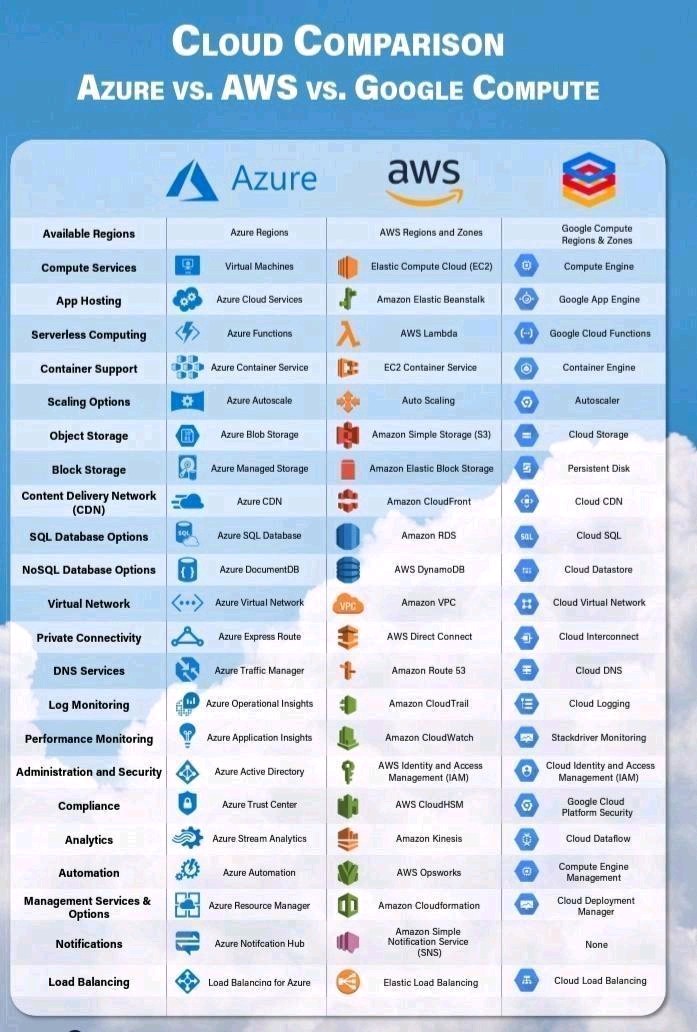
Trying to learn AWS, Azure, and GCP at once leads to confusion. Focus on one platform first—depth beats breadth.
Start with AWS for Maximum Job Opportunities
AWS holds over 30% of the market and offers the most roles globally. Use:
– AWS Free Tier: 12 months of free access to EC2, S3, and more
– AWS Skill Builder: Free learning paths and hands-on labs
– AWS Educate: Free credits for students
Begin with core services:
– EC2 – Launch and manage virtual servers
– S3 – Store and serve files securely
– VPC – Design isolated cloud networks
– IAM – Control user access and permissions
Choose Azure If You Work in Enterprise IT
Azure integrates tightly with Microsoft products like Active Directory and Office 365. Ideal if you’re already in a corporate IT role.
Take advantage of:
– Azure Free Account: $200 credit for 30 days
– Microsoft Learn: Interactive, free modules with badges
– GitHub Student Pack: Includes Azure credits
Focus on:
– Azure VMs and Blob Storage
– Azure Active Directory (AAD)
– Resource Groups and Azure Portal navigation
Consider Google Cloud for Data and AI Projects
GCP leads in data analytics and machine learning. Best for learners interested in:
– BigQuery – Run SQL queries on massive datasets
– Cloud Functions – Build event-driven serverless apps
– Google Kubernetes Engine (GKE) – Master container orchestration
Use Google Cloud Skills Boost for guided labs with temporary accounts—no billing required.
Build Hands-On Labs Every Day
You don’t learn cloud computing by watching. You learn by doing—repeatedly.
Set Up a Safe, Low-Cost Practice Environment
Always use free tiers and sandbox accounts:
– Enable billing alerts to avoid surprise charges
– Use temporary lab environments like Qwiklabs or AWS Event Engine
– Shut down VMs and delete unused resources daily
Never enter a credit card without setting a spending limit.
Complete Realistic Mini-Projects
Build muscle memory with short, focused labs:
Project 1: Host a Static Website
– Upload HTML/CSS files to S3 or Blob Storage
– Enable public access and set permissions
– Open the site in your browser using the provided URL
Project 2: Launch and Connect to a VM
– Create an EC2 instance or Azure VM
– Connect via SSH (Linux) or RDP (Windows)
– Install Apache or Nginx and serve a test page
Project 3: Create a Secure Network
– Build a VPC or Virtual Network
– Add subnets, route tables, and security groups
– Launch a VM in a private subnet and access it via a jump box
Spend 30–60 minutes per project. Document each step in a notebook or blog.
Break Things on Purpose to Learn Troubleshooting
Intentionally make mistakes:
– Block SSH access with a restrictive security group
– Delete a storage bucket and restore from versioning
– Exceed service limits and resolve the error
This builds confidence in diagnosing and fixing real-world issues.
Follow a Certification Learning Path
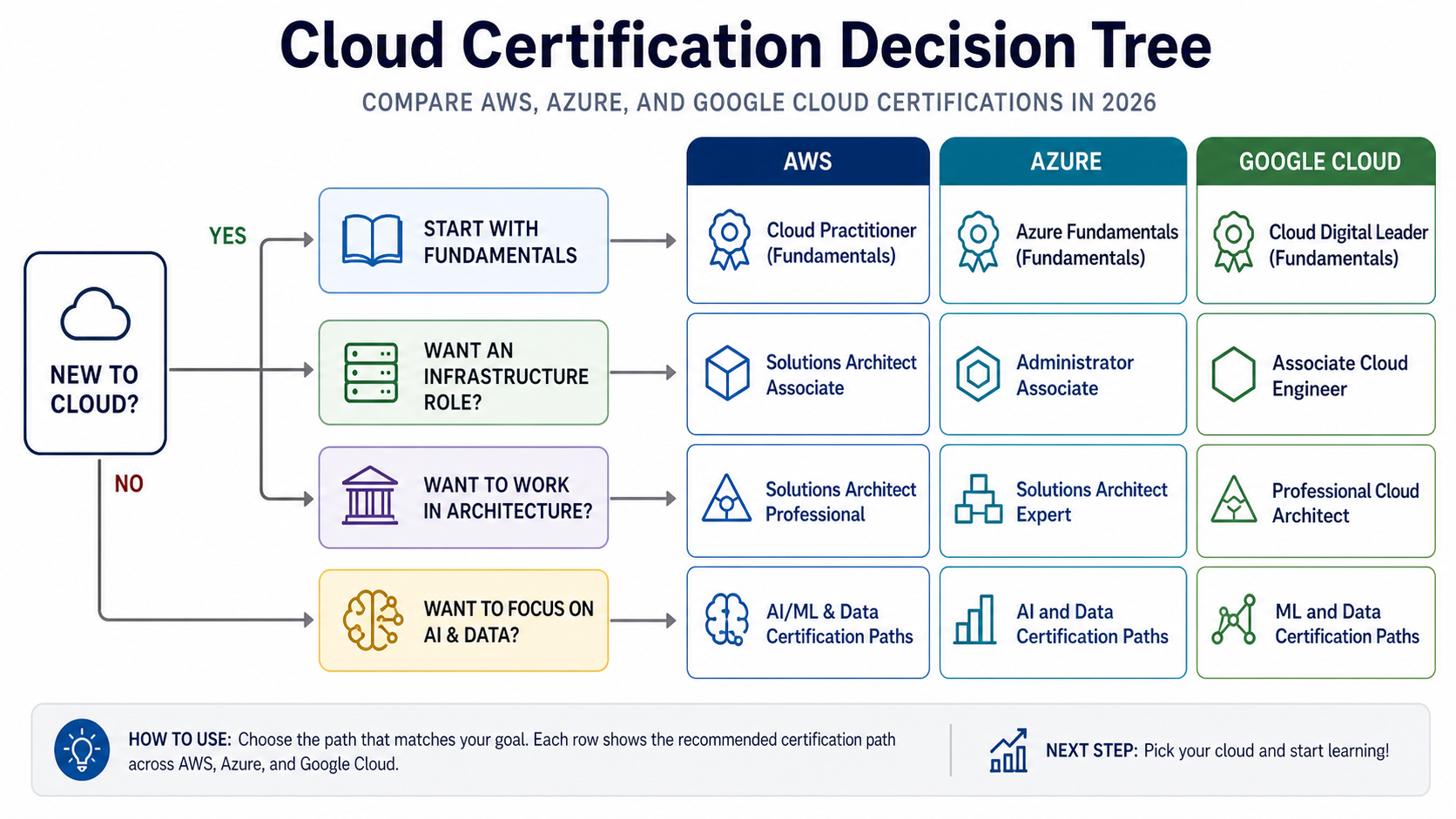
Certifications validate your skills and get your resume noticed.
Begin with Associate-Level Exams
These are designed for beginners with 6–12 months of experience.
Top entry certifications:
– AWS Certified Cloud Practitioner – Broad overview, great starting point
– AWS Certified Solutions Architect – Associate (SAA-C03)
– Microsoft Azure Fundamentals (AZ-900)
– Google Associate Cloud Engineer
Study plan: 1 hour per day for 2–3 months.
Use Trusted Study Resources
Avoid outdated content. Stick to:
– Official documentation from AWS, Azure, or GCP
– A Cloud Guru or LinkedIn Learning video courses
– Tutorials Dojo practice exams (especially for AWS)
– Free exam guides and sample questions from provider sites
Take at least 5 full-length practice tests before scheduling your exam.
Schedule Your Exam Early to Stay Accountable
Paying $100–$160 creates motivation. Most exams allow online proctoring.
Exam tips:
– Read questions carefully—look for “most secure” or “cost-effective” answers
– Eliminate incorrect options first
– Flag uncertain questions and return later
Passing requires understanding, not memorization.
Join Cloud Communities and Share Your Progress
Learning in isolation slows growth. Engage with others to stay motivated.
Participate in Active Forums
Ask and answer questions on:
– Reddit: r/AWSCertifications, r/learnazure
– Stack Overflow (tag: aws, azure, gcp)
– AWS Developer Forums and Microsoft Tech Community
Always search before posting—your question may already have an answer.
Document Your Journey Publicly
Start a free blog or post on LinkedIn:
– “Day 20: I built my first VPC with private subnets”
– “How I passed the AZ-900 on my first try”
– “3 IAM mistakes I made and how I fixed them”
Sharing reinforces learning and builds professional credibility.
Attend Free Cloud Events
Watch sessions from:
– AWS re:Invent
– Microsoft Ignite
– Google Cloud Next
– Local cloud meetups (check Meetup.com)
These expose you to real use cases and networking opportunities.
Build Real-World Projects for Your Portfolio
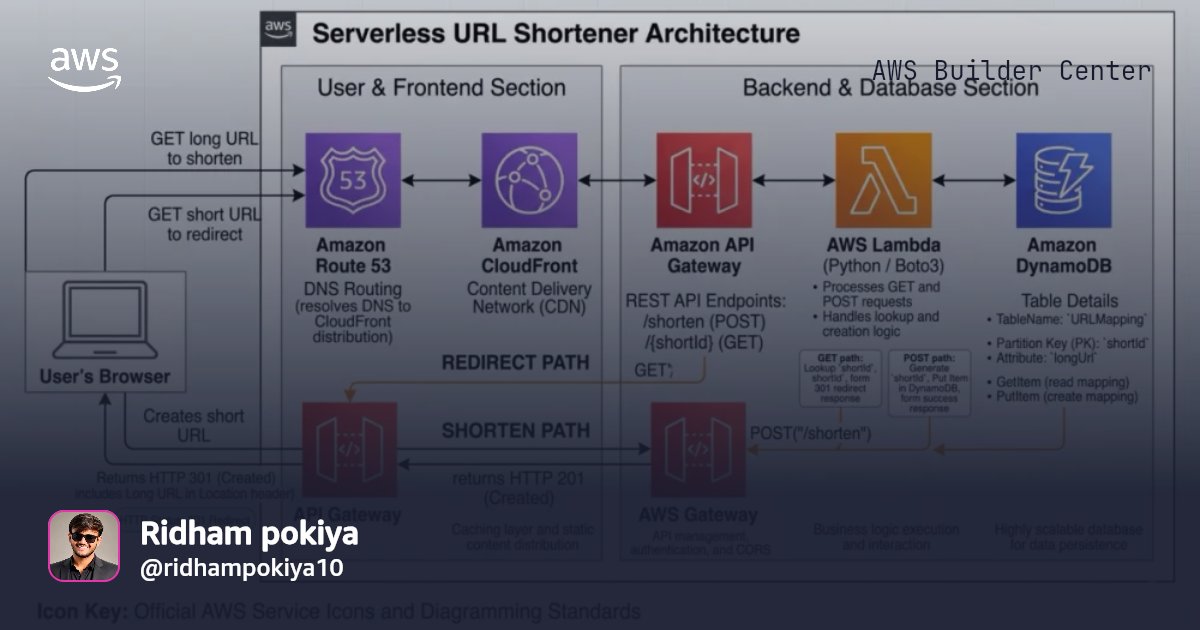
After basics, create complex projects that mimic real jobs.
Develop Resume-Ready Cloud Applications
Build 3–5 projects like:
Project Idea 1: Serverless URL Shortener
– Use AWS Lambda + API Gateway + DynamoDB
– Deploy via CLI or Terraform
– Add logging with CloudWatch
Project Idea 2: Automated Backup System
– Script nightly backups from EC2 to S3
– Use IAM roles instead of keys
– Trigger alerts via CloudWatch
Project Idea 3: CI/CD Pipeline
– Host code in GitHub
– Trigger AWS CodePipeline on push
– Automatically deploy to a test environment
Publish code on GitHub with a clear README. Employers review this.
Contribute to Open Source Projects
Look for “good first issue” tags in repos like:
– Terraform
– Kubernetes
– Ansible
Fix documentation, update examples, or solve small bugs. Even minor contributions boost your profile.
Automate with Infrastructure as Code (IaC)
Clicking in the console doesn’t scale. Learn to automate everything.
Use AWS CLI or Azure CLI Daily
Install the command-line tool and run: